Housekeeping · XLSX
Free Hotel Housekeeping Productivity Tracker Excel Template for 2026
Hotel housekeeping productivity tracker with room credits, paid hours, inspection results, labor cost estimates, and operational alerts.
Formula and workbook structure checked before publication
This hotel housekeeping productivity tracker is a free Excel template for recording room assignments, cleaning time, workload credits, inspection outcomes, and daily exceptions. It gives housekeeping leaders a consistent way to review productivity without separating labor, quality, and completion data into unrelated files.
The workbook contains four sheets: Dashboard, Housekeeping Log, Standards & Staff, and Instructions. Together, they organize daily room activity, property-defined cleaning standards, employee information, performance summaries, and review flags.
Use the tracker to compare completed room credits with paid time and target room credits while retaining the operational details behind each result. Inspection status, rework minutes, overtime minutes, notes, source references, and record status provide context for manager review.
At a glance
What this workbook helps you manage
- Connects completed rooms, room credits, paid hours, and estimated labor cost in one workbook.
- Compares actual cleaning activity with property-defined target minutes and productivity thresholds.
- Keeps inspection results, rework time, and operating notes alongside each room or task entry.
- Surfaces incomplete rooms, failed inspections, low productivity, overtime, and missing time data for review.
See the actual file
Inside the workbook
Included in the file
- Four worksheets: Dashboard, Housekeeping Log, Standards & Staff, and Instructions.
- A 500-row Housekeeping Log with formulas and structured dropdown selections.
- Dashboard KPIs, daily and employee summaries, operational alerts, and three charts.
- Editable cleaning credits, target minutes, review thresholds, staff details, and wage assumptions.
How to use the template
1. Review standards and thresholds
Begin on Standards & Staff. Confirm the inspection passing score, productivity review threshold, overtime review threshold, minutes variance review threshold, and standard shift hours. The supplied values are 90 for the inspection passing score, 85% for the productivity review threshold, 30 overtime minutes, 10 minutes of variance, and an eight-hour standard shift.
Review each cleaning type and its assigned room credits and target minutes. The sheet includes Stayover, Checkout, Deep Clean, Touch-Up, Turndown, Public Area, and Other. These are property-defined workload assumptions, so managers should adjust them to match the hotel’s operating model.
2. Maintain staff records
Use the staff area on Standards & Staff to maintain employee information and hourly wage planning values. The Housekeeping Log uses the employee ID to retrieve the corresponding employee name, job role, and hourly wage. Accurate IDs are important because several calculated fields depend on that match.
3. Enter daily housekeeping activity
On Housekeeping Log, use one row for each room assignment or consolidated non-room assignment. Enter the work date, shift, employee ID, hotel section, room number, room type, cleaning type, start and end times, and completion status. Dropdown lists are provided for several entry fields, including shift, employee ID, section, room type, cleaning type, completion status, inspection result, and record status.
Record non-room task minutes only when that time is not already included in room-cleaning time. Add inspection results, inspection scores, inspector names, and rework minutes when applicable. Notes can document guest access delays, maintenance holds, linen shortages, training, or approved deep-clean work.
4. Check calculated results and exceptions
The log calculates productive minutes from start and end times, then adds entered non-room task minutes to determine total paid minutes. It also calculates room credits, target minutes, target room credits, minutes variance, productivity attainment, estimated labor cost, manager review status, and an exception reason.
Review red exception formatting and confirm that unusual entries are supported by the operational details. Record Status can be set to Draft, Reviewed, or Approved to identify where each row stands in the internal review process.
5. Read the Dashboard
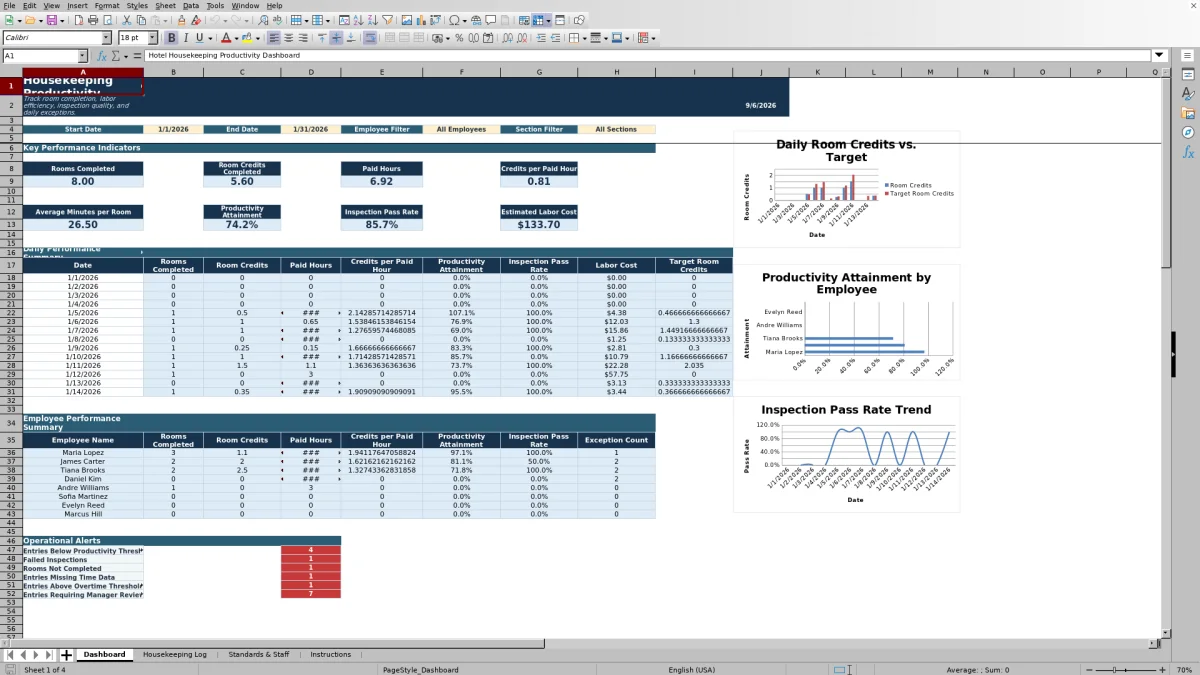
Set the Dashboard start and end dates and review its employee and section filter controls. The key performance indicators show rooms completed, room credits completed, paid hours, credits per paid hour, average minutes per room, productivity attainment, inspection pass rate, and estimated labor cost.
Use the daily and employee summaries to identify patterns rather than relying on a single total. The operational alerts count entries below the productivity threshold, failed inspections, rooms not completed, entries missing time data, entries above the overtime threshold, and entries requiring manager review.
What does the hotel housekeeping productivity tracker measure?
The workbook measures output, time, quality, and selected labor planning data. Output includes rooms completed and room credits completed. Time measures include productive minutes, non-room task minutes, total paid minutes, target minutes, minutes variance, paid hours, and average minutes per room.
Productivity attainment is calculated as completed room credits divided by target room credits. Credits per paid hour provides another view of workload output. Because room credits and target minutes are set by cleaning type, a checkout, stayover, deep clean, and touch-up can carry different workload assumptions.
Quality measures include inspection result, inspection score, inspector, rework minutes, and inspection pass rate. The pass-rate calculation includes Passed and Recheck Passed results among passed, recheck-passed, and failed inspections.
How are housekeeping labor estimates calculated?
Each staff record can include an hourly wage planning value. For a matching employee ID, the log retrieves that wage and multiplies it by total paid minutes converted to hours. The result appears as estimated labor cost for the entry and is summarized on the Dashboard.
This measure depends on the time and wage assumptions entered in the workbook. It is designed for operational planning and performance review. Non-room task minutes affect paid minutes, target room credits, and the labor estimate, so they should be entered consistently and should not duplicate room-cleaning time.
Which housekeeping exceptions receive attention?
The Manager Review field returns Yes when an entry meets one of the workbook’s review conditions. These conditions include a Not Completed status, a Failed inspection, productivity attainment below the configured threshold, or overtime minutes above the configured threshold.
The Exception Reason field identifies the applicable reason as Room Not Completed, Failed Inspection, Productivity Below Threshold, or Overtime Above Threshold. The Dashboard also reports operational alert counts for low productivity, failed inspections, incomplete rooms, missing time data, overtime, and entries requiring manager review.
Managers can use Notes and Source Reference to preserve the context behind an exception. Common operating circumstances may include access delays, maintenance holds, linen shortages, training, and deep-clean work.
How does the tracker support daily housekeeping meetings?
The Daily Performance Summary organizes results by date, including rooms completed, room credits, paid hours, credits per paid hour, productivity attainment, inspection pass rate, labor cost, and target room credits. The Employee Performance Summary shows rooms completed, room credits, paid hours, credits per paid hour, productivity attainment, inspection pass rate, and exception count by employee.
Three Dashboard charts visualize daily room credits against target room credits, employee productivity attainment, and daily inspection pass rate. These summaries help leaders focus discussions on workload, time, quality, and exceptions while retaining the row-level details needed to investigate a result.
Questions about this workbook
How many housekeeping entries can the workbook hold?
The Housekeeping Log contains 500 prepared data rows, from row 2 through row 501. Formulas for calculated fields are already present across those rows.
Can the room credits and target cleaning times be changed?
Yes. Standards & Staff contains editable room credits and target minutes for each listed cleaning type. The log uses those values to calculate credits, target minutes, target room credits, variance, and productivity attainment.
What completion and inspection statuses are available?
Completion Status offers Completed, Not Completed, Out of Order, Guest Refused, and Reassigned. Inspection Result offers Not Inspected, Passed, Failed, and Recheck Passed.
Does the workbook track non-room housekeeping work?
Yes. Each entry includes Non-Room Task Minutes, and Public Area is available as a cleaning type. The Instructions sheet directs users to create one row for each room assignment or consolidated non-room assignment and to avoid duplicating time already included in room cleaning.
What do the workbook colors mean?
The Instructions sheet defines pale yellow as user input, light blue as a formula, red as an exception, and green as meeting or exceeding the target.
Transparent credits
Editorial and workbook QA bylines
The named editorial signatures and their responsibilities stay consistent across the library.

Workbook guide and editorial context
Audrey Whitmore
Audrey Whitmore is the consistent editorial byline for practical setup guidance written from each workbook’s final manifest and published features.
Meet the editorial byline →
Workbook structure and formula QA byline
Ethan Cole
Ethan Cole is the consistent QA byline shown only when recorded checks pass for worksheet structure, formulas, validations, recalculation, and the published XLSX bytes.
See the QA byline and checks →