Housekeeping · XLSX
Free Hotel Room Cleaning Checklist Spreadsheet Excel Template for 2026
Hotel room cleaning checklist spreadsheet with task tracking, inspections, cleaning times, room status, and a filtered operations dashboard.
Formula and workbook structure checked before publication
This hotel room cleaning checklist spreadsheet is a free Excel template for recording daily room service, checklist completion, inspections, room-release status, and follow-up issues. It gives housekeeping teams one structured record for each room service.
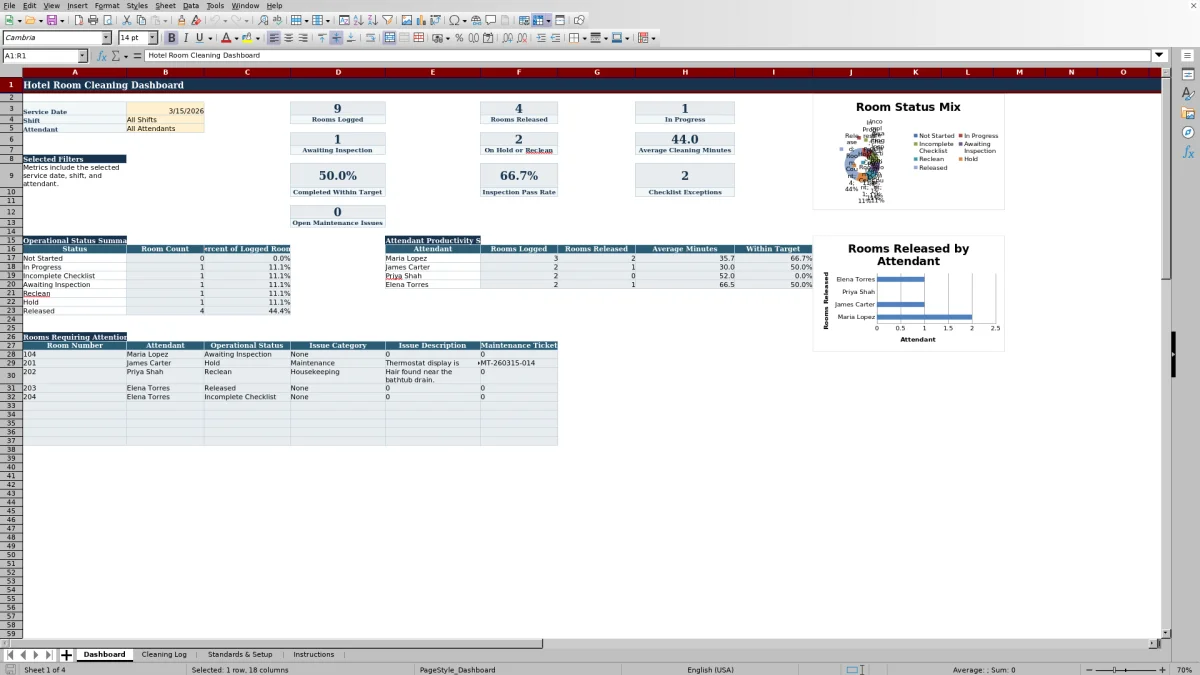
The workbook includes Dashboard, Cleaning Log, Standards & Setup, and Instructions sheets. Managers can monitor room status and exceptions by service date, shift, or attendant while reviewing cleaning times, inspection results, maintenance issues, and incomplete checklist items.
Built-in formulas calculate cleaning minutes, assign operational statuses, and summarize activity from the Cleaning Log. Dropdown lists support consistent entries for common housekeeping fields, while data-quality checks identify records that may need correction.
At a glance
What this workbook helps you manage
- Keeps room assignments, cleaning details, checklist results, inspections, and issues in one daily log.
- Shows rooms that are in progress, awaiting inspection, on hold, marked for reclean, or released.
- Compares calculated cleaning minutes with the target assigned to each cleaning type.
- Provides filtered operational and attendant summaries for the selected date, shift, and attendant.
See the actual file
Inside the workbook
Included in the file
- Four sheets: Dashboard, Cleaning Log, Standards & Setup, and Instructions.
- Eleven checklist columns covering room entry, linens, bathroom, amenities, surfaces, floors, safety, and final appearance.
- Dropdown-controlled fields for service details, checklist results, inspections, and issue categories.
- Two Dashboard charts summarizing operational room status and rooms released by attendant.
How to use the template
1. Review the setup lists and operating targets
Start on Standards & Setup. Review the room master, employee list, cleaning targets, and checklist standards before entering daily activity. The room master supplies the floor and room type when a room number is selected. Cleaning targets provide the target minutes associated with each cleaning type.
Managers can also review the inspection pass goal, maximum linen variance quantity, cleaning time alert allowance, and Dashboard exception limit. These are internal operating settings documented within the workbook.
2. Add one row for each room service
Use the Cleaning Log to enter the service date, room number, attendant, shift, cleaning type, occupancy status, and priority. Available cleaning types include stayover service, departure clean, deep clean, and turndown service. Priority choices include standard, rush, VIP, and accessibility request.
Enter the start and completion times so Excel can calculate cleaning minutes. Floor, room type, and target minutes are populated by formulas based on the selected room and cleaning type.
3. Complete the room checklist
Record Complete, Not Needed, or Needs Attention for every applicable area:
- Entry door and DND check
- Beds and linens
- Bathroom, towels, and amenities
- Dust, surfaces, floors, trash, and recycling
- Kitchenette or minibar
- Climate and lighting
- Safety and room condition
- Final appearance
A Needs Attention entry can place the room on Hold. If a completion time is entered while checklist fields remain blank, the calculated status can show Incomplete Checklist.
4. Record inspections and follow-up items
If inspection is required, enter the inspector, inspection time, and Pass or Fail result. A failed result can assign Reclean status, while a room requiring inspection may remain Awaiting Inspection until a result is entered.
Use the issue fields for the category, description, maintenance ticket, lost-and-found item, linen variance quantity, and supervisor notes. The data-quality column can flag duplicate room-and-date records and certain missing details.
5. Review the Dashboard
Select the service date and, if useful, filter for a morning or evening shift and a listed attendant. The Dashboard reports rooms logged, rooms released, rooms in progress, rooms awaiting inspection, rooms on hold or marked for reclean, average cleaning minutes, completion within target, inspection pass rate, checklist exceptions, and open maintenance issues.
Use the rooms requiring attention list to review the room number, attendant, operational status, issue category, issue description, and maintenance ticket for relevant exceptions.
What does the hotel room cleaning checklist track?
The Cleaning Log tracks the service date and room number along with the assigned attendant, shift, cleaning type, occupancy status, and priority. Start and completion times support a calculated cleaning duration, and the cleaning type determines the target minutes from the setup sheet.
The checklist covers 11 operational areas, from the entry door and DND check through final appearance. Each area accepts Complete, Not Needed, or Needs Attention, giving supervisors a consistent way to distinguish completed work from exceptions and tasks that do not apply.
Inspection details, issue documentation, lost-and-found information, linen variance, supervisor notes, and the last-updated field can remain with the same room-service record.
How does the spreadsheet determine room-cleaning status?
The Operational Status formula evaluates the room record and returns a status such as Not Started, In Progress, Incomplete Checklist, Awaiting Inspection, Reclean, Hold, or Released. For example, a room with a start time but no completion time is treated as in progress. A failed inspection can move the record to Reclean.
A checklist item marked Needs Attention can produce Hold status. When inspection is required but no result has been recorded, the room can remain awaiting inspection. These calculated labels create a consistent status view without requiring staff to type the status manually.
What can a housekeeping manager review on the Dashboard?
The Dashboard summarizes records for the selected 2026 service date. Shift filters include All Shifts, Morning, and Evening, while the attendant filter can show all listed attendants or one of the four attendants available on the Dashboard.
Operational metrics include room volume, release progress, average cleaning minutes, target-time performance, inspection results, checklist exceptions, and open maintenance issues. An attendant productivity summary shows rooms logged, rooms released, average minutes, rooms within target, and failed inspections for the attendants displayed there.
Two charts present the operational status summary and rooms released by attendant. A separate exception list displays qualifying rooms that require attention, subject to the Dashboard exception limit in Standards & Setup.
How does the workbook support cleaner housekeeping records?
Dropdown lists reduce inconsistent wording across core fields. Room numbers, attendants, shifts, cleaning types, occupancy statuses, priorities, checklist results, inspection fields, and issue categories use predefined choices in the Cleaning Log.
The Data Quality Check formula reviews several record conditions. It can identify a duplicate room and service date, a completion time without a start time, an inspection-related inconsistency, a missing inspector, or missing information associated with a maintenance issue. These checks help supervisors locate entries that may need review while preserving the underlying room-service history.
Questions about this workbook
How many room-cleaning records can the spreadsheet hold?
The Cleaning Log provides 250 data rows, running from row 2 through row 251. Each row is intended for one room-service record.
Can I filter the room-cleaning log?
Yes. The Cleaning Log has an Excel table with filtering across its columns. The Dashboard also has filters for service date, shift, and attendant, allowing managers to narrow the calculated summaries.
Does the spreadsheet calculate cleaning time?
Yes. When valid start and completion times are entered, the Cleaning Minutes formula calculates the elapsed time in minutes. The Dashboard uses those results for average cleaning minutes and comparisons with target minutes.
How are maintenance and housekeeping issues documented?
The log includes Issue Category, Issue Description, and Maintenance Ticket fields. Categories include Maintenance, Housekeeping, Linen, Amenities, Lost and Found, Safety Concern, Guest Request, Other, and None. Open maintenance issues without a ticket can be included in the Dashboard summary.
Can room and employee details be changed?
Yes. Standards & Setup contains editable room and employee lists, including room number, floor, room type, employee name, role, and active status. Managers can also update cleaning targets and checklist standards. Because some dropdown choices and Dashboard attendant choices are explicitly configured in the workbook, review dependent entries when changing setup information.
Transparent credits
Editorial and workbook QA bylines
The named editorial signatures and their responsibilities stay consistent across the library.

Workbook guide and editorial context
Audrey Whitmore
Audrey Whitmore is the consistent editorial byline for practical setup guidance written from each workbook’s final manifest and published features.
Meet the editorial byline →
Workbook structure and formula QA byline
Ethan Cole
Ethan Cole is the consistent QA byline shown only when recorded checks pass for worksheet structure, formulas, validations, recalculation, and the published XLSX bytes.
See the QA byline and checks →