Hotels · XLSX
Free Hotel Daily Manager Checklist Spreadsheet Excel Template for 2026
Hotel daily manager checklist spreadsheet for tracking assignments, due times, completion, issues, costs, and shift handoffs in 2026.
Formula and workbook structure checked before publication
This hotel daily manager checklist spreadsheet is a free Excel template for assigning operating tasks, confirming completion, documenting exceptions, and preparing shift handoffs. It organizes daily oversight across Front Office, Housekeeping, Engineering, Food and Beverage, Security, Sales and Events, Accounting, and Management.
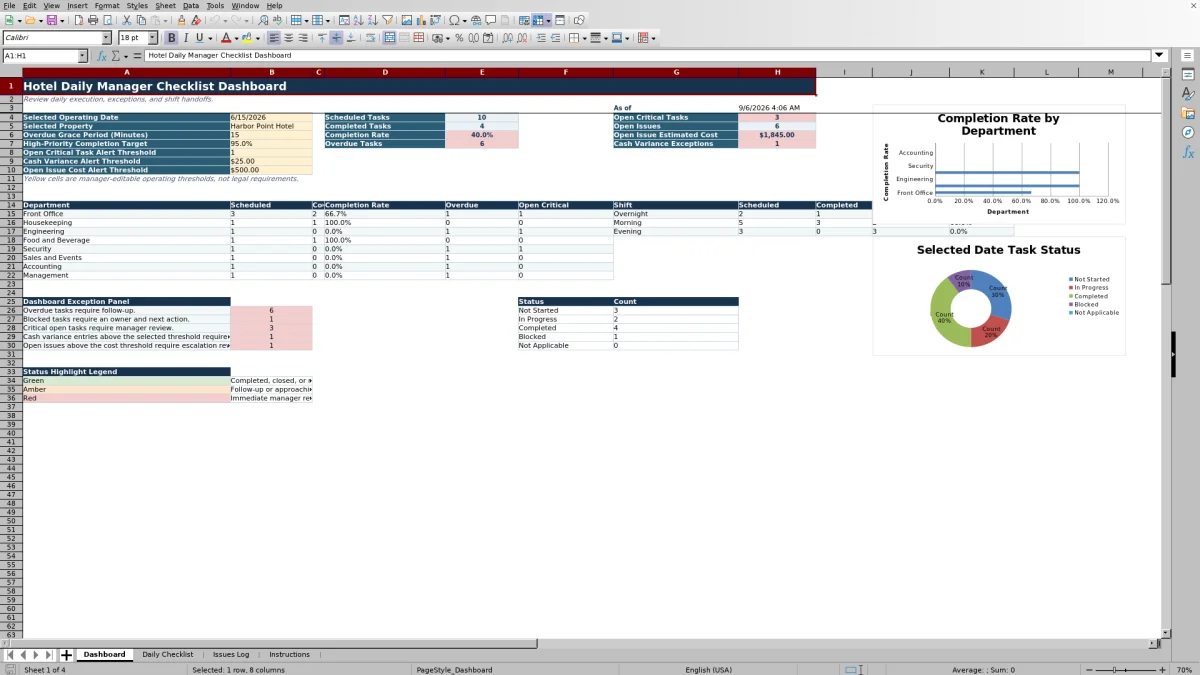
The workbook contains four sheets: Dashboard, Daily Checklist, Issues Log, and Instructions. Managers can review completion by department and shift, identify overdue or critical work, monitor open issues and estimated costs, and record who completed and verified each task.
Built specifically for 2026 operating dates, the file includes validated entry fields, calculated timing indicators, record checks, conditional formatting, and two dashboard charts. Yellow Dashboard cells contain manager-editable operating thresholds rather than legal requirements.
At a glance
What this workbook helps you manage
- Keeps daily assignments, due times, completion details, verification, and manager notes in one structured checklist.
- Surfaces overdue work, open critical tasks, cash variance exceptions, and unresolved issue costs on the Dashboard.
- Connects operational issues to related checklist IDs for clearer follow-up and shift accountability.
- Supports consistent handoffs with issue ownership, target resolution times, immediate actions, and handoff notes.
See the actual file
Inside the workbook
Included in the file
- Four dedicated sheets: Dashboard, Daily Checklist, Issues Log, and Instructions.
- Structured Excel tables provide 250 checklist rows and 150 issue-log rows with filters and frozen headers.
- Formula-driven timing, issue aging, resolution checks, completion metrics, and record-quality messages.
- Validated lists, date and numeric controls, conditional formatting, currency formats, and two Dashboard charts.
How to use the template
1. Read the Instructions sheet
Start with the workbook purpose, daily workflow, and status definitions. The Instructions sheet also holds the supporting lists used for properties, shifts, departments, priorities, checklist statuses, guest impact, issue categories, severities, and issue statuses.
2. Set the Dashboard controls
Select the operating date and property on the Dashboard. The date entry is validated for January 1 through December 31, 2026. Review the editable grace period and alert thresholds for high-priority completion, open critical tasks, cash variance, and open issue cost. These settings drive Dashboard exception reporting.
3. Prepare and update the Daily Checklist
Use one row for each operating task. Enter or review the checklist ID, property, operating date, shift, department, area, priority, task, due time, assigned employee, and status. Available shifts are Overnight, Morning, and Evening. Checklist priorities are Routine, High, and Critical.
- Use Not Started, In Progress, Completed, Blocked, or Not Applicable for status.
- Enter completion and verification timestamps when work is finished.
- Record the verifier, cash variance, guest impact, related Issue ID, and manager notes when applicable.
The calculated Due Date and Time combines the operating date and due time. The Timing Flag identifies records as Closed, Missing Due Time, Overdue, Due Now, or On Track based on the current time and Dashboard grace period. The Record Check calls attention to missing or inconsistent entries.
4. Document significant exceptions
Create a record in the Issues Log when an operational problem requires ownership or continued follow-up. Capture the report date and time, department, area or room, category, description, severity, guest impact, immediate action, owner, status, target resolution time, estimated cost, vendor or contact, and shift handoff notes.
When an issue comes from a checklist task, enter the related checklist ID in the Issues Log and place the Issue ID on the checklist row. Calculated columns show issue age in hours, resolution status, and record-check messages.
5. Review exceptions before handoff
Return to the Dashboard for the selected property and operating date. Review scheduled and completed tasks, completion rate, overdue tasks, open critical work, open issues, estimated open-issue cost, and cash variance exceptions. Department and shift summaries help the manager identify where follow-up remains before briefing the next shift.
What does the hotel daily manager checklist track?
The Daily Checklist covers the operational details needed to assign, monitor, and verify work. Each record includes a checklist ID, property, operating date, shift, department, area, priority, task description, due time, assigned employee, and status.
Completion fields record the completion date and time, verifier, and verification date and time. Managers can also document a cash variance in U.S. dollars, guest impact, an Issue ID, and manager notes. This supports both routine task control and review of exceptions without mixing the issue investigation into the task description.
The sheet accommodates 250 checklist records. Filters are available across the checklist columns, and the header remains visible while scrolling.
How does the Dashboard help a hotel manager prioritize the day?
The Dashboard reports activity for the selected operating date and property. Its headline measures include scheduled tasks, completed tasks, completion rate, overdue tasks, open critical tasks, open issues, open issue estimated cost, and cash variance exceptions.
Department rows show scheduled, completed, completion rate, overdue, and open critical counts for eight hotel departments. A separate shift summary reports scheduled, completed, overdue, and completion rate for Overnight, Morning, and Evening shifts.
Managers can adjust the overdue grace period and alert thresholds in the designated yellow cells. The current-time calculations use Excel's current date and time when the workbook recalculates, so timing results can change as the operating day progresses.
How are overdue and blocked tasks handled?
A task's due date and time is calculated from its operating date and due time. If a task is not Completed or Not Applicable, the Timing Flag compares that deadline with the current time. It first identifies Due Now work, then marks the task Overdue after the Dashboard grace period has passed.
Blocked is an available checklist status. The Record Check can prompt for blocked-task notes, helping the manager document why progress stopped. It also checks for details such as a missing operating date, assigned employee, due time, or completion timestamp. These messages support a more complete record before a shift handoff.
What information belongs in the hotel Issues Log?
The Issues Log is designed for operational exceptions that need an owner, target, or continuing handoff. Categories include Guest Service, Maintenance, Housekeeping, Security, Food and Beverage, Technology, Cash Handling, Event Setup, Staffing, and Other. Severity choices are Low, Moderate, High, and Critical.
Issue statuses include Open, Monitoring, Waiting on Vendor, Resolved, and Closed. The workbook calculates issue age in hours and indicates whether an unresolved item is Within Target or Past Target. Resolved and closed items are checked for a resolution timestamp.
The log provides 150 rows. Estimated Cost is formatted in U.S. dollars, and open issue costs are summarized on the Dashboard for the selected property.
Questions about this workbook
Is this hotel manager checklist designed specifically for 2026?
Yes. The Dashboard operating-date control and the date fields in the Daily Checklist and Issues Log accept dates from January 1 through December 31, 2026.
Which hotel departments are included?
The department lists include Front Office, Housekeeping, Engineering, Food and Beverage, Security, Sales and Events, Accounting, and Management. The Dashboard provides completion and exception summaries for these departments.
Can managers assign tasks to individual employees?
Yes. Each checklist row includes an Assigned To field. Separate fields capture the person who verified the work and the verification date and time.
Can a checklist task be connected to an operational issue?
Yes. The Daily Checklist has an Issue ID field, and the Issues Log has a Related Checklist ID field. The Issues Log record check can identify a related checklist ID that is not found in the checklist.
What alerts and thresholds can the manager change?
The Dashboard provides editable controls for the overdue grace period in minutes, high-priority completion target, open critical task alert threshold, cash variance alert threshold, and open issue cost alert threshold. The workbook states that these are operating thresholds, not legal requirements.
Does the workbook include sample hotel records?
Yes. The supplied file contains sample checklist and issue records for Harbor Point Hotel dated June 15, 2026. They demonstrate completed, in-progress, and issue-linked entries, including verification details, guest impact, estimated cost, and shift handoff notes.
Transparent credits
Editorial and workbook QA bylines
The named editorial signatures and their responsibilities stay consistent across the library.

Workbook guide and editorial context
Audrey Whitmore
Audrey Whitmore is the consistent editorial byline for practical setup guidance written from each workbook’s final manifest and published features.
Meet the editorial byline →
Workbook structure and formula QA byline
Ethan Cole
Ethan Cole is the consistent QA byline shown only when recorded checks pass for worksheet structure, formulas, validations, recalculation, and the published XLSX bytes.
See the QA byline and checks →