Hotels · XLSX
Free Inn Reservation Calendar Spreadsheet Excel Template for 2026
Manage inn reservations, monthly occupancy, arrivals, departures, balances, and room conflicts with this Excel reservation calendar.
Formula and workbook structure checked before publication
This inn reservation calendar spreadsheet is a free Excel template for organizing guest stays, room assignments, booking details, payments, and daily operating information. It combines reservation records with a monthly calendar, a date-specific guest roster, and a management dashboard.
The workbook contains four worksheets: Dashboard, Reservations, Calendar, and Setup & Instructions. Enter each booking once in the Reservations sheet, then use the calculated views to review occupancy, arrivals, departures, balances, and room conflicts.
At a glance
What this workbook helps you manage
- Keeps guest, stay, room, payment, and operating details in one reservation register.
- Calculates nights, lodging charges, estimated tax, estimated totals, and balances due.
- Summarizes daily occupancy, arrivals, departures, available rooms, and room conflicts.
- Highlights operational issues such as missing information, overlapping stays, and overdue statuses.
See the actual file
Inside the workbook
Included in the file
- Four connected worksheets for setup, reservations, calendar planning, and dashboard review.
- Monthly calendar with daily arrivals, departures, occupied rooms, available rooms, and occupancy.
- As-of-date guest roster with balances, special requests, and assigned team members.
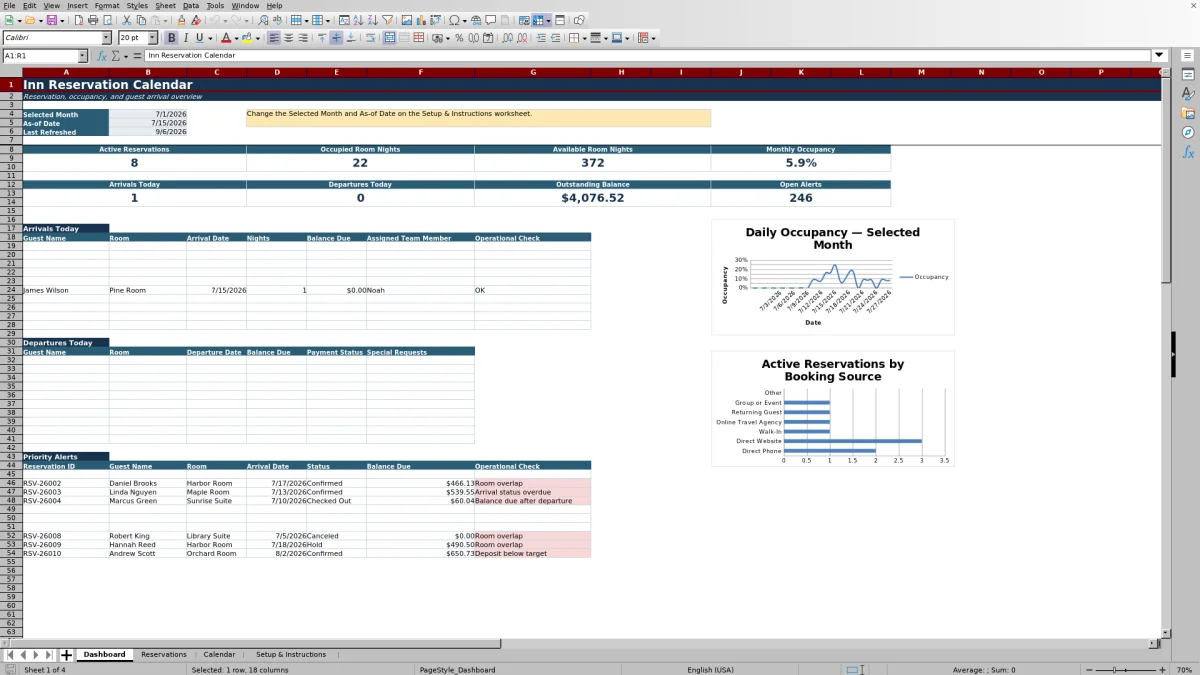
- Dashboard with monthly metrics, current-day lists, alerts, and two summary charts.
How to use the template
1. Review the operating setup
Open Setup & Instructions before entering reservations. Set the selected month and as-of date, then review Total Rooms Available, Lodging Tax Rate, and Service Charge Rate. The sheet also contains the room, reservation status, and booking source lists used by the workbook.
Confirm that the room list matches the names your team will enter. Room names need to remain consistent because reservation assignments, overlap checks, and calendar calculations rely on those entries.
2. Enter reservations in the register
Use one row per booking on the Reservations sheet. Record the reservation ID, confirmation number, guest contact details, room, party size, arrival and departure dates, status, booking source, nightly rate, and deposit paid. Optional operating fields include special requests, assigned team member, and last updated date.
The sheet includes 250 reservation rows. Room, status, and booking source fields use list validation, while guest counts, dates, nightly rates, and deposits have entry limits appropriate to their field types.
3. Check calculated amounts and alerts
Formulas calculate nights, lodging amount, service charge, estimated tax, estimated total, balance due, and payment status. The Overlap Count checks whether another active reservation uses the same room during intersecting stay dates.
Review the Operational Check column after adding or changing a booking. It can identify issues including a missing reservation ID, missing guest name, invalid stay dates, room overlap, and arrival status that requires attention.
4. Review the calendar and dashboard
The Calendar sheet presents the selected month from Sunday through Saturday. Each date shows arrivals, departures, occupied rooms, and occupancy. A supporting daily section also reports available rooms, confirmed revenue, outstanding balance, room conflicts, and an operating note.
Use the roster beside the calendar for the as-of date. It displays active guests with room, status, stay dates, adults, children, balance due, requests, and assigned team member. The Dashboard provides a daily operating overview with arrivals, departures, priority alerts, booking-source counts, and monthly performance figures.
What information can an inn track in the reservation spreadsheet?
The Reservations sheet holds both guest-facing and operational booking details. Identification fields include Reservation ID and Confirmation Number. Guest records include name, email, phone, adults, and children. Stay details cover room, arrival date, departure date, nights, status, and booking source.
Financial columns include nightly rate, lodging amount, service charge, estimated tax, estimated total, deposit paid, balance due, and payment status. The final fields provide space for special requests, assigned team member, last updated date, overlap count, and operational check.
Because the calculated columns run through the reservation register, staff can focus data entry on the booking facts while Excel determines the related stay totals and payment position.
How does the monthly inn reservation calendar work?
The Calendar sheet uses the Selected Month from Setup & Instructions. Its Sunday-through-Saturday layout displays each day with counts for arrivals, departures, occupied rooms, and occupancy percentage. Canceled reservations are excluded from the active stay calculations shown in the calendar formulas.
A detailed daily section supports the visual calendar with the date, weekday, selected-month indicator, arrivals, departures, occupied rooms, available rooms, occupancy, confirmed revenue, outstanding balance, room conflicts, and operating note. This makes it possible to compare guest movement with room availability by date.
The separate roster uses the as-of date rather than the full month. It lists reservations active on that date, helping the front desk identify in-house guests, assigned rooms, balances, requests, and staff ownership.
What does the reservation dashboard show?
The Dashboard summarizes the selected month and as-of date. Monthly measures include active reservations, occupied room nights, available room nights, and monthly occupancy. Current operating measures include arrivals today, departures today, outstanding balance, and open alerts.
Dedicated lists show arriving guests, departing guests, and priority alerts. Depending on the list, the details can include guest name, room, stay date, nights, balance due, payment status, special requests, assigned team member, reservation status, and operational check.
Two charts summarize daily occupancy and active reservations by booking source. The booking sources listed in the workbook are Direct Phone, Direct Website, Walk-In, Online Travel Agency, Returning Guest, Group or Event, and Other.
How can an inn identify overlapping room bookings?
Each reservation row includes an Overlap Count formula. It compares the assigned room and stay dates with the other non-canceled reservations in the register. A conflict exists when another booking for the same room intersects the arrival and departure period.
The result also feeds the Operational Check field, where a detected issue is labeled as a room overlap. Room conflict totals appear in the Calendar sheet, and relevant issues can surface in the Dashboard’s priority alert area.
For useful results, enter a room, valid arrival and departure dates, a reservation ID, and a current status for every booking. Staff should review any room overlap alert against the underlying reservation rows and correct the room, dates, or status as appropriate.
Questions about this workbook
Which worksheets are included in the inn reservation calendar spreadsheet?
The workbook includes four worksheets: Dashboard, Reservations, Calendar, and Setup & Instructions. Reservations is the booking register, Calendar provides monthly and date-specific views, Dashboard summarizes operating information, and Setup & Instructions stores editable assumptions and lists.
How many reservations can the Excel template hold?
The Reservations table runs from row 2 through row 251, providing 250 reservation rows. Calculated columns and validation rules are present across those rows.
Which reservation statuses are available?
The status list includes Inquiry, Hold, Confirmed, Checked In, Checked Out, Canceled, and No-Show. The Reservations sheet provides a list selection for these values.
Does the spreadsheet calculate guest charges?
Yes. Based on the entered stay dates, nightly rate, setup rates, and deposit paid, the workbook calculates nights, lodging amount, service charge, estimated tax, estimated total, balance due, and payment status. Canceled reservations return a zero balance due in the reservation formula.
Can staff track special requests and task ownership?
Yes. Each reservation row includes Special Requests and Assigned Team Member fields. These details also appear in the date-specific Calendar roster, and special requests are included in the Dashboard’s departure list.
Transparent credits
Editorial and workbook QA bylines
The named editorial signatures and their responsibilities stay consistent across the library.

Workbook guide and editorial context
Audrey Whitmore
Audrey Whitmore is the consistent editorial byline for practical setup guidance written from each workbook’s final manifest and published features.
Meet the editorial byline →
Workbook structure and formula QA byline
Ethan Cole
Ethan Cole is the consistent QA byline shown only when recorded checks pass for worksheet structure, formulas, validations, recalculation, and the published XLSX bytes.
See the QA byline and checks →