Hotels · XLSX
Hotel Night Audit Checklist Excel Template — Free 2026 Edition
Hotel night audit checklist with task tracking, reconciliation variances, exception checks, manager review, and a date-based dashboard.
Formula and workbook structure checked before publication
This hotel night audit checklist is a free Excel template for documenting nightly tasks, financial reconciliations, supporting references, exceptions, and management review. It organizes the audit process by hotel business date rather than relying on an informal paper checklist.
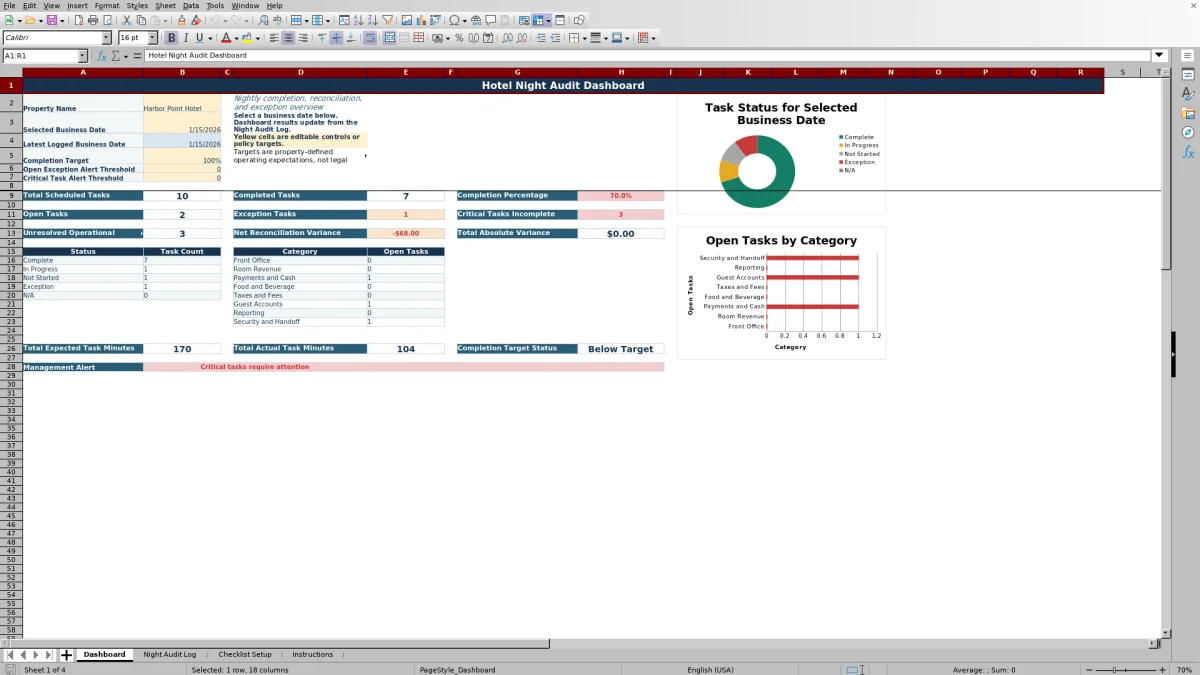
The workbook includes four sheets: Dashboard, Night Audit Log, Checklist Setup, and Instructions. Formulas connect task settings to log entries, calculate elapsed minutes and financial variances, detect selected operational issues, and summarize results for the date chosen on the Dashboard.
Hotel teams can adjust property-defined tasks and tolerances, record work during the shift, and review open items before handoff. The workbook records manual activity and does not automatically connect to hotel systems.
At a glance
What this workbook helps you manage
- Creates a consistent record of nightly tasks, statuses, timing, evidence, and follow-up.
- Compares expected and actual amounts while calculating the variance for reconciliation tasks.
- Identifies missing evidence, missing amounts, duplicate task-and-date entries, and critical incomplete tasks.
- Summarizes completion, exceptions, open tasks, timing, and variances for a selected business date.
See the actual file
Inside the workbook
Included in the file
- Four worksheets covering dashboard reporting, audit records, task configuration, and workbook instructions.
- A 500-row Night Audit Log table with date, shift, assignment, status, timing, reconciliation, evidence, exception, and review fields.
- Formula-based elapsed minutes, amount variance, duplicate detection, operational checks, and record IDs.
- A date-controlled Dashboard with summary metrics, status and category counts, and two charts.
How to use the template
1. Review the task library
Start on Checklist Setup. Each task can include a Task ID, category, task description, critical designation, reconciliation designation, evidence requirement, expected minutes, tolerance, default source report, guidance, active status, and display order.
Adjust the yellow input cells to match the hotel's approved procedures. The setup area reports duplicate Task IDs and counts active, active critical, and active reconciliation tasks. Treat every tolerance as a property-defined review threshold, not a statutory or legal standard.
2. Add tasks to the Night Audit Log
Enter one row for each task required for the applicable hotel business date. Record the Business Date, Audit Shift, and Task ID. Selecting a configured Task ID fills the associated category, task description, critical flag, reconciliation flag, evidence requirement, expected minutes, and tolerance through formulas.
The Audit Shift list includes Night Audit, Overnight, and Early Morning Close. Assign the task and choose a status from Not Started, In Progress, Complete, Exception, or N/A.
3. Document timing, amounts, and supporting references
Enter start and completion times so the sheet can calculate actual task minutes. For reconciliation work, enter the Expected Amount supported by the primary close report and the Actual Amount confirmed from the comparison source. Variance is calculated as Actual Amount minus Expected Amount.
- Use Evidence / Reference for report names, batch numbers, deposit bag numbers, or internal references.
- Use Exception Details to describe an unresolved difference or explain why a task is N/A.
- Record Corrective Action when follow-up has occurred.
- Use Manager Review and Manager Initials for the review record.
4. Review checks and the Dashboard
The Operational Check can flag duplicate task-and-date entries, missing required evidence, missing reconciliation amounts, variances beyond tolerance, and critical tasks that are not Complete or N/A. Review these messages rather than treating status alone as confirmation that the record is complete.
On the Dashboard, select the applicable business date. Review completion percentage, open and exception tasks, incomplete critical tasks, unresolved operational checks, net variance, total absolute variance, expected and actual minutes, and category-level open tasks. The completion target and alert thresholds are editable property controls.
What should a hotel night audit checklist record?
A usable checklist should show what was required, who handled it, when it was performed, and whether an issue remains open. The Night Audit Log provides fields for Business Date, Audit Shift, Task ID, Category, Task, Assigned To, Status, Start Time, and Completion Time.
It also supports Expected and Actual Amounts, Variance, Tolerance, Evidence / Reference, Exception Details, Corrective Action, Manager Review, Manager Initials, and Source Report or System. These fields create a structured record for shift handoff and later management review without requiring unnecessary guest information.
How does the Excel checklist support nightly reconciliation?
Tasks marked as reconciliation work can be evaluated with expected and actual amounts. The workbook calculates the reconciliation variance and compares it with the tolerance stored for that Task ID. A variance outside the positive or negative tolerance is identified by the Operational Check.
The Dashboard totals net reconciliation variance and total absolute variance for the selected business date. Net variance shows the combined signed result, while total absolute variance adds the magnitude of differences without allowing positive and negative amounts to offset one another.
How can managers find incomplete or exception tasks?
The Dashboard counts tasks by status: Complete, In Progress, Not Started, Exception, and N/A. It separately reports open tasks, exception tasks, and critical tasks that remain incomplete. Category summaries cover Front Office, Room Revenue, Payments and Cash, Food and Beverage, Taxes and Fees, Guest Accounts, Reporting, and Security and Handoff.
A management alert is driven by the workbook's date-specific results and editable targets. Managers can also use the Night Audit Log fields to mark an item Reviewed or Follow-Up Required and enter initials where appropriate.
How should evidence and sensitive information be handled?
Evidence should identify where the auditor obtained or confirmed information. Appropriate references may include a report name, payment batch number, deposit bag number, business-date screen, or other internal reference. The Source Report or System field records the origin of the information; it does not create a system connection.
Do not enter full payment card numbers, passwords, security codes, or confidential system credentials. Avoid unnecessary guest personal information. The workbook's manual evidence record is intended to point reviewers to supporting material without copying sensitive data into the file.
Questions about this workbook
What worksheets are included in the hotel night audit checklist?
The workbook contains Dashboard, Night Audit Log, Checklist Setup, and Instructions. The Dashboard summarizes a selected business date, the log stores audit activity, the setup sheet holds the task library, and Instructions explains workflow, statuses, reconciliation guidance, data security, scope, and the color key.
Which night audit statuses are available?
The status list includes Not Started, In Progress, Complete, Exception, and N/A. Complete indicates that the task is finished and required evidence is recorded. Exception is for a difference or unresolved issue. When N/A is used, the workbook instructions call for a reason in Exception Details.
Does the workbook calculate task duration and financial variance?
Yes. Actual Minutes is calculated from Start Time and Completion Time, including work that crosses midnight. Variance is calculated by subtracting Expected Amount from Actual Amount. Both calculations remain blank when their required inputs are missing.
What issues can the Operational Check identify?
Based on the available formulas, the check can identify a duplicate task for the same business date, missing evidence on a completed evidence-required task, missing amounts on a completed reconciliation task, a variance outside tolerance, and a critical task that is neither Complete nor N/A.
Does this Excel workbook connect to hotel systems?
No. It records manual night audit activity and does not automatically connect to hotel systems. Users enter amounts, statuses, timing, and references from their source reports or systems.
Transparent credits
Editorial and workbook QA bylines
The named editorial signatures and their responsibilities stay consistent across the library.

Workbook guide and editorial context
Audrey Whitmore
Audrey Whitmore is the consistent editorial byline for practical setup guidance written from each workbook’s final manifest and published features.
Meet the editorial byline →
Workbook structure and formula QA byline
Ethan Cole
Ethan Cole is the consistent QA byline shown only when recorded checks pass for worksheet structure, formulas, validations, recalculation, and the published XLSX bytes.
See the QA byline and checks →