Housekeeping · XLSX
Free Hotel Room Status Tracker Excel Template for 2026
Hotel room status tracker with a dashboard for room readiness, housekeeping workload, stale updates, and operational exceptions.
Formula and workbook structure checked before publication
Keep front desk, housekeeping, maintenance, and management aligned with this free Excel template for hotel room status tracking. The workbook maintains one current record per room and summarizes room readiness, housekeeping workload, maintenance conditions, arrivals, departures, and priority rooms.
The Room Status Tracker includes fields for occupancy, housekeeping progress, inspections, maintenance tickets, update times, and shift notes. Formulas determine whether a room is ready to sell, calculate the age of its latest update, and identify records that may need review.
A formula-driven Dashboard turns current entries into a practical shift handoff snapshot. Editable lists and settings let the property maintain room types, staff names, operating statuses, and its internal status-update threshold.
At a glance
What this workbook helps you manage
- Provides one room-level view for occupancy, housekeeping, inspection, maintenance, and shift details.
- Calculates ready-to-sell status from Vacant, Inspected, and Available entries.
- Surfaces overdue updates and operational exceptions for management review.
- Summarizes room readiness and housekeeping assignments on a formula-driven dashboard.
See the actual file
Inside the workbook
Included in the file
- Four worksheets: Dashboard, Room Status Tracker, Lists & Settings, and Instructions.
- Dropdown-controlled fields for room, status, staffing, maintenance, role, and priority entries.
- Dashboard metrics, percentage summaries, housekeeping workload details, and two charts.
- Formula checks for readiness, status age, overdue updates, and operational exceptions.
How to use the template
1. Review the Instructions sheet
Start with the workbook guidance covering setup, daily workflow, status definitions, data entry, exceptions, and limitations. Establish who will update each part of the tracker during the operating day.
2. Configure Lists & Settings
Enter the property name, maximum floor number, and status update threshold in hours. Review the editable lists for room types, occupancy statuses, housekeeping statuses, room conditions, departure statuses, housekeepers, inspectors, maintenance priorities, PMS statuses, updated-by roles, and Yes/No values.
Changes to these lists affect the dropdown choices available for future room-status entries. Operating thresholds are internal property choices and should follow management-approved procedures.
3. Build the current room list
Use the Room Status Tracker for one current record per physical room. Enter or paste room numbers, floors, and room types, then complete the applicable operating fields. The table provides room-entry rows 2 through 151.
- Record occupancy, housekeeping, and room-condition statuses.
- Add arrival, departure, and departure-status details where applicable.
- Assign housekeepers and inspectors, with start, completion, and inspection times.
- Enter maintenance ticket references, priorities, and issue summaries when needed.
- Maintain the latest status time, updated-by role, priority flag, and shift notes.
4. Protect the calculated columns
Do not paste over Ready to Sell, Status Age Hours, Update Check, or Operational Check. These formula columns evaluate room readiness, measure elapsed time since the latest status update, compare that age with the selected threshold, and flag possible record issues.
5. Review the Dashboard at operating checkpoints
Use the Dashboard during morning assignments, room-readiness meetings, and shift handoff. Confirm that room records and status times are current before relying on totals for occupied, vacant clean, vacant inspected, dirty, cleaning-in-progress, out-of-order, and out-of-service rooms.
What hotel room details can the tracker record?
The main tracker contains 28 columns covering a room’s physical details and current operating state. Core fields include Room Number, Floor, Room Type, Occupancy Status, Housekeeping Status, and Room Condition. The calculated Ready to Sell field returns Yes only when a room is Vacant, Inspected, and Available.
Stay-related fields include Guest Last Name, External Reservation ID, Arrival Date, Departure Date, and Departure Status. The workbook also records assigned housekeepers, cleaning start and completion times, inspectors, and inspection times. Maintenance Ticket, Maintenance Priority, and Issue Summary support room-level follow-up.
PMS Status is included for copied or manually entered reference data. It does not connect to another system. Last Status Update, Updated By, Priority, and Shift Notes help teams document the latest operating context for each room.
How does the hotel room status dashboard support daily operations?
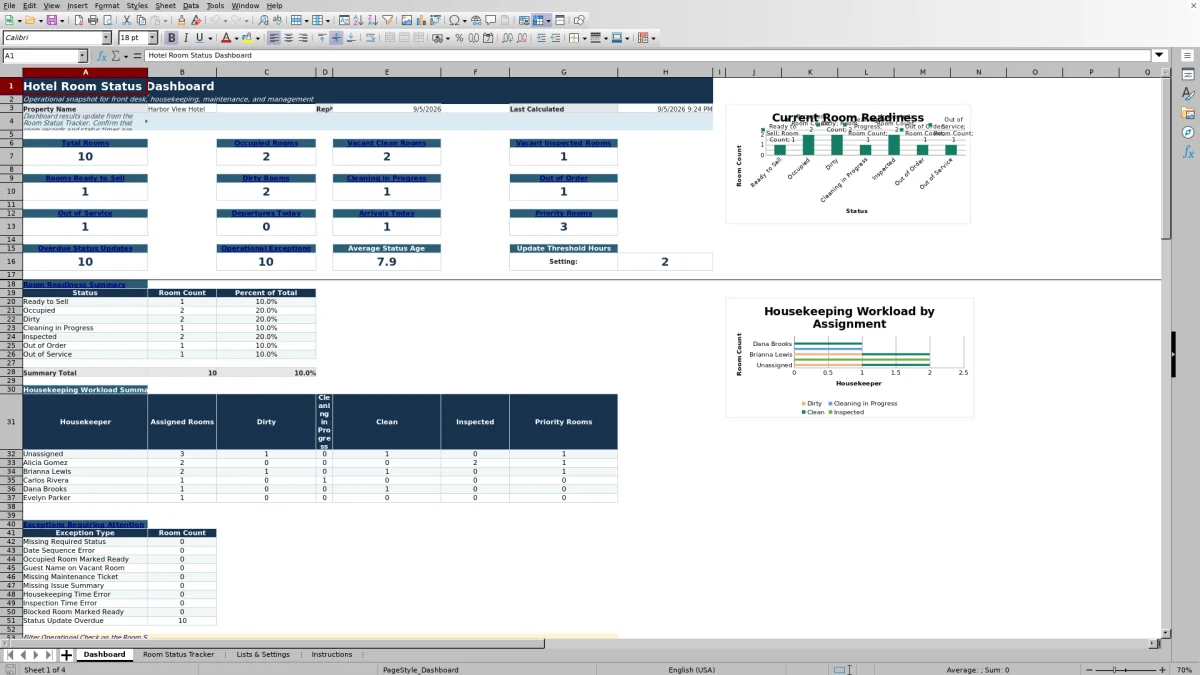
The Dashboard shows the property name, report date, and last-calculated time. Its top-level metrics include total rooms, occupied rooms, vacant clean rooms, vacant inspected rooms, rooms ready to sell, dirty rooms, rooms being cleaned, out-of-order rooms, and out-of-service rooms.
Additional counts cover departures today, arrivals today, priority rooms, overdue status updates, and operational exceptions. It also displays average status age and the configured update-threshold hours. A room-readiness summary reports counts and percentages for seven status groups, while a housekeeping workload summary breaks assignments into dirty, cleaning-in-progress, clean, inspected, and priority counts.
Two charts visualize the room-readiness mix and housekeeping workload. Dashboard results depend on the accuracy and timing of entries in the Room Status Tracker.
How are stale room updates identified?
For each populated room record, Status Age Hours calculates the number of hours since Last Status Update. Update Check then compares that age with the Status Update Threshold Hours stored on Lists & Settings.
A record without an update time is labeled Missing Update Time. A record older than the selected threshold is labeled Overdue; otherwise, it is labeled Current. The Dashboard counts overdue records and reports average status age, helping managers locate entries requiring verification before a handoff or readiness discussion.
Because the calculation uses the entered timestamp, staff should update Last Status Update whenever the room’s status changes.
What room-status errors can the workbook flag?
The Operational Check reviews room records for conditions that may indicate incomplete or conflicting data. Workbook guidance identifies exceptions including Missing Required Status, Date Sequence Error, Missing Maintenance Ticket, Missing Issue Summary, Housekeeping Time Error, Inspection Time Error, and Status Update Overdue.
Examples include a departure date earlier than arrival, an out-of-order room without a maintenance reference, cleaning completion before its start time, or an inspection recorded before cleaning was completed. The formulas also check for inconsistent operating states such as an occupied room marked ready or a vacant room with a guest name.
These operational checks are prompts for staff review. Their usefulness depends on complete, accurate, and timely room entries.
Questions about this workbook
How many room records does the Excel tracker provide?
The Room Status Tracker has entry rows 2 through 151, providing 150 room-record rows beneath the header. The instructions call for one current record per physical room.
When does the workbook mark a room ready to sell?
Ready to Sell returns Yes only when Occupancy Status is Vacant, Housekeeping Status is Inspected, and Room Condition is Available. Other combinations return No for a populated room record.
Can the dropdown lists be customized?
Yes. Lists & Settings contains editable values for room types, operating statuses, housekeepers, inspectors, maintenance priorities, PMS statuses, updated-by roles, and Yes/No choices. Changes affect future dropdown selections in the tracker.
Does the workbook connect to a hotel PMS?
No system integration is included. External Reservation ID and PMS Status are manual reconciliation and reference fields. Staff must enter or paste the relevant information.
What guest information should be entered?
The tracker includes Guest Last Name and External Reservation ID fields. Its instructions recommend using fictional or limited guest information in demonstrations and avoiding payment card data, identification numbers, or sensitive guest notes.
Which cells should staff avoid overwriting?
Do not paste over the Ready to Sell, Status Age Hours, Update Check, or Operational Check columns. These columns contain formulas for readiness, elapsed update time, threshold evaluation, and exception review.
Transparent credits
Editorial and workbook QA bylines
The named editorial signatures and their responsibilities stay consistent across the library.

Workbook guide and editorial context
Audrey Whitmore
Audrey Whitmore is the consistent editorial byline for practical setup guidance written from each workbook’s final manifest and published features.
Meet the editorial byline →
Workbook structure and formula QA byline
Ethan Cole
Ethan Cole is the consistent QA byline shown only when recorded checks pass for worksheet structure, formulas, validations, recalculation, and the published XLSX bytes.
See the QA byline and checks →