Hotels · XLSX
Free Hotel Overbooking Tracker Spreadsheet Excel Template for 2026
Hotel overbooking tracker spreadsheet for room-type risk, reservation review, physical shortages, and estimated relocation costs.
Formula and workbook structure checked before publication
This hotel overbooking tracker spreadsheet is a free Excel template for monitoring room inventory exposure by stay date and room type. It connects reservation details, inventory assumptions, forecast demand, authorized overbooking, and relocation planning in one workbook.
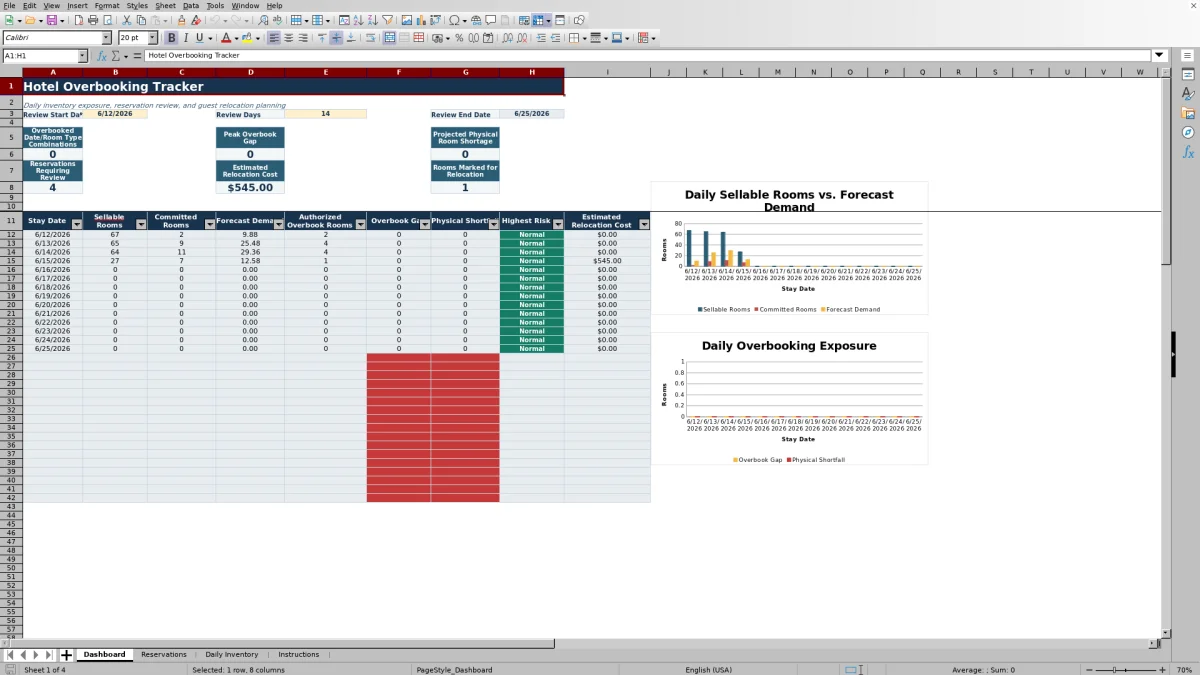
The four worksheets are Dashboard, Reservations, Daily Inventory, and Instructions. Formulas calculate sellable rooms, committed rooms, forecast demand, overbook gaps, physical shortfalls, and estimated relocation costs. The Dashboard summarizes a selected review period of 1 to 31 days and displays two charts for daily inventory and shortage trends.
Use the file as a structured operating view for revenue management, reservations, and front office review. Editable assumptions let the property reflect its own cancellation, no-show, occupancy, cost, and overbooking policies.
At a glance
What this workbook helps you manage
- Compares forecast demand with sellable rooms and authorized capacity by date and room type.
- Identifies overbook gaps, projected physical shortages, and Normal, Watch, or Critical risk status.
- Organizes reservation review, ownership, relocation decisions, partner hotel details, and guest recovery costs.
- Summarizes a selected review period with operating metrics, daily detail, and two Dashboard charts.
See the actual file
Inside the workbook
Included in the file
- Four worksheets: Dashboard, Reservations, Daily Inventory, and Instructions.
- Excel tables with filters for 250 reservation rows and 400 daily inventory rows.
- Drop-down validation for room types, statuses, priorities, decisions, and review owners.
- Formula-driven Dashboard metrics, conditional formatting, date filtering, and two charts.
How to use the template
1. Review the workbook instructions
Start on the Instructions worksheet. It provides the workbook’s getting-started sequence and the validation lists used by the Reservations and Daily Inventory sheets. These lists standardize entries such as booking source, room type, reservation status, relocation decision, and review owner.
2. Set the operating assumptions
Update the yellow assumption cells on the Reservations and Daily Inventory worksheets. Reservation assumptions include the default partner hotel nightly rate, transportation cost, guest recovery amount, review age threshold, and high ADR review threshold.
Inventory assumptions include expected cancellation and no-show rates, target occupancy, the demand-to-sellable-rooms watch threshold, the critical physical shortfall threshold, and default authorized overbook rooms. Treat these as property-controlled assumptions, not brand or legal requirements.
3. Enter active reservations
Use the Reservations table for each active booking. Enter identifying details, stay dates, room type, rooms booked, guest counts, status, guarantee type, average nightly rate, guest priority, and contact information. The worksheet provides 250 reservation rows.
For each booking under review, record the review status, last reviewed date, assigned team member, relocation decision, and notes. If relocation is selected, add the partner hotel, partner confirmation number, replacement nightly rate, relocation nights, transportation cost, and guest recovery amount.
4. Build daily inventory by room type
On Daily Inventory, enter the stay date, room type, base room inventory, out-of-order rooms, operating holds, authorized overbook rooms, forecast pickup, and applicable forecast rates. The worksheet provides 400 inventory rows.
Formulas calculate sellable rooms, committed rooms, forecast demand, demand relative to sellable rooms, authorized capacity, overbook gap, physical shortfall, and risk status. Assign a review owner, enter the last reviewed date, and use Operating Notes for context.
5. Set the Dashboard review period
Enter a review start date and choose 1 to 31 review days. The end date calculates automatically. Review the summary metrics, daily rows, highest risk status, estimated relocation cost, and the two charts. Investigate any Watch or Critical dates before updating reservation decisions.
How does the spreadsheet calculate hotel overbooking exposure?
The Daily Inventory worksheet begins with base room inventory, then subtracts out-of-order rooms and operating holds to calculate sellable rooms. It pulls committed rooms from qualifying reservations that overlap each stay date and match the selected room type.
Forecast demand adjusts committed rooms using expected cancellation and no-show rates, then adds forecast pickup. The workbook compares rounded forecast demand with authorized capacity to calculate the overbook gap. It also compares demand directly with sellable rooms to show the physical shortfall.
This distinction matters operationally. A date can be within an authorized overbooking allowance while still projecting demand above the hotel’s physical sellable room count. Reviewing both figures helps operators separate an approved selling position from potential arrival-day displacement exposure.
Which reservations can the hotel team review?
The Reservations worksheet captures arrival and departure dates, room type, rooms booked, reservation status, guarantee type, rate, guest priority, relocation priority, relocatable status, flexible dates, and guest contact details. These fields give the team a consistent record for discussing options.
Review activity can be documented with a status, review date, assigned team member, relocation decision, and notes. The worksheet also calculates review age in days and displays a data check. That check can identify invalid stay dates, missing room counts or room types, and missing partner hotel or relocation-night details when Relocate is selected.
The workbook organizes the decision process but does not prescribe which guest should be relocated. Property policy and the circumstances of each reservation remain part of the operating review.
How are estimated relocation costs tracked?
Reservation-level relocation planning includes the partner hotel, partner confirmation number, replacement nightly rate, relocation nights, transportation cost, and guest recovery amount. When a reservation is marked Relocate, the worksheet calculates an estimated total using rooms booked, relocation nights, lodging cost, transportation, and recovery amounts.
If row-level replacement, transportation, or recovery amounts are not supplied, the calculation can use the default assumptions entered at the top of the Reservations sheet. All displayed cost values use U.S. dollar formatting.
The Dashboard totals estimated relocation costs for arrivals within its selected review period and separately reports the rooms marked for relocation. Operators can update the underlying entries as partner pricing or handling plans change.
What should teams review on the Dashboard?
The Dashboard reports overbooked date and room-type combinations, the peak overbook gap, projected physical room shortage, reservations requiring review, estimated relocation cost, and rooms marked for relocation. Its daily detail displays stay date, sellable rooms, committed rooms, forecast demand, authorized overbook rooms, overbook gap, physical shortfall, highest risk, and estimated relocation cost.
Risk is summarized as Normal, Watch, or Critical based on inventory calculations and the thresholds maintained on Daily Inventory. One chart compares sellable rooms, committed rooms, and forecast demand by date. The second compares overbook gap and physical shortfall.
A practical review can start with the highest-risk dates, continue with affected room types in Daily Inventory, and finish with reservation assignments and decisions. Review owners and last-reviewed dates help teams document who is handling each inventory line.
Questions about this workbook
What worksheets are included in the hotel overbooking tracker?
The workbook contains four worksheets: Dashboard, Reservations, Daily Inventory, and Instructions. No additional worksheets are included.
How many reservation and inventory rows are available?
The Reservations table contains 250 entry rows, from rows 11 through 260. The Daily Inventory table contains 400 entry rows, from rows 11 through 410.
Which room types are available in the drop-down lists?
The supplied room-type validation list contains King, Double Queen, and Suite. The same list is used for reservation and daily inventory entries.
Can the Dashboard review period be changed?
Yes. Enter a review start date and a review length from 1 to 31 days. The workbook calculates the corresponding review end date and updates the Dashboard formulas for that period.
Does the tracker include guest relocation planning?
Yes. Reservation fields cover the relocation decision, partner hotel, partner confirmation number, replacement nightly rate, relocation nights, transportation cost, guest recovery amount, total relocation cost, assigned team member, and notes.
Transparent credits
Editorial and workbook QA bylines
The named editorial signatures and their responsibilities stay consistent across the library.

Workbook guide and editorial context
Audrey Whitmore
Audrey Whitmore is the consistent editorial byline for practical setup guidance written from each workbook’s final manifest and published features.
Meet the editorial byline →
Workbook structure and formula QA byline
Ethan Cole
Ethan Cole is the consistent QA byline shown only when recorded checks pass for worksheet structure, formulas, validations, recalculation, and the published XLSX bytes.
See the QA byline and checks →