Hotels · XLSX
Free Hotel Opening Checklist Excel Template for 2026
Hotel opening checklist with task ownership, deadlines, progress, and budget tracking in one Excel workbook for pre-opening reviews.
Formula and workbook structure checked before publication
This hotel opening checklist is a free Excel template for organizing pre-opening work by phase, department, priority, owner, date, budget, and completion status. It gives hotel leadership one structured place to document tasks and review readiness before opening.
The workbook includes Dashboard, Checklist, Parameters, and Instructions sheets. Calculated fields identify overdue, due-soon, on-track, complete, and unscheduled work, while the dashboard summarizes department readiness and spending for recurring leadership reviews.
At a glance
What this workbook helps you manage
- Keeps opening tasks, owners, dates, dependencies, budgets, progress, and notes in one master checklist.
- Separates work by opening phase and seven hotel departments for clearer operational accountability.
- Calculates task status, days to due, assigned lead, and budget variance from entered checklist data.
- Summarizes completion, deadline exposure, department progress, and spending for leadership review.
See the actual file
Inside the workbook
Included in the file
- Four worksheets: Dashboard, Checklist, Parameters, and Instructions.
- Checklist fields for phases, departments, tasks, priorities, dates, dependencies, budgets, completion, status, and notes.
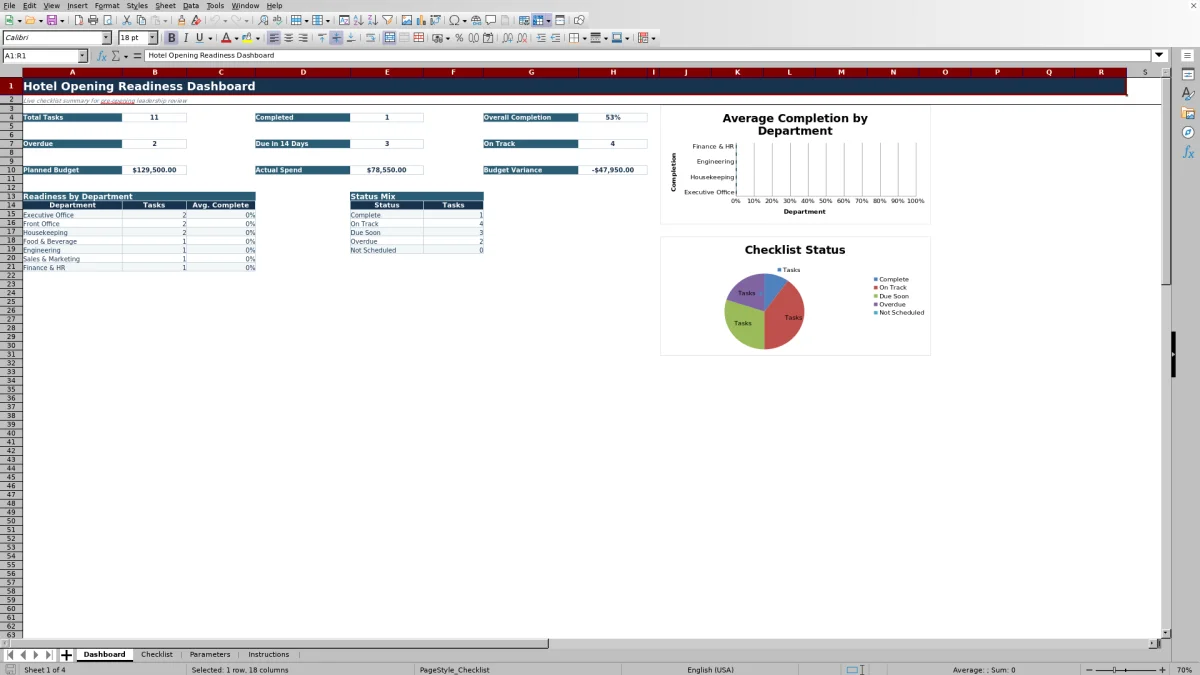
- Dashboard KPIs for task completion, deadline status, planned budget, actual spend, and budget variance.
- Two dashboard charts showing department readiness and task status mix.
How to use the template
1. Review the workbook instructions
Start with the Instructions sheet. It identifies the editable inputs and calculated fields on each sheet, explains the status logic, and provides a five-point quick-start sequence. Gold cells on the Checklist and Parameters sheets are intended for user entries.
2. Set the operating assumptions
Open Parameters and revise the hotel name, target opening date, opening budget, due-soon window, and department lead defaults. The initial due-soon window is 14 days. Department assignments cover Executive Office, Front Office, Housekeeping, Food & Beverage, Engineering, Sales & Marketing, and Finance & HR.
Changing a department's default lead updates the calculated Assigned Lead field for checklist rows assigned to that department. The target opening date is a planning reference; individual task timing is entered separately on the Checklist.
3. Build and maintain the master checklist
Use the Checklist sheet to enter or revise opening work through row 111. Keep each opening task specific and measurable. Available inputs include:
- Task ID, phase, department, and opening task
- Priority, planned start, due date, and completion date
- Dependency or predecessor
- Planned budget and actual spend in U.S. dollars
- Percent complete and notes
Phase choices are Planning, Pre-Opening, Opening Week, and Post-Opening. Priority choices are Critical, High, Medium, and Low. The sheet includes filters and a frozen header area to support routine list review.
4. Update progress and review calculated results
Enter the latest percent complete and completion date using documented operating evidence. A task becomes Complete when it has a completion date or reaches 100% complete. Otherwise, its due date and the due-soon window determine whether it is Overdue, Due Soon, On Track, or Not Scheduled.
The workbook also calculates days remaining to the due date for incomplete scheduled tasks. Budget variance is calculated as Actual Spend minus Planned Budget, helping the team see whether recorded spending is above or below the plan.
5. Use the dashboard in leadership meetings
Review the Dashboard during recurring pre-opening meetings. Confirm total tasks, completed tasks, overall completion, overdue work, items due within the configured window, and on-track work. Then compare planned budget, actual spend, and total variance. Two charts present readiness by department and the mix of task statuses.
What should a hotel pre-opening checklist track?
A useful opening checklist should connect each deliverable to timing, accountability, progress, and cost. This workbook records a task ID, opening phase, department, task description, assigned lead, priority, planned start, due date, completion date, dependency, planned budget, actual spend, percent complete, and notes.
Those inputs make it possible to discuss more than whether a task exists. Leadership can examine who owns it, when it should happen, what must occur first, how much has been allocated, and whether completion is supported by current information. The dependency or predecessor field is especially useful when one opening activity cannot begin until another is finished.
How does the hotel opening status logic work?
Status is calculated from the task description, completion date, percent complete, due date, the current date, and the editable due-soon window. A row with a completion date or 100% completion is classified as Complete. An unfinished task without a due date is Not Scheduled.
For other unfinished tasks, a past due date produces Overdue status. A task due within the configured window is Due Soon, while a later task is On Track. The default window is 14 days and can be changed on Parameters. This creates a consistent deadline view without requiring users to type status labels manually.
How can department leaders use the checklist?
The department field includes seven operating groups: Executive Office, Front Office, Housekeeping, Food & Beverage, Engineering, Sales & Marketing, and Finance & HR. Parameters stores a default lead for each group, and the Checklist uses that mapping to calculate the assigned lead.
Department leaders can filter the master list to review their tasks, priorities, dates, dependencies, spending, progress, and notes. The Dashboard separately reports task counts and average completion for each department. This provides a shared readiness view while preserving task-level detail on the Checklist.
How does the opening budget tracker support reviews?
Each checklist row includes Planned Budget and Actual Spend fields formatted in U.S. dollars. Variance is calculated as actual spend minus planned budget when actual spending has been entered. A positive result therefore means actual spending is higher than the plan for that task, while a negative result means it is lower.
The Dashboard totals planned budget, actual spend, and variance across the checklist. These figures can be reviewed alongside deadlines and completion, helping opening leadership discuss cost and readiness in the same meeting. Parameters also includes an editable opening budget as a leadership planning assumption.
Questions about this workbook
What sheets are included in this hotel opening checklist Excel template?
The workbook has four sheets: Dashboard, Checklist, Parameters, and Instructions. Dashboard summarizes readiness and spending, Checklist holds task-level information, Parameters stores editable assumptions and default department leads, and Instructions explains the fields and recommended workflow.
Which checklist fields are calculated automatically?
Assigned Lead, Variance, Status, and Days to Due are calculated on the Checklist. Dashboard KPI cards, department summaries, status counts, and both charts are also calculated from checklist data.
How is a hotel opening task marked complete?
Enter a completion date or set the task to 100% complete. Either condition causes the calculated status to display Complete. The Instructions sheet recommends updating completion information from documented operating evidence.
Can the due-soon period be changed?
Yes. The Due Soon Window field is editable on the Parameters sheet. Its initial value is 14 days, and the status formulas use that value to distinguish Due Soon tasks from On Track tasks.
What controls the assigned lead for a task?
The department selected on the Checklist determines the Assigned Lead through the department-to-lead mapping on Parameters. Revising a default department lead changes calculated assignments associated with that department.
Does the workbook track planned and actual opening costs?
Yes. Each task has fields for Planned Budget and Actual Spend, with a calculated Variance equal to actual spend minus planned budget. The Dashboard totals all three amounts for a consolidated review.
Transparent credits
Editorial and workbook QA bylines
The named editorial signatures and their responsibilities stay consistent across the library.

Workbook guide and editorial context
Audrey Whitmore
Audrey Whitmore is the consistent editorial byline for practical setup guidance written from each workbook’s final manifest and published features.
Meet the editorial byline →
Workbook structure and formula QA byline
Ethan Cole
Ethan Cole is the consistent QA byline shown only when recorded checks pass for worksheet structure, formulas, validations, recalculation, and the published XLSX bytes.
See the QA byline and checks →