Housekeeping · XLSX
Free Hotel HVAC Maintenance Schedule Spreadsheet Excel Template for 2026
Hotel HVAC maintenance schedule spreadsheet for tracking tasks, timing, downtime, costs, and asset service details in one Excel workbook.
Formula and workbook structure checked before publication
This free Excel template gives hotel engineering teams a structured hotel HVAC maintenance schedule spreadsheet for preventive work, corrective repairs, inspections, seasonal service, and emergencies. It connects scheduled tasks with an HVAC asset register so operators can review work by equipment, property area, room, priority, and assigned person.
The workbook contains four sheets: Dashboard, HVAC Schedule, Asset Register, and Instructions. Built-in formulas calculate timing status, days overdue, task cost, asset service history, and data-quality warnings from the information entered by the user.
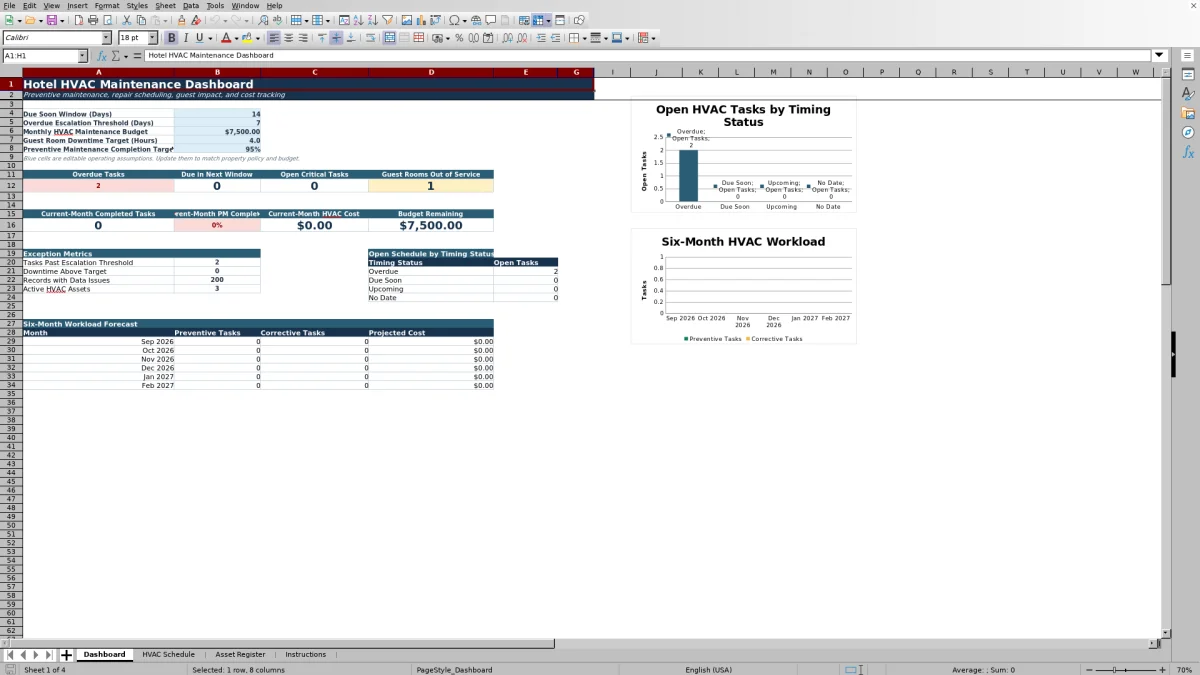
The Dashboard summarizes overdue and upcoming work, open critical tasks, guest rooms out of service, current-month spending, budget remaining, and a six-month workload forecast. Editable assumptions let the property set its due-soon window, escalation threshold, monthly HVAC budget, downtime target, and preventive maintenance completion target.
At a glance
What this workbook helps you manage
- Keeps preventive, corrective, inspection, seasonal, and emergency HVAC work in one schedule.
- Connects work orders to registered equipment, property areas, and guest room numbers.
- Summarizes open tasks, completion, downtime, guest impact, and HVAC costs on a dashboard.
- Flags missing or inconsistent schedule data that may require an engineering review.
See the actual file
Inside the workbook
Included in the file
- Four worksheets: Dashboard, HVAC Schedule, Asset Register, and Instructions.
- Formula-driven timing categories for Completed, Canceled, Overdue, Due Soon, Upcoming, and No Date.
- Cost fields for labor, parts, and vendors, with calculated total cost and monthly dashboard totals.
- Dashboard charts for open work by timing status and the six-month preventive and corrective workload forecast.
How to use the template
1. Set the Dashboard assumptions
Start with the blue editable cells on the Dashboard. Enter the property's due-soon window in days, overdue escalation threshold, monthly HVAC maintenance budget, guest room downtime target in hours, and preventive maintenance completion target. These assumptions support the workbook's exception reporting and monthly calculations.
2. Review the Asset Register
Maintain one row for each HVAC asset and use a unique Asset ID. Record the asset name, equipment type, property area, room number, manufacturer, model, serial number, installation date, status, criticality, service provider, maintenance interval, replacement cost, warranty date, filter size, electrical requirement, and notes as applicable.
The register includes formula fields for last completed service, next open service date, and open task count. Asset selections on the schedule come from this list, and the selected asset's property area is returned automatically.
3. Enter scheduled work
Use one row per maintenance event on the HVAC Schedule. Assign a Work Order ID and Asset ID, then complete the relevant scheduling fields:
- Maintenance type, task category, description, and priority
- Workflow state, scheduled date, start time, assigned person, and vendor
- Room number, expected labor hours, downtime, room status, and guest impact
- Labor, parts, and vendor costs
The sheet provides 200 task rows. List selections are available for maintenance type, priority, workflow state, room-out-of-service status, guest impact, and follow-up status.
4. Update completion and follow-up details
As work progresses, update the workflow state, completed date and time, labor hours, downtime, costs, findings, and follow-up information. Entering a completed date changes the calculated timing status to Completed. Labor, parts, and vendor amounts are combined into Total Cost.
5. Review exceptions and operating metrics
Use the Dashboard during engineering reviews to check overdue tasks, work due soon, critical open work, rooms out of service, downtime above target, and records with data issues. The schedule's Data Quality Flag column helps identify entries that need correction before reports are used for planning.
What information can a hotel track for each HVAC work order?
The HVAC Schedule covers both planning and closeout. Each row can include a Work Order ID, linked Asset ID, property area, room number, maintenance type, task category, task description, priority, workflow state, scheduled date and time, assigned person, and vendor.
Operational impact fields include labor hours, downtime hours, whether a room is out of service, and guest impact. Cost fields separate labor, parts, and vendor expenses before calculating the total. Teams can also document completion findings, whether follow-up is required, a follow-up date, and an external reference.
The calculated Timing Status distinguishes completed and canceled records from open work. Open tasks are classified as overdue, due soon, upcoming, or no date based on the scheduled date and the Dashboard's editable due-soon window.
How does the spreadsheet help prioritize hotel HVAC maintenance?
Priority can be recorded as Low, Routine, High, or Critical. The Dashboard separately counts open critical tasks that do not have a completed date and are not canceled. It also shows overdue tasks, work due within the selected window, and tasks that have passed the escalation threshold.
Guest-facing concerns are visible through room-out-of-service status, guest impact, and downtime hours. The Dashboard compares qualifying downtime records with the editable guest room downtime target. This gives engineering leaders a concise view of work that may affect room availability or the guest experience without removing the underlying task detail.
How are hotel HVAC maintenance costs monitored?
Each scheduled task has separate entries for labor cost, parts cost, and vendor cost. The spreadsheet adds those amounts to produce a calculated total for the work order. Canceled tasks are excluded from the Dashboard's current-month HVAC cost and projected-cost calculations.
The Dashboard compares current-month costs with the editable monthly HVAC budget and calculates the remaining amount. Its six-month forecast summarizes scheduled preventive tasks, corrective tasks, and projected cost by month. These views can support engineering workload discussions and property-level expense monitoring.
What does the HVAC Asset Register include?
The Asset Register holds up to 100 asset rows. Equipment types include PTACs, fan coil units, air handling units, rooftop units, chillers, boilers, make-up air units, exhaust fans, mini-splits, heat pumps, cooling towers, and other equipment.
Along with identifying and location details, operators can record asset status, criticality, service provider, default maintenance interval, replacement cost, warranty end date, filter size, electrical requirement, and notes. Formula fields summarize each asset's last completed service, next open service date, and open task count from the HVAC Schedule.
How does the workbook identify schedule data issues?
The Data Quality Flag formula checks schedule entries for defined problems, including a missing Asset ID, missing scheduled date, duplicate Work Order ID, a completion date before the scheduled date, and a completed task without an assigned person. The Dashboard counts records with populated data-quality warnings.
These flags are intended for internal review. The Instructions sheet recommends checking both the Dashboard and the flag column during daily engineering meetings. The workbook is an internal scheduling and monitoring tool and does not provide compliance guarantees or connect automatically with other hotel systems.
Questions about this workbook
How many HVAC tasks can the spreadsheet hold?
The HVAC Schedule includes 200 work-order rows, covering rows 5 through 204. Each row is intended for one scheduled maintenance task or repair.
Does the workbook calculate when recurring maintenance should be created?
The Asset Register includes a field for the default maintenance interval in days, but the workbook does not automatically create recurring work orders. Scheduled tasks and dates must be entered on the HVAC Schedule.
What makes a task overdue or due soon?
An open task is overdue when its scheduled date is before the current date. An open task is due soon when its scheduled date falls within the editable due-soon window on the Dashboard. A completed date produces Completed status, while a Canceled workflow state produces Canceled status.
Can the schedule record guest room downtime?
Yes. Each work order can include downtime hours, room-out-of-service status, room number, and guest impact. The Dashboard counts guest rooms out of service and identifies qualifying downtime records above the editable target.
Which HVAC costs are included?
The schedule contains labor cost, parts cost, and vendor cost fields. A formula adds these entries into total cost, and the Dashboard summarizes current-month HVAC cost, budget remaining, and projected monthly cost.
Does this workbook connect to other hotel systems?
No. The Instructions sheet states that the workbook does not connect automatically to other hotel systems. Information must be maintained within the Excel file.
Transparent credits
Editorial and workbook QA bylines
The named editorial signatures and their responsibilities stay consistent across the library.

Workbook guide and editorial context
Audrey Whitmore
Audrey Whitmore is the consistent editorial byline for practical setup guidance written from each workbook’s final manifest and published features.
Meet the editorial byline →
Workbook structure and formula QA byline
Ethan Cole
Ethan Cole is the consistent QA byline shown only when recorded checks pass for worksheet structure, formulas, validations, recalculation, and the published XLSX bytes.
See the QA byline and checks →