Housekeeping · XLSX
Free Hotel Pool Maintenance Checklist Excel Template for 2026
Hotel pool maintenance checklist Excel template with daily checks, recheck tracking, work orders, cost totals, and a clear dashboard.
Formula and workbook structure checked before publication
This hotel pool maintenance checklist is a free Excel template for recording routine water, equipment, safety, and facility observations in 2026. It gives hotel engineering and operations teams one workbook for daily checks, corrective actions, rechecks, and related maintenance work orders.
The four-sheet file includes Dashboard, Daily Pool Checks, Work Orders, and Setup & Instructions. Built-in formulas summarize current operating conditions and follow-up needs, while structured logs preserve the details behind each dashboard result.
Use the workbook alongside property procedures, equipment instructions, and applicable local requirements. Review flagged conditions promptly and keep operating decisions with the responsible property team.
At a glance
What this workbook helps you manage
- Keeps pool, spa, and related facility checks in one structured daily log.
- Identifies action-needed results and pending or overdue rechecks.
- Connects maintenance issues to work orders, target dates, status, and costs.
- Summarizes current activity and open items on a formula-driven dashboard.
See the actual file
Inside the workbook
Included in the file
- Four worksheets covering setup, daily checks, work orders, and dashboard reporting.
- Validated entry lists for shifts, facilities, statuses, conditions, categories, and priorities.
- Formulas for overall results, recheck status, total cost, days open, and overdue status.
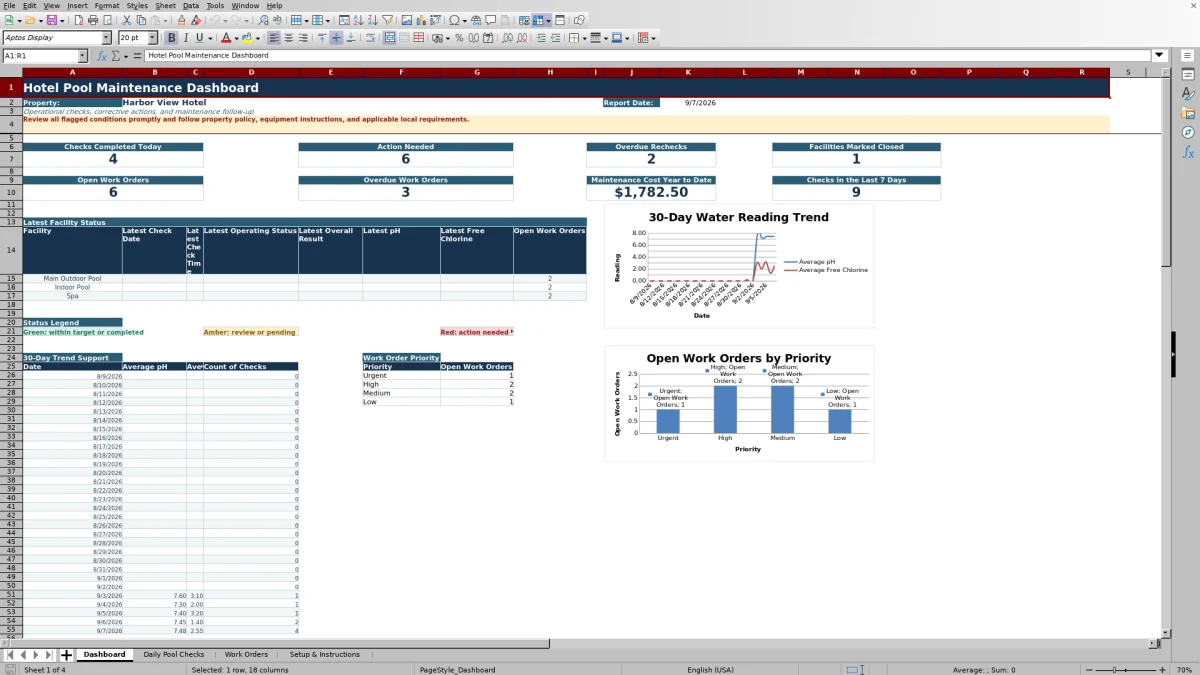
- Two dashboard charts supporting 30-day water-reading trends and open work orders by priority.
How to use the template
1. Complete the property setup
Start on Setup & Instructions. Enter the property name and review the three facility setup rows. The facility entries supply the lists used in Daily Pool Checks and Work Orders, and the associated target values support the overall check result formulas.
2. Record each pool check
Add one record to Daily Pool Checks for every inspection. Use a unique Check ID and enter the check date, time, shift, facility, employee name, and operating status. The sheet provides 250 prepared check rows with filters and frozen headers.
Complete the available readings and observations:
- Water temperature, pH, free chlorine, combined chlorine, and total alkalinity
- Filter pressure and flow reading
- Water level and clarity
- Deck condition, safety equipment, and chemical storage area
- Corrective action, supervisor review, and notes
3. Document rechecks
When follow-up is required, mark Recheck Required as Yes and enter the due date and time. Add the completion date and time after the follow-up occurs. The Recheck Status formula returns Not Required, Pending, Overdue, or Completed based on those entries, creating a consistent recheck trail.
4. Create and update work orders
Use Work Orders for issues requiring maintenance follow-up. Record the related Check ID when applicable, then enter the facility, category, priority, issue description, assignment, vendor, target date, and status. The sheet contains 150 prepared work-order rows.
Enter labor, parts, and vendor costs in U.S. dollars. Excel totals the three cost fields, calculates days open, and identifies open items as On Schedule, Overdue, or Target Date Needed. Completion details, resolution, invoice or reference information, and supervisor review can remain with the work-order record.
5. Review the dashboard
Use Dashboard for a daily operating review. It reports checks completed today, action-needed results, overdue rechecks, facilities marked closed, open and overdue work orders, year-to-date maintenance cost, and checks completed during the last seven days. The latest-facility table and 30-day trend support provide additional context for follow-up.
What does the daily hotel pool checklist record?
The Daily Pool Checks sheet combines operational readings with visual and safety observations. Staff can document water temperature, pH, free chlorine, combined chlorine, total alkalinity, filter pressure, flow, water level, and water clarity. Separate fields cover the deck, safety equipment, chemical storage area, and operating status.
The sheet also records who completed the check and whether it occurred during the opening, midday, evening, or closing shift. Corrective action, recheck timing, supervisor review, and notes can remain on the same row, giving managers a complete check record rather than a reading without context.
How does Excel identify conditions that need attention?
The Overall Result column compares entered data with the facility setup. It can return Action Needed when required readings are missing, readings fall outside configured targets, or listed operating observations indicate a concern. If the facility is not found in setup, the result directs the user to review setup.
Recheck Status is calculated separately. A required recheck remains Pending until completed, changes to Overdue after its due date and time, and displays Completed after a completion entry is recorded. These results feed the Dashboard counts for action-needed and overdue items.
How can hotel teams track pool maintenance work orders?
The Work Orders sheet provides fields for the work-order ID, reported date, related check, facility, category, priority, description, assignment, vendor, target date, and status. Available status entries include Open, In Progress, Waiting on Parts, Completed, and Canceled.
Managers can record labor hours and separate labor, parts, and vendor costs. The Total Cost formula adds those cost categories, while Days Open measures elapsed time from the reported date. The Overdue Flag distinguishes overdue work from work that is on schedule and identifies records that still need a target date.
What information appears on the pool maintenance dashboard?
The Dashboard presents a report date and property name, followed by operational totals for today and the previous seven days. It also displays open work orders, overdue work orders, year-to-date maintenance cost, and the number of facilities marked closed today.
A latest-status area shows each configured facility’s most recent check date, check time, operating status, overall result, pH, free chlorine, and open work-order count. Supporting areas calculate 30 days of average pH, average free chlorine, and check counts. A second summary groups open work orders by priority, from Urgent through Low.
Questions about this workbook
How many pool checks can the workbook hold?
The Daily Pool Checks sheet contains 250 prepared data rows, covering rows 2 through 251 beneath the header. Each row includes formulas for Overall Result and Recheck Status.
How many work orders are included?
The Work Orders sheet contains 150 prepared data rows, covering rows 2 through 151. Each row includes formulas for total cost, days open, and overdue status.
Can the workbook track more than one hotel pool or spa?
Yes. Setup & Instructions provides three facility setup rows, and the sample file uses Main Outdoor Pool, Indoor Pool, and Spa. Those facility entries flow into the validated facility lists used by the check and work-order sheets.
Does the template calculate pool chemical readings?
The workbook records readings and compares entered values with facility targets in Setup & Instructions to produce an Overall Result. It does not calculate chemical dosing amounts.
Can managers track pool maintenance expenses?
Yes. Each work order has separate fields for labor cost, parts cost, and vendor cost. A formula totals those amounts, and the Dashboard summarizes maintenance cost year to date in U.S. dollars.
Does the workbook include sample records?
Yes. The supplied workbook contains example property, check, and work-order information that demonstrates the intended structure. Review and replace those entries with the property’s own facilities, readings, assignments, dates, costs, and maintenance details before operational use.
Transparent credits
Editorial and workbook QA bylines
The named editorial signatures and their responsibilities stay consistent across the library.

Workbook guide and editorial context
Audrey Whitmore
Audrey Whitmore is the consistent editorial byline for practical setup guidance written from each workbook’s final manifest and published features.
Meet the editorial byline →
Workbook structure and formula QA byline
Ethan Cole
Ethan Cole is the consistent QA byline shown only when recorded checks pass for worksheet structure, formulas, validations, recalculation, and the published XLSX bytes.
See the QA byline and checks →