Housekeeping · XLSX
Free Hotel Equipment Maintenance Log Spreadsheet Excel Template for 2026
Track hotel equipment, service dates, work orders, downtime, and maintenance costs with this 2026 hotel equipment maintenance log spreadsheet.
Formula and workbook structure checked before publication
This hotel equipment maintenance log spreadsheet is a free Excel template for organizing equipment records, service schedules, work orders, downtime, and costs in 2026. It gives hotel engineering and operations teams one file for tracking maintainable assets across guest rooms, kitchens, laundry areas, pools, event spaces, and other property areas.
The workbook contains four sheets: Dashboard, Equipment Register, Maintenance Log, and Instructions. Its linked equipment and work-order records help staff identify upcoming service, overdue equipment, open high-priority work, and units marked out of service.
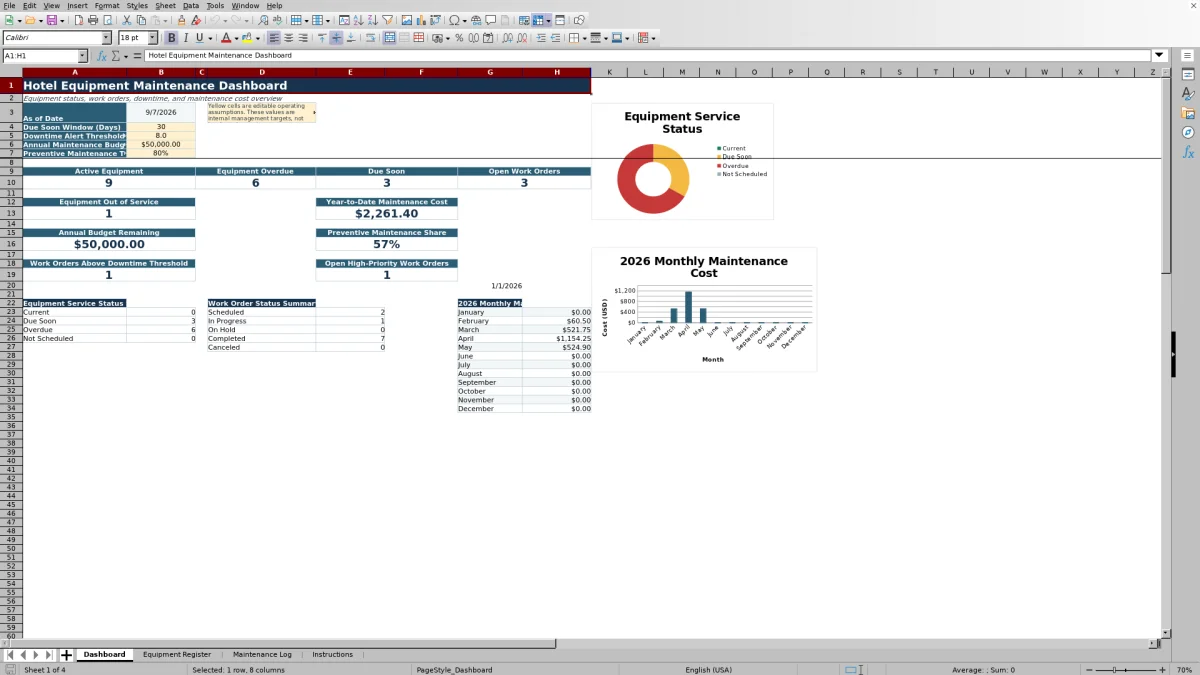
Built-in formulas calculate service dates, service status, and total work-order cost. The Dashboard summarizes equipment and work-order activity against editable operating assumptions, including the due-soon window, downtime threshold, annual maintenance budget, and preventive maintenance target.
At a glance
What this workbook helps you manage
- Keeps equipment details, service intervals, vendors, locations, and lifecycle status in one register.
- Connects each work order to an Equipment ID and automatically returns the equipment name and location.
- Calculates total work-order cost from parts, labor, and other costs.
- Summarizes service status, downtime, open work orders, and 2026 maintenance spending on the Dashboard.
See the actual file
Inside the workbook
Included in the file
- Four worksheets: Dashboard, Equipment Register, Maintenance Log, and Instructions.
- Equipment Register with fields for identification, location, vendor, lifecycle, warranty, and service scheduling.
- Maintenance Log with work-order status, priority, tasks, downtime, labor hours, costs, follow-up, and notes.
- Dashboard with service-status and work-order summaries plus charts for equipment service status and monthly maintenance cost.
How to use the template
1. Review the Dashboard assumptions
Start with the yellow assumption cells on the Dashboard. Set the due-soon window in days, downtime alert threshold in hours, annual maintenance budget in U.S. dollars, and preventive maintenance target. These are internal operating targets, not legal requirements.
2. Build the Equipment Register
Enter one row for each maintainable unit and assign a unique Equipment ID. Complete the available fields for property area, equipment category, equipment name, manufacturer, model, serial or asset tag, specific location, service vendor, vendor phone, purchase date, lifecycle status, warranty expiration, and maintenance interval.
The sheet calculates the last completed service, next service due, and service status. Lifecycle choices are Active, Out of Service, and Retired. Service status can display Current, Due Soon, Overdue, Not Scheduled, Out of Service, or Retired.
3. Record each work order
Add one row to the Maintenance Log for each maintenance event or work order. Select the matching Equipment ID so the equipment name and specific location populate from the register. Then enter the maintenance type, relevant dates, status, priority, issue or task description, action taken, assignee, vendor, hours, costs, follow-up date, invoice or reference, notes, and person who entered the record.
- Maintenance types include Preventive, Corrective, Emergency, Inspection, Cleaning, Calibration, and Warranty.
- Work-order statuses include Scheduled, In Progress, On Hold, Completed, and Canceled.
- Priorities include Low, Medium, and High.
4. Update completion details and costs
As work progresses, update its status, action taken, downtime hours, labor hours, and cost fields. The Total Cost field adds parts cost, labor cost, and other cost. Marking a work order Completed allows its date to feed the equipment’s last completed service calculation.
5. Review operating exceptions
Use the Dashboard to check overdue and due-soon equipment, open work orders, out-of-service units, high-priority open work, and work orders above the downtime threshold. Review year-to-date cost, annual budget remaining, preventive maintenance share, and the 2026 monthly cost summary during engineering or operations meetings.
What hotel equipment can the spreadsheet organize?
The Equipment Register is structured for assets from multiple hotel departments. Property-area selections include Guest Rooms, Front Desk, Lobby, Housekeeping, Laundry, Kitchen, Restaurant, Bar, Pool and Spa, Fitness Center, Meeting and Event Space, Grounds, Parking, Engineering, and Back of House.
Each unit can be classified by equipment category and documented with its manufacturer, model, serial or asset tag, and exact location. This helps distinguish similar assets, such as individual guest-room HVAC units or equipment located in separate kitchens and mechanical rooms.
A unique Equipment ID connects the register to the Maintenance Log. The register provides 100 prepared equipment rows, while its filterable Excel table supports practical review by area, category, lifecycle status, vendor, or service status.
How does the workbook calculate upcoming hotel equipment maintenance?
The Equipment Register uses the maintenance interval, purchase date, and completed work-order history to calculate scheduling information. If an asset has completed maintenance records, the latest completed service date becomes its last completed service. The next service date is calculated by adding the maintenance interval in days.
If there is no completed service, the next date can be based on the purchase date and maintenance interval. Assets without enough scheduling information display Not Scheduled. Retired equipment remains labeled Retired, while equipment marked Out of Service retains that status.
The Dashboard’s editable Due Soon Window determines when a future service date changes from Current to Due Soon. A service date earlier than the Dashboard’s as-of date is categorized as Overdue.
What should hotel staff record for each work order?
The Maintenance Log provides 200 prepared rows for work orders. Every entry can include a Work Order ID, Equipment ID, maintenance type, scheduled or completed date, date reported, work-order status, priority, issue or task description, action taken, assigned employee, and service vendor.
Operational fields cover downtime hours and labor hours. Financial fields separate parts cost, labor cost, and other cost before calculating the total. Staff can also enter a follow-up date, invoice or reference, notes, and the name of the person who entered the record.
Consistent status updates are important because the Dashboard excludes Completed and Canceled entries when counting open work orders. The same status data supports the work-order summary for Scheduled, In Progress, On Hold, Completed, and Canceled records.
How can hotel operators monitor maintenance cost and downtime?
The Dashboard calculates year-to-date maintenance cost from completed work orders dated from January 1, 2026 through the current as-of date. It also subtracts that completed-work total from the entered annual maintenance budget to show the remaining amount.
A monthly 2026 cost summary reports completed maintenance costs from January through December, and a chart presents the same monthly series. Because total cost is calculated from three separate fields, operators can retain visibility into parts, labor, and other expenses at the work-order level.
For downtime review, the Dashboard compares entered downtime hours with the editable Downtime Alert Threshold. It counts work orders above that threshold and separately identifies open High-priority work orders, helping teams focus routine reviews on exceptions recorded in the log.
Questions about this workbook
What sheets are included in the hotel equipment maintenance log spreadsheet?
The Excel workbook includes four sheets: Dashboard, Equipment Register, Maintenance Log, and Instructions. The register stores asset information, the log stores work orders, the Dashboard summarizes activity, and the Instructions sheet provides operating guidance and reference lists.
Does the spreadsheet calculate the next maintenance date?
Yes. The Equipment Register calculates the next service due date from the maintenance interval and either the last completed service date or, when applicable, the purchase date. A blank maintenance interval or missing supporting date can result in a Not Scheduled status.
How are equipment name and location added to a work order?
Select an Equipment ID in the Maintenance Log. Formulas look for that ID in the Equipment Register and return the corresponding equipment name and specific location. If the ID cannot be matched, the workbook displays an equipment-ID-not-found message.
Which maintenance costs does the workbook track?
Each work order has separate fields for parts cost, labor cost, and other cost. The Total Cost column adds those three amounts. Completed work-order costs feed the Dashboard’s year-to-date total and 2026 monthly maintenance cost summary.
Can the workbook track preventive and emergency maintenance?
Yes. Available maintenance types are Preventive, Corrective, Emergency, Inspection, Cleaning, Calibration, and Warranty. The Dashboard also calculates preventive maintenance as a share of all completed work orders.
How does the Dashboard identify open work orders?
The open-work-order count includes populated Maintenance Log records whose status is neither Completed nor Canceled. The Dashboard also counts open High-priority records and work orders with downtime above the entered threshold.
Transparent credits
Editorial and workbook QA bylines
The named editorial signatures and their responsibilities stay consistent across the library.

Workbook guide and editorial context
Audrey Whitmore
Audrey Whitmore is the consistent editorial byline for practical setup guidance written from each workbook’s final manifest and published features.
Meet the editorial byline →
Workbook structure and formula QA byline
Ethan Cole
Ethan Cole is the consistent QA byline shown only when recorded checks pass for worksheet structure, formulas, validations, recalculation, and the published XLSX bytes.
See the QA byline and checks →