Hotels · XLSX
Free 2026 Hotel Booking Cancellation Analysis Excel Template
Hotel booking cancellation analysis template for tracking cancellation rates, fee recovery, canceled room nights, and net revenue exposure.
Formula and workbook structure checked before publication
This free Excel template gives hotel operators a structured way to review booking cancellations, timing, reasons, fee recovery, replacement revenue, and estimated revenue exposure. It connects reservation-level details to a formula-driven Dashboard and Analysis worksheet.
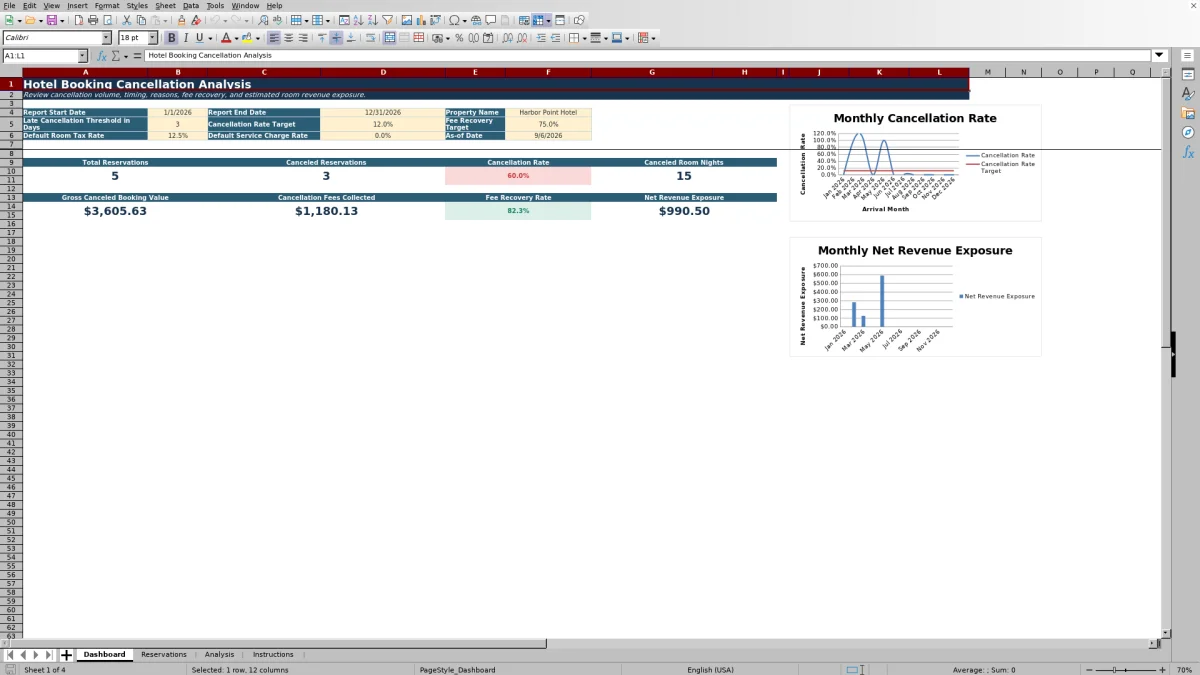
Use the workbook to monitor cancellation rate, canceled room nights, gross canceled booking value, fees collected, fee recovery rate, and net revenue exposure for a selected arrival-date range. Two Dashboard charts provide monthly views of cancellation performance and revenue exposure.
The file contains four worksheets: Dashboard, Reservations, Analysis, and Instructions. The Reservations sheet includes 500 prepared data rows with formulas, dropdown lists, record checks, and exception indicators.
At a glance
What this workbook helps you manage
- Measures cancellation volume and canceled room nights for a selected arrival-date range.
- Compares cancellation fees expected with fees collected to calculate fee recovery.
- Accounts for replacement revenue when estimating net revenue exposure.
- Flags incomplete, duplicate, inconsistent, or negative reservation records for review.
See the actual file
Inside the workbook
Included in the file
- Four worksheets: Dashboard, Reservations, Analysis, and Instructions.
- A 500-row reservation table with formulas from rows 6 through 505.
- Seven dropdown validation lists for standardized reservation classifications.
- Two Dashboard charts covering monthly cancellation rate performance and net revenue exposure.
How to use the template
1. Set the Dashboard controls
Enter the property name, report start and end dates, late-cancellation threshold, cancellation rate target, fee recovery target, default room tax rate, and default service charge rate. The late threshold accepts zero to 30 days, while targets and rate inputs use controlled percentage ranges.
2. Enter reservation details
On the Reservations worksheet, enter or paste one row per reservation. Keep each Reservation ID unique; the External Reservation ID is optional. Available fields include guest last name, booking and stay dates, rooms, guest counts, booking channel, market segment, status, room type, rate plan, and average nightly room rate.
Use the supplied dropdown lists for booking channel, market segment, status, cancellation reason, canceled by, room type, and rate plan. Yellow cells are intended for user input, while gray cells contain formulas.
3. Complete cancellation and financial fields
For canceled reservations, enter the cancellation date, reason, who canceled, cancellation fee expected, cancellation fee collected, refunded amount, replacement room nights, replacement revenue, and any notes. The workbook calculates stay nights, canceled room nights, booking value, cancellation timing, fee recovery, booking lead time, and net revenue exposure.
4. Review record checks and exceptions
Check the Record Check column before relying on the summaries. It can identify duplicate reservation IDs, invalid stay dates, missing cancellation dates, and missing cancellation reasons. Separate exception columns also flag fees collected above expected fees, replacement room nights above canceled room nights, negative amounts, duplicate IDs, and cancellation dates after arrival.
5. Read the Dashboard and Analysis results
The Dashboard summarizes reservations with arrival dates inside the selected report period. Review total reservations, canceled reservations, cancellation rate, canceled room nights, gross canceled booking value, fees collected, fee recovery rate, and net revenue exposure. The Analysis worksheet provides formula-driven monthly detail, including late cancellations and average days before arrival canceled.
What hotel cancellation metrics does the workbook calculate?
The Dashboard presents eight core measures for the selected report period: total reservations, canceled reservations, cancellation rate, canceled room nights, gross canceled booking value, cancellation fees collected, fee recovery rate, and net revenue exposure.
The Analysis sheet adds monthly totals for cancellation fees expected, replacement revenue, average days before arrival canceled, and late cancellations. It also carries the Dashboard’s cancellation rate target into each analysis row, allowing monthly results to be compared with the selected target.
How are late hotel cancellations classified?
The workbook compares each canceled reservation’s cancellation date with its arrival date. Days before arrival canceled are calculated automatically. If that result is less than or equal to the threshold entered on the Dashboard, the reservation is labeled Late. Otherwise, it is labeled Within Standard Window.
If a reservation is marked Canceled but has no cancellation date, the late-cancellation field displays Review. The Dashboard threshold is initially set to three days and can be changed to an integer from zero through 30.
How does the template estimate canceled booking value and revenue exposure?
Room revenue before tax is calculated from stay nights, rooms, and average nightly room rate. The workbook then calculates room tax and service charge amounts from their respective rates. These amounts are combined into total booking value.
For canceled reservations, net revenue exposure is calculated from total booking value after subtracting cancellation fees collected and replacement revenue, with the result prevented from falling below zero. This keeps fee recovery and replacement business visible alongside the original canceled value. Currency fields use U.S. dollar formatting.
How can hotel teams improve cancellation data quality?
Consistent source data is important because Dashboard and Analysis results depend on reservation dates, status, and financial entries. Use the workbook’s dropdown lists instead of entering several variations of the same channel, segment, status, reason, canceling party, room type, or rate plan.
Review the Record Check result and exception fields after adding or changing records. A record marked OK has passed the workbook’s built-in checks, but operators should still confirm that rates, fees, refunds, and replacement revenue match their supporting records. The Instructions worksheet provides the entry sequence and the category lists used by the dropdowns.
Questions about this workbook
Which worksheets are included in the hotel booking cancellation analysis template?
The workbook includes Dashboard, Reservations, Analysis, and Instructions worksheets. Dashboard contains report controls, summary measures, and two charts. Reservations holds row-level booking data. Analysis contains formula-driven summaries, and Instructions provides entry guidance and dropdown source lists.
How many reservation records can be entered?
The Reservations worksheet provides 500 prepared rows, running from row 6 through row 505. Each row contains input fields and calculated fields for one reservation.
Which date determines whether a reservation appears in the Dashboard report period?
The Dashboard formulas use the reservation’s arrival date. A reservation is included when its arrival date falls between the report start date and report end date entered on the Dashboard.
What data problems can the workbook flag?
The workbook can flag duplicate reservation IDs, departure dates that are not after arrival dates, missing cancellation dates or reasons for canceled reservations, fees collected above expected fees, replacement room nights above canceled room nights, negative amounts, and cancellation dates after arrival.
How is the fee recovery rate calculated?
At the reservation level, fee recovery rate divides the cancellation fee collected by the cancellation fee expected. Dashboard and Analysis summaries compare total collected fees with expected fees for canceled reservations. If the relevant denominator is unavailable, the summary formulas return zero rather than an error.
Transparent credits
Editorial and workbook QA bylines
The named editorial signatures and their responsibilities stay consistent across the library.

Workbook guide and editorial context
Audrey Whitmore
Audrey Whitmore is the consistent editorial byline for practical setup guidance written from each workbook’s final manifest and published features.
Meet the editorial byline →
Workbook structure and formula QA byline
Ethan Cole
Ethan Cole is the consistent QA byline shown only when recorded checks pass for worksheet structure, formulas, validations, recalculation, and the published XLSX bytes.
See the QA byline and checks →