Hotels · XLSX
Free Hotel Key Control Log Spreadsheet Excel Template for 2026
Hotel key control log spreadsheet for tracking issuance, returns, overdue keys, inventory status, holders, replacement costs, and audits.
Formula and workbook structure checked before publication
This hotel key control log spreadsheet is a free Excel template for documenting controlled physical keys, key rings, access fobs, and secured key devices. It gives hotel teams one place to maintain inventory, record each issue and return, identify overdue assignments, and prepare for routine inventory reviews.
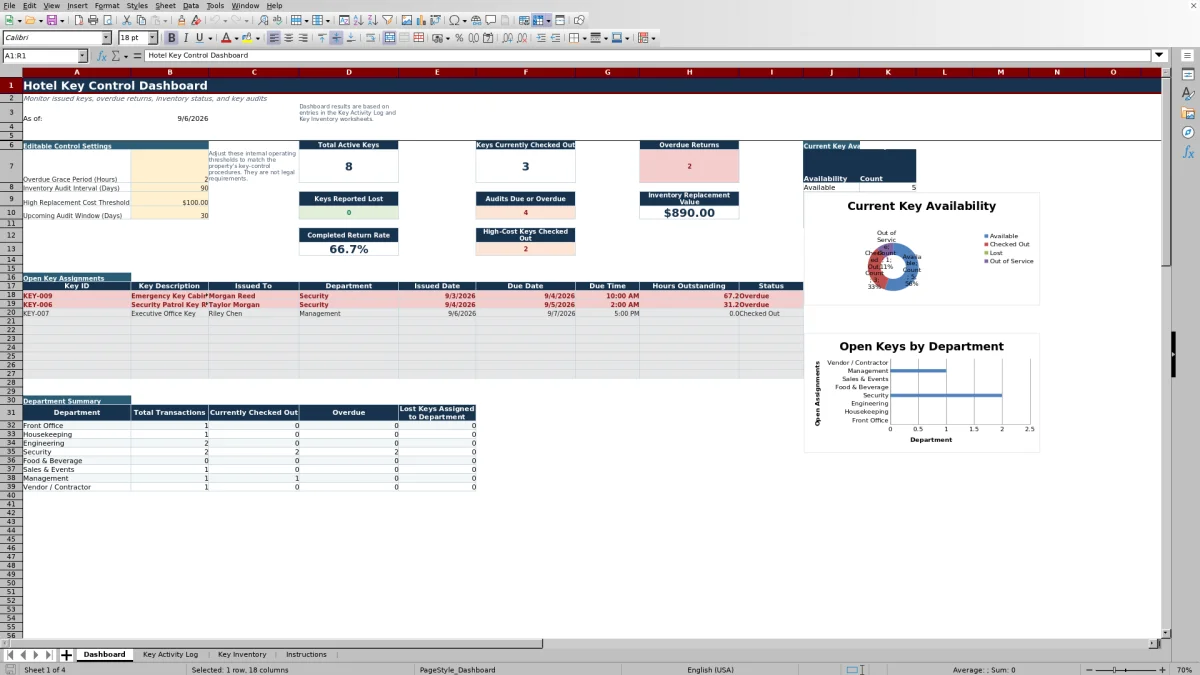
The workbook contains four worksheets: Dashboard, Key Activity Log, Key Inventory, and Instructions. Formulas connect activity records with inventory information so managers can review current holders, availability, return status, audit timing, and replacement-cost flags without re-entering the same key details.
It is designed for internal operational control at hotels and venues. Property teams should set thresholds and record-retention practices according to their own procedures, and they should never enter door codes, PINs, alarm codes, lock combinations, or other access credentials.
At a glance
What this workbook helps you manage
- Creates a consistent record of who received a key, why it was issued, when it was due, and who accepted its return.
- Shows open, overdue, and returned assignments using issue, due, and return dates and times.
- Connects each activity record to inventory details such as key description, type, access area, and replacement cost.
- Supports shift-change reviews with dashboard totals, open assignments, department summaries, and audit indicators.
See the actual file
Inside the workbook
Included in the file
- Four worksheets covering the dashboard, activity history, key inventory, and operating instructions.
- Activity table with 250 rows for issue, return, authorization, condition, status, cost, and notes information.
- Inventory table with 100 rows for controlled keys and devices, ownership, storage, lifecycle, cost, and audit details.
- Dashboard formulas, conditional formatting, editable control settings, department summaries, and two charts.
How to use the template
1. Review the Instructions worksheet
Start with the included guidance on workflow, data entry, and status definitions. Gold cells are intended for entry, while gray cells contain formulas and should not be overwritten. Remove or replace the fictional sample records before using the workbook for property activity.
2. Build the Key Inventory
Enter one row for every controlled physical key or device. Assign a unique Key ID and complete the description, key type, access area, department owner, normal storage location, assigned custodian, lifecycle status, replacement cost, date added, and audit information. Use descriptive access areas without recording credentials.
The inventory includes calculated availability and audit fields. Based on the activity log and Dashboard settings, it can show current availability, current holder, open status, next audit due, audit status, and a high-cost flag.
3. Record each issuance
Add one Key Activity Log row whenever an item is issued. Record a transaction ID, Key ID, recipient, employee or vendor ID, department, company when applicable, purpose, authorization reference, issue date and time, due date and time, issuer, and condition out.
Choosing a Key ID fills the key description, key type, access area, and replacement cost from Key Inventory. The log then calculates status and hours outstanding from the issue, due, return, and grace-period information.
4. Complete the return fields
When the key comes back, enter Returned Date, Returned Time, Received By, and Condition In. Add notes when useful. A key remains checked out until the return fields are completed, so prompt entry is important for an accurate Dashboard.
5. Review exceptions and maintain the records
Check the Dashboard at shift change for open assignments, overdue returns, keys reported lost, audits due or overdue, and high-cost keys still checked out. Update Lifecycle Status when an item becomes lost, out of service, or retired. Record new Last Audit Date and Last Verified By information after inventory reviews.
What should a hotel key control log record?
A practical key log needs to establish the item, the recipient, the reason for access, and the expected return. This workbook records Transaction ID, Key ID, Issued To, Employee or Vendor ID, Department, Company, Purpose, Authorization Reference, and issue and due dates and times.
Return details include Returned Date, Returned Time, Received By, and Condition In. Separate Condition Out and Condition In fields help the team document whether the item was good, worn, damaged, missing a tag, or not returned. A Notes field provides space for relevant operational context.
The workbook also preserves issuer and receiver accountability through Issued By and Received By fields. Authorization Reference can hold a manually entered internal work order, event order, approval, or vendor reference.
How does the spreadsheet identify overdue hotel keys?
Each activity row compares its Due Date and Due Time with the current date and time. The calculation also applies the editable Overdue Grace Period on the Dashboard. An open item remains Checked Out until it passes the due time plus that grace period; it then becomes Overdue. Entering a return date changes the activity status to Returned.
The Dashboard begins with a two-hour grace period, which can be changed from zero to 72 hours. This is an internal operating threshold, not a legal requirement. Managers can use the overdue count and open-assignment details to focus follow-up at shift change.
How does Key Inventory stay connected to activity?
The Key ID links the two operational worksheets. When a listed Key ID is selected in the activity log, formulas retrieve its description, type, access area, and replacement cost from Key Inventory. Open assignments are then used to calculate whether an active inventory item is Available or Checked Out and, when applicable, identify its current holder and open status.
Key Inventory also distinguishes lifecycle status from current availability. A property can mark an item Active, Lost, Out of Service, or Retired. This prevents a lost or retired item from appearing simply as available because it has no open transaction.
How can hotel managers monitor key audits and replacement costs?
For inventory reviews, enter each item's Last Audit Date. The workbook calculates Next Audit Due using the editable Inventory Audit Interval, initially set to 90 days. Audit Status displays Current, Due Soon, or Overdue based on that date and the upcoming-audit window, initially set to 30 days.
Replacement Cost is a property-entered internal estimate in U.S. dollars. The Dashboard initially uses $100 as the high-cost threshold. Inventory items at or above that value receive a High Cost flag, while open activity for those items receives a Review flag. The Dashboard summarizes high-cost open assignments and total inventory replacement value.
Questions about this workbook
What worksheets are included in the hotel key control log spreadsheet?
The workbook includes Dashboard, Key Activity Log, Key Inventory, and Instructions. The two data worksheets feed calculated information to the Dashboard.
What types of keys and devices can be listed?
The inventory is intended for controlled physical keys, key rings, access fobs, and secured key devices. Its Key Type list includes Grand Master, Department Master, Floor Master, Office Key, Mechanical Key, Storage Key, Exterior Key, Access Fob, Key Ring, and Secured Device.
Can the log record keys issued to vendors or contractors?
Yes. Activity fields include Issued To, Employee or Vendor ID, Company, Department, Purpose, and Authorization Reference. Vendor or Contractor is also available as a department selection.
When does a key show as returned?
An activity record changes to Returned when its Returned Date is entered. For a complete operational record, also enter Returned Time, Received By, and Condition In.
Can the overdue and audit settings be changed?
Yes. Editable Dashboard settings cover the overdue grace period, inventory audit interval, high replacement-cost threshold, and upcoming audit window. The supplied starting values are two hours, 90 days, $100, and 30 days.
Should access codes be entered in the workbook?
No. The workbook specifically instructs users not to enter lock combinations, alarm codes, PINs, door codes, digital credentials, or similar access information.
Transparent credits
Editorial and workbook QA bylines
The named editorial signatures and their responsibilities stay consistent across the library.

Workbook guide and editorial context
Audrey Whitmore
Audrey Whitmore is the consistent editorial byline for practical setup guidance written from each workbook’s final manifest and published features.
Meet the editorial byline →
Workbook structure and formula QA byline
Ethan Cole
Ethan Cole is the consistent QA byline shown only when recorded checks pass for worksheet structure, formulas, validations, recalculation, and the published XLSX bytes.
See the QA byline and checks →