Housekeeping · XLSX
Hotel Amenity Inventory Spreadsheet Free Excel Template for 2026
Track hotel amenity stock, movements, reorder needs, inventory value, and physical count timing with this hotel amenity inventory spreadsheet.
Formula and workbook structure checked before publication
This hotel amenity inventory spreadsheet is a free Excel template for organizing item details, stock activity, replenishment needs, inventory value, and physical count timing in 2026. It gives housekeeping, purchasing, front desk, and other operating departments a shared structure for recording supplies.
The workbook contains four worksheets: Dashboard, Amenity Inventory, Stock Movements, and Instructions. Together, they connect amenity master data with receipts, issues, adjustments, calculated quantities, reorder information, and count status.
Sample records demonstrate how to track guest room toiletries and other hotel supplies by amenity ID, category, unit of measure, supplier, storage location, and cost. Operators can replace those examples with property-specific information while preserving the workbook formulas.
At a glance
What this workbook helps you manage
- Maintains item, supplier, cost, par level, reorder point, storage, and count details in one inventory list.
- Calculates on-hand quantities from opening balances, receipts, issues, and inventory adjustments.
- Identifies out-of-stock, reorder-now, below-par, in-stock, and inactive items.
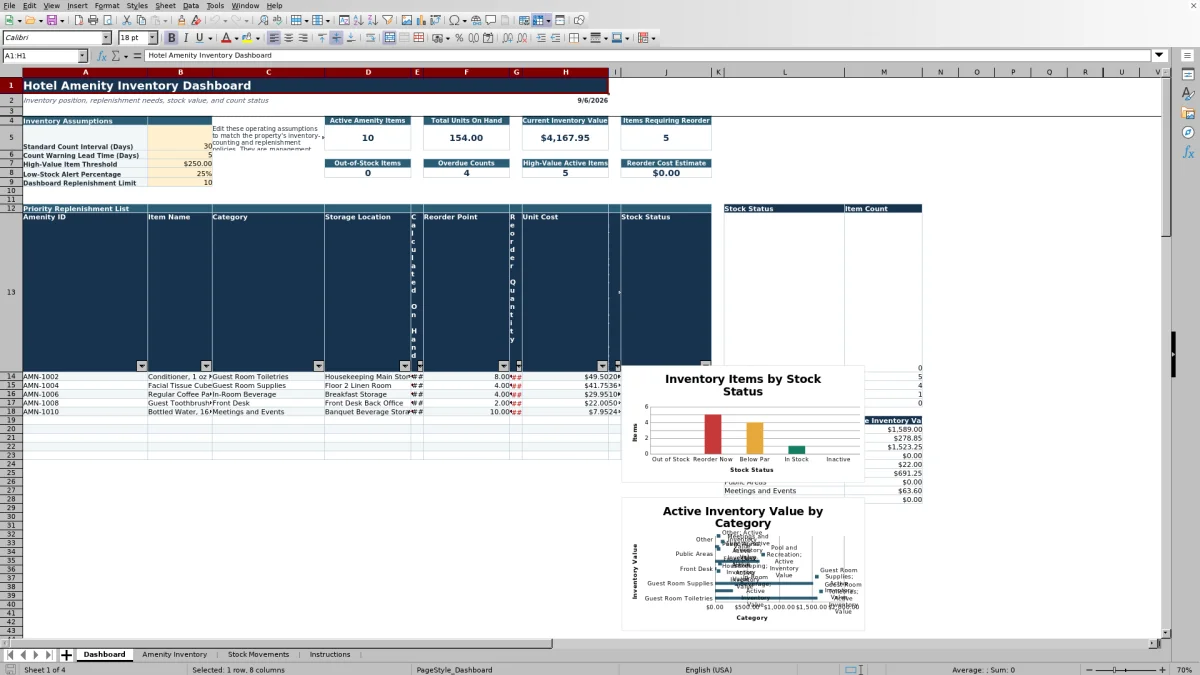
- Summarizes active inventory value, reorder cost estimates, and physical count timing on the Dashboard.
See the actual file
Inside the workbook
Included in the file
- Four connected worksheets: Dashboard, Amenity Inventory, Stock Movements, and Instructions.
- Inventory formulas for receipts, issues, net adjustments, on-hand quantity, reorder quantity, value, and status.
- Movement log fields for dates, item IDs, movement types, quantities, costs, departments, references, users, and notes.
- Dashboard summaries, a priority replenishment list, stock-status counts, category values, and two charts.
How to use the template
1. Review the Instructions worksheet
Start with the workbook purpose and recommended workflow. The sheet also contains the lists used for categories, units of measure, movement types, departments, storage locations, and Yes or No values.
2. Set the Dashboard assumptions
Review the editable management settings before entering regular activity. The Dashboard includes a standard count interval, count warning lead time, high-value item threshold, low-stock alert percentage, and replenishment-list limit. Adjust these values to match the property's operating policies; they are not presented as legal requirements.
3. Build the amenity master list
On Amenity Inventory, enter a unique Amenity ID and complete the applicable item fields. These include category, item name, unit of measure, storage location, preferred supplier, supplier item number, unit cost, opening quantity, par level, reorder point, last physical count, active status, and notes.
Use a consistent unit for each item. For example, if shampoo is stocked by the case, opening quantity, movement quantity, par level, and reorder point should all represent cases. This keeps calculated on-hand inventory meaningful.
4. Record every stock movement
Add each receipt, issue, adjustment increase, or adjustment decrease as a separate row on Stock Movements. Enter quantities as positive numbers. The Signed Quantity formula applies the appropriate positive or negative direction based on movement type.
- Use the Amenity ID associated with the master inventory record.
- Add the movement date, quantity, department, and storage location.
- Use reference number, entered by, and notes fields when useful for internal follow-up.
- Enter Unit Cost Used when a transaction-specific cost is needed; otherwise, the extended-value formula references the unit cost in Amenity Inventory.
5. Review replenishment and count priorities
Use the Dashboard to review reorder priorities, out-of-stock items, overdue counts, high-value active items, total units on hand, current inventory value, and the estimated reorder cost. After a physical count, update Last Physical Count and enter any approved correction as an adjustment on Stock Movements.
What does the hotel amenity inventory spreadsheet track?
The Amenity Inventory sheet stores the core record for each supply item. Available fields cover Amenity ID, category, item name, unit of measure, storage location, preferred supplier, supplier item number, unit cost, opening quantity, par level, reorder point, last physical count, active status, and notes.
Formula columns summarize movement receipts, movement issues, and net adjustments. They then calculate on-hand quantity, reorder quantity, inventory value, stock status, next count due, and count status. The inventory table provides rows for 200 amenity records.
The included category list covers Guest Room Toiletries, In-Room Beverage, Guest Room Supplies, Housekeeping, Front Desk, Pool and Recreation, and Public Areas, with additional categories present in the workbook's list range. Operators should select the category that best matches each item rather than combining unrelated supplies under one record.
How are hotel supply receipts, issues, and adjustments recorded?
The Stock Movements sheet provides rows for 500 transactions. Each entry can include a movement ID, movement date, amenity ID, movement type, quantity, unit cost used, department, storage location, reference number, entered by, and notes.
After an Amenity ID is selected, the Item Name formula looks up the matching inventory record. The movement type determines the signed quantity: receipts and adjustment increases are positive, while issues and adjustment decreases are negative. The Extended Value field multiplies signed quantity by the transaction cost when entered or by the item's inventory unit cost when that field is blank.
Recording separate rows preserves useful operational context. A delivery can carry a purchase order reference, while an issue to housekeeping can carry an internal reference and note describing where the stock was released.
How does the spreadsheet determine when to reorder amenities?
For an active item, the workbook compares Calculated On Hand with its Reorder Point and Par Level. When on-hand quantity is at or below the reorder point, Reorder Quantity calculates the amount required to bring the item back to par, without returning a negative quantity.
Stock Status separates items into Out of Stock, Reorder Now, Below Par, In Stock, or Inactive. The Dashboard counts these statuses and displays a priority replenishment list with amenity ID, item name, category, storage location, calculated on hand, reorder point, reorder quantity, unit cost, estimated order cost, and stock status.
The number of records shown in that list is controlled by the Dashboard Replenishment Limit, which accepts a value from 5 through 25. Reorder results depend on the opening quantities, movement entries, par levels, reorder points, and active settings entered by the property.
How can hotel teams monitor inventory counts and value?
Each amenity record includes Last Physical Count, Next Count Due, and Count Status. Next Count Due adds the Dashboard's standard count interval to the last physical count date. Count Status identifies active items as Never Counted, Overdue, Due Soon, or Current based on that date and the warning lead time. Inactive records receive an Inactive status.
Inventory Value is calculated from the nonnegative on-hand quantity multiplied by unit cost. The Dashboard rolls up current inventory value for active items and also identifies active items meeting the editable high-value threshold. A category summary and chart show active inventory value by category, while a separate chart summarizes item counts by stock status.
These views help managers focus count work and purchasing review, but their accuracy depends on timely movement entries, current costs, appropriate item settings, and updated physical count dates.
Questions about this workbook
Which worksheets are included in the hotel amenity inventory workbook?
The workbook has four worksheets: Dashboard, Amenity Inventory, Stock Movements, and Instructions. No other worksheets are included.
How many amenity items and movement records are laid out?
Amenity Inventory contains 200 prepared item rows, from row 6 through row 205. Stock Movements contains 500 prepared transaction rows, from row 6 through row 505.
Does the spreadsheet calculate current stock on hand?
Yes. Calculated On Hand uses opening quantity plus movement receipts, minus movement issues, plus net adjustments. Those movement totals are drawn from entries carrying the matching Amenity ID.
What movement types can be entered?
The supplied movement list includes Receipt, Issue, Adjustment Increase, and Adjustment Decrease. Quantities are entered as positive values, and the Signed Quantity formula assigns their direction.
Can inactive amenities remain in the inventory list?
Yes. The Active field accepts Yes or No. A record marked No receives an Inactive stock and count status, contributes no reorder quantity, and is excluded from the Dashboard calculations that specifically summarize active items.
Transparent credits
Editorial and workbook QA bylines
The named editorial signatures and their responsibilities stay consistent across the library.

Workbook guide and editorial context
Audrey Whitmore
Audrey Whitmore is the consistent editorial byline for practical setup guidance written from each workbook’s final manifest and published features.
Meet the editorial byline →
Workbook structure and formula QA byline
Ethan Cole
Ethan Cole is the consistent QA byline shown only when recorded checks pass for worksheet structure, formulas, validations, recalculation, and the published XLSX bytes.
See the QA byline and checks →