Hotels · XLSX
Free Hotel Group Booking Tracker Excel Template for 2026
Track hotel group bookings, daily room blocks, pickup, cutoff dates, deposits, and estimated revenue with this practical Excel workbook.
Formula and workbook structure checked before publication
This hotel group booking tracker is a free Excel template for organizing group sales details, room blocks, pickup, cutoff dates, deposits, follow-up tasks, and planning revenue. It gives hotel sales and operations teams one structured workbook for reviewing group business through 2026.
The file includes Dashboard, Group Bookings, Daily Room Blocks, and Instructions sheets. Enter each group once, connect daily room block lines with a unique Group ID, and review calculated pickup, revenue, deposit, and attention indicators. All pickup figures and external references are entered manually.
At a glance
What this workbook helps you manage
- Keeps group contacts, status, stay dates, financial estimates, deposits, and next actions in one record.
- Connects daily room blocks to group records through a unique Group ID.
- Calculates blocked and picked-up room nights, pickup percentage, room revenue, and rooms remaining.
- Surfaces approaching cutoffs, overdue follow-ups, deposit balances, and room block exceptions.
See the actual file
Inside the workbook
Included in the file
- Four worksheets: Dashboard, Group Bookings, Daily Room Blocks, and Instructions.
- Structured entry tables with filters for up to 150 group records and 200 daily room block lines.
- Formula-based pickup, revenue, tax, service charge, deposit balance, and attention calculations.
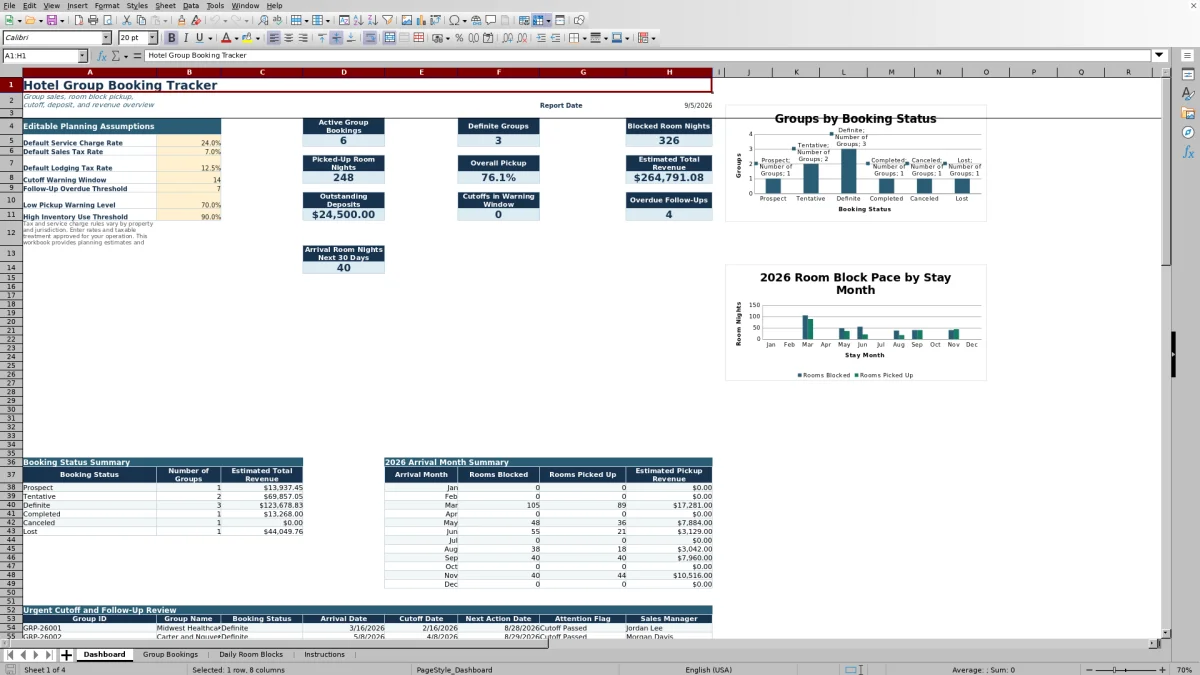
- Dashboard summaries and two charts covering booking status and monthly room block activity.
How to use the template
1. Review the planning assumptions
Start on the Dashboard and update the editable assumptions for service charge, sales tax, lodging tax, cutoff warning window, follow-up threshold, low pickup warning level, and high inventory use threshold. The supplied starting rates are planning values only. Use property-approved assumptions that reflect applicable contracts, exemptions, taxable items, and local rules.
2. Create one record for each group
On Group Bookings, assign a unique Group ID and enter the group name, market segment, booking status, sales manager, contact information, arrival date, departure date, cutoff date, and peak rooms. The sheet also provides fields for an external system reference, meeting room rental, food and beverage estimate, deposits, contact dates, next action, and notes.
Use the available lists for market segment, booking status, and sales manager. Keep the Group ID consistent because the Daily Room Blocks sheet uses it to retrieve the group name, booking status, and cutoff date.
3. Enter daily block and pickup details
Add one Daily Room Blocks line for each applicable stay date and room type. Enter the block line ID, Group ID, stay date, room type, rooms available when used for planning, rooms blocked, rooms picked up, group rate, and operations notes.
The workbook calculates rooms remaining, pickup percentage, blocked room revenue, picked-up room revenue, and inventory use percentage. Its Block Check field can identify issues such as pickup above block, block above entered availability, an unmatched Group ID, or a stay date outside the group dates.
4. Review the Dashboard and attention fields
Use the Dashboard to monitor active and definite groups, blocked and picked-up room nights, overall pickup, estimated total revenue, outstanding deposits, upcoming cutoffs, overdue follow-ups, and arrival room nights in the next 30 days. Review the booking status and 2026 arrival-month summaries, then investigate records marked by the attention and deposit status formulas.
What information can a hotel track for each group booking?
The Group Bookings sheet covers the commercial and operational details needed to review a group account. Core fields include Group ID, group name, market segment, booking status, sales manager, primary contact, contact details, arrival and departure dates, cutoff date, and peak rooms.
Calculated columns summarize blocked room nights, picked-up room nights, pickup percentage, average picked-up rate, and estimated room revenue from linked daily block lines. Additional fields cover meeting room rental, food and beverage estimate, rate overrides, estimated charges and taxes, deposit requirements, next actions, and notes. Status choices include Prospect, Tentative, Definite, Completed, Canceled, and Lost.
How does the room block pickup tracker work?
Each Daily Room Blocks line connects to a booking by Group ID and represents a stay date and room type. Staff manually enter rooms blocked, rooms picked up, group rate, and optional rooms available. The workbook then calculates rooms remaining and pickup percentage for that line.
Picked-up room revenue is based on rooms picked up multiplied by the group rate. At the booking level, formulas total room nights and picked-up revenue across all matching block lines. This allows sales teams to review overall group pickup while operations teams examine the nightly room-type detail behind it.
How are group revenue and deposit estimates calculated?
Estimated room revenue uses picked-up rooms multiplied by the entered group rate. Estimated service charge applies to meeting room rental plus the food and beverage estimate. Estimated sales tax applies to meeting room rental, food and beverage, and estimated service charge, while estimated lodging tax applies to estimated room revenue.
Blank rate overrides use the Dashboard defaults; entered overrides replace those defaults for the applicable group. The estimated total combines room revenue, rental, food and beverage, service charge, sales tax, and lodging tax. Deposit balance is calculated from the required amount less the amount paid. These are planning estimates, and the workbook instructs users to apply approved property assumptions.
Which group booking issues does the Dashboard highlight?
The Dashboard counts cutoffs that fall within the editable warning window and open follow-ups whose next action dates are overdue. It also reports outstanding deposit balances and summarizes room nights arriving during the next 30 days.
At the booking level, the Attention Flag can identify closed records, passed or approaching cutoffs, overdue follow-ups, and pickup or inventory concerns based on workbook inputs and thresholds. Daily Block Check results provide more detail when pickup exceeds the block, a block exceeds entered availability, a Group ID is not found, or a stay date does not align with the booking dates.
Questions about this workbook
Does the workbook include sample hotel group booking data?
Yes. The workbook contains sample group and daily room block records that demonstrate the linked calculations. The Instructions sheet directs users to replace sample data before operational use.
Can I track different room types by night?
Yes. Daily Room Blocks includes Stay Date and Room Type fields. Available room-type choices include Standard King, Standard Two Queens, Deluxe King, Suite, Accessible King, Accessible Two Queens, and Other.
Does pickup update automatically from another hotel system?
No. The workbook has no automated PMS, POS, sales system, channel-manager, payment, payroll, or accounting connection. Pickup figures, external identifiers, and other source information must be entered manually.
Can tax and service charge rates vary by group?
Yes. Dashboard rates serve as defaults, while Group Bookings provides separate override fields for service charge, sales tax, and lodging tax. A blank override uses the corresponding Dashboard rate.
What does Rooms Available mean in the daily block sheet?
Rooms Available is an optional planning input used to calculate inventory use percentage and check whether a block exceeds the entered availability. It is not live hotel inventory.
Transparent credits
Editorial and workbook QA bylines
The named editorial signatures and their responsibilities stay consistent across the library.

Workbook guide and editorial context
Audrey Whitmore
Audrey Whitmore is the consistent editorial byline for practical setup guidance written from each workbook’s final manifest and published features.
Meet the editorial byline →
Workbook structure and formula QA byline
Ethan Cole
Ethan Cole is the consistent QA byline shown only when recorded checks pass for worksheet structure, formulas, validations, recalculation, and the published XLSX bytes.
See the QA byline and checks →