Hotels · XLSX
Free Hotel Arrivals and Departures Spreadsheet Excel Template for 2026
Hotel arrivals and departures spreadsheet with a daily dashboard, room readiness tracking, balance review, and operational alerts.
Formula and workbook structure checked before publication
This hotel arrivals and departures spreadsheet is a free Excel template for organizing daily guest movement across the front desk, housekeeping, and guest services. It keeps reservation details, arrival and departure timing, room readiness, balances, requests, ownership, and staff notes in one structured workbook.
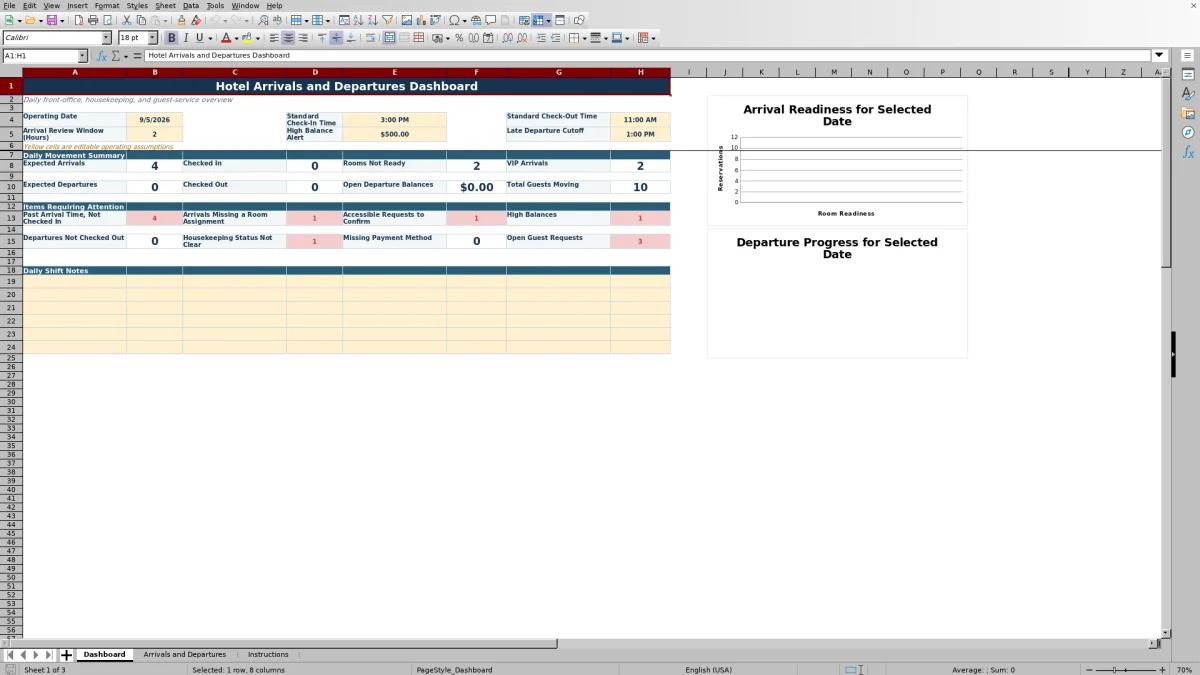
The file contains three sheets: Dashboard, Arrivals and Departures, and Instructions. Enter one reservation per row, maintain current operating statuses, and use the daily movement dashboard to review expected arrivals, expected departures, rooms not ready, VIP arrivals, open departure balances, and items requiring attention.
At a glance
What this workbook helps you manage
- Provides one structured reservation record for arrival, stay, departure, payment, room, and request details.
- Summarizes daily arrivals, departures, readiness, balances, guest movement, and operational exceptions.
- Supports front-desk and housekeeping coordination with separate ownership and status fields.
- Uses filters, status lists, conditional formatting, formulas, and two dashboard charts to support daily review.
See the actual file
Inside the workbook
Included in the file
- Three-sheet workbook with Dashboard, Arrivals and Departures, and Instructions.
- Reservation table with 39 fields spanning guest details, stay dates, rates, balances, statuses, requests, owners, and notes.
- Formula-driven nights, estimated room charge, movement status, operational alert, and dashboard summaries.
- Editable operating assumptions, filter controls, frozen headers, list selections, conditional formatting, and two dashboard charts.
How to use the template
1. Review the instructions and operating assumptions
Start on the Instructions sheet, which explains the basic workflow and supplies the lists used by the workbook’s status fields. On the Dashboard, review the operating date and the yellow editable assumptions: standard check-in time, standard check-out time, arrival review window, high balance alert, and late departure cutoff.
2. Enter one reservation per row
Use the Arrivals and Departures sheet for the working guest list. Replace the example records with current reservation information. Enter the reservation ID, guest name and contact details, arrival and departure dates and times, guest counts, room type, room number, rate plan, nightly rate, balance due, and payment method.
The sheet calculates nights and estimated room charge from the entered dates and nightly rate. Keep arrival and departure dates accurate so the movement status and dashboard counts reflect the intended operating day.
3. Maintain operational statuses
Update reservation, check-in, check-out, room readiness, housekeeping priority, VIP, and request information as conditions change. The workbook provides list selections for these controlled fields:
- Room type, rate plan, and payment method
- Reservation, check-in, and check-out status
- Room readiness and housekeeping priority
- VIP level and Yes or No request indicators
- Special-request status
Record the front desk owner and housekeeping owner where responsibility needs to be clear. Actual check-in and check-out times, last updated information, and staff notes can document shift activity.
4. Work the dashboard and alerts
Use the Dashboard for the selected operating date. Review the items requiring attention, including guests past arrival time who are not checked in, arrivals missing room assignments, accessible requests to confirm, high balances, departures not checked out, unclear housekeeping status, missing payment methods, and open guest requests.
Arrival-readiness counts cover Ready, In Progress, Dirty, Inspected, Out of Order, and Not Assigned. Departure-progress counts cover Due Out, Late Departure, and Checked Out. Two charts visualize those readiness and progress categories.
What should a hotel arrivals and departures spreadsheet track?
A useful movement list needs more than guest names and dates. This workbook records reservation ID, phone, email, arrival and departure timing, adults, children, room type, room number, rate plan, nightly rate, estimated room charge, balance due, payment method, and reservation status.
Operational columns extend the record through check-in and check-out. Teams can maintain room readiness, housekeeping priority, VIP level, accessibility needs, early-arrival and late-departure requests, special requests, parking notes, assigned owners, actual movement times, and staff notes. The result is a shared daily operating view rather than separate arrival and departure lists.
How does the dashboard support the morning operations meeting?
The Dashboard uses the operating date to summarize expected arrivals and departures, completed check-ins and check-outs, rooms not ready, VIP arrivals, open departure balances, and total guests moving. Canceled reservations are excluded from several date-based movement and readiness counts.
Managers can compare arrival readiness with departure progress before assigning follow-up. The dashboard also includes a Daily Shift Notes area, allowing the team to place operational context near the day’s summary. Standard check-in and check-out times, the arrival review window, the high balance threshold, and the late departure cutoff can be adjusted in the identified yellow cells.
How can front desk and housekeeping use the same workbook?
The front desk can maintain reservation status, payment method, balance due, room assignment, check-in status, actual check-in time, and guest requests. Housekeeping can use room readiness, housekeeping priority, housekeeping owner, and departure status to identify rooms that need attention.
Separate Front Desk Owner and Housekeeping Owner fields make task responsibility visible on each reservation row. Filters on the Arrivals and Departures sheet can narrow the list by date, room status, priority, VIP level, request status, or owner during a shift review.
Which exceptions does the workbook identify?
The Operational Alert column evaluates each populated reservation row and displays an exception or review message based on the record. The workbook can identify conditions represented in its formulas and dashboard, including departure date errors, missing room assignments for near-term stays, rooms that are not ready for today’s arrivals, and canceled reservations.
The Dashboard expands the review with counts for past arrival time without check-in, accessible requests to confirm, high balances, departures not checked out, unclear housekeeping status, missing payment methods, and open requests. These exception-focused counts help shift leaders prioritize records that need review instead of reading every row in sequence.
Questions about this workbook
What sheets are included in the hotel arrivals and departures spreadsheet?
The workbook contains three sheets: Dashboard, Arrivals and Departures, and Instructions. The Dashboard summarizes daily movement and exceptions, the Arrivals and Departures sheet holds reservation-level records, and the Instructions sheet provides setup guidance and source lists for status selections.
Does the spreadsheet calculate the number of nights and room charge?
Yes. The Nights column calculates the difference between the arrival and departure dates, with a minimum result of zero. Estimated Room Charge multiplies the calculated nights by the nightly rate. Taxes, fees, incidental charges, discounts, and other adjustments are not represented in that calculation.
Can the operating date and hotel timing assumptions be changed?
Yes. The Dashboard displays an operating date based on the current date and identifies yellow cells as editable operating assumptions. The listed assumptions are standard check-in time, standard check-out time, arrival review window in hours, high balance alert, and late departure cutoff.
What status lists are available for arrivals and departures?
The workbook includes list selections for reservation status, check-in status, check-out status, room readiness, housekeeping priority, VIP level, and request status. Examples shown in the workbook include Confirmed, Guaranteed, Checked In, Due Out, Checked Out, Ready, Inspected, Dirty, Rush, VIP, and High VIP.
Can the reservation list be filtered during a shift?
Yes. The Arrivals and Departures range is formatted as the StayMovement table with filters across its headers. The header row is frozen, so column labels remain visible while staff review records farther down the sheet.
Transparent credits
Editorial and workbook QA bylines
The named editorial signatures and their responsibilities stay consistent across the library.

Workbook guide and editorial context
Audrey Whitmore
Audrey Whitmore is the consistent editorial byline for practical setup guidance written from each workbook’s final manifest and published features.
Meet the editorial byline →
Workbook structure and formula QA byline
Ethan Cole
Ethan Cole is the consistent QA byline shown only when recorded checks pass for worksheet structure, formulas, validations, recalculation, and the published XLSX bytes.
See the QA byline and checks →