Housekeeping · XLSX
Hotel Room Out of Order Tracker Excel Template — Free for 2026
Track hotel rooms out of order, return dates, ownership, overdue work, and estimated revenue exposure in one practical Excel workbook.
Formula and workbook structure checked before publication
This hotel room out of order tracker is a free Excel template for documenting rooms removed from sellable inventory. It gives front office, engineering, housekeeping, and management teams one place to record the issue, responsible department, work status, target return date, inspection details, and final release.
The workbook separates user entries from calculated fields and provides a daily operating view of rooms that are open, overdue, due back today, or returned to service. It also estimates blocked room nights and room revenue exposure using editable Average Daily Rate and expected occupancy assumptions.
Four worksheets are included: Dashboard, Out of Order Tracker, Lists & Settings, and Instructions. The tracker contains 200 prepared data rows, sample records, validation lists, conditional formatting, and operational checks intended to support consistent follow-up.
At a glance
What this workbook helps you manage
- Keeps room restrictions, ownership, dates, costs, inspections, and updates in one structured tracker.
- Identifies open rooms that are overdue, due today, missing updates, or missing required operating details.
- Estimates lost room nights and room revenue exposure using editable property assumptions.
- Summarizes current restrictions by type, reason category, department owner, and return activity.
See the actual file
Inside the workbook
Included in the file
- Four worksheets: Dashboard, Out of Order Tracker, Lists & Settings, and Instructions.
- A 200-row Excel table with 32 fields covering room restrictions from reporting through return to service.
- Calculated days open, days overdue, lost room nights, estimated revenue exposure, aging, update, and operational checks.
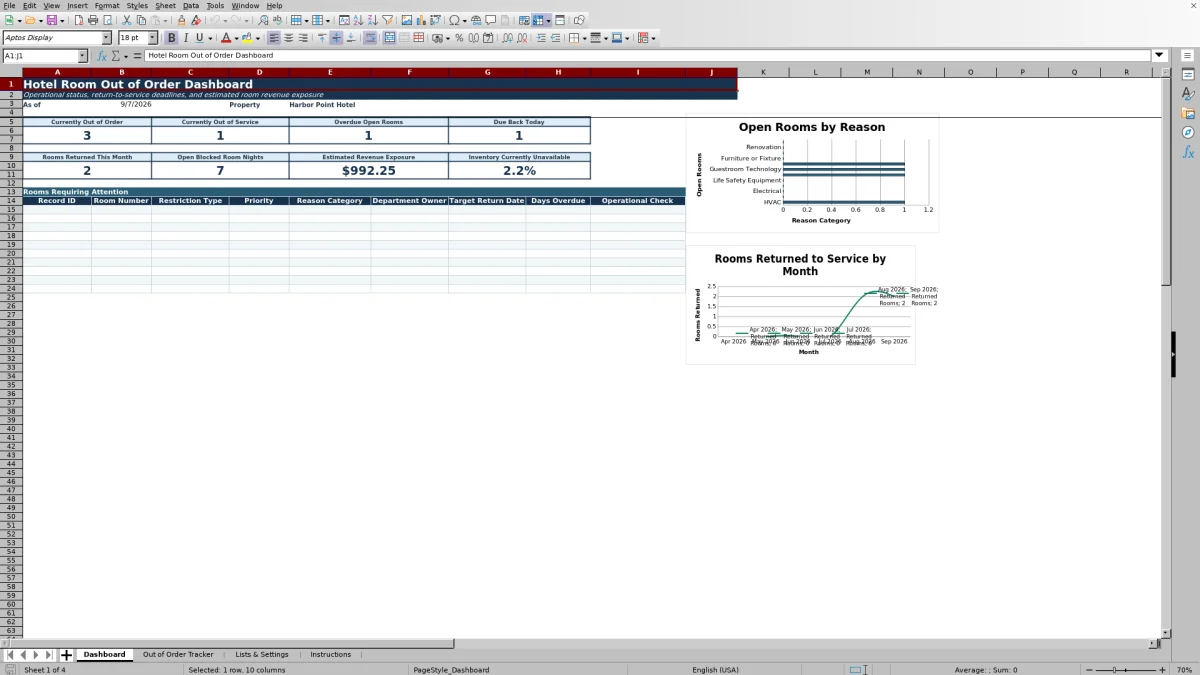
- Dashboard formulas, conditional formatting, and two charts for open rooms by reason and returned rooms by month.
How to use the template
1. Configure the property settings
Open Lists & Settings and replace the sample property name and location. Enter total sellable room inventory, Average Daily Rate, expected occupancy, the escalation threshold, the stale-update threshold, and the target maximum open days. The rate and occupancy values are planning assumptions used for estimated room revenue exposure.
2. Replace the sample records
Save a backup, then replace the 10 sample records in Out of Order Tracker. Use one row each time a guestroom is removed from sellable inventory. Enter the record ID, room number, floor or area, room type, restriction type, lifecycle status, priority, reason category, issue description, and applicable dates.
The prepared lists cover fields such as restriction type, lifecycle status, priority, reason category, department owner, and inspection status. Use the property’s own definitions for Out of Order and Out of Service because the workbook does not establish a universal definition.
3. Assign and update the work
Complete the Department Owner and Assigned To fields, then add a work order number, PMS block reference, vendor, and estimated repair cost when applicable. Work order and PMS references are manual reference fields; they do not create a system integration.
As work progresses, update Last Update Date and Notes and Follow-Up. Calculated columns report days open, days overdue, lost room nights, aging status, update status, and operational checks. Do not overwrite the gray calculated cells.
4. Review the dashboard each day
Use the Dashboard during the morning operations meeting to review critical and time-sensitive rooms. It shows currently Out of Order, currently Out of Service, overdue open rooms, rooms due back today, rooms returned this month, open blocked room nights, estimated revenue exposure, and inventory currently unavailable.
- Review the rooms requiring attention.
- Confirm ownership and expected completion dates.
- Follow up on stale or missing updates.
- Resolve missing target dates, inspections, approvals, or return dates.
5. Complete the return-to-service record
When required by property policy, enter the inspection status, inspector, inspection date, and return approver. Add the Actual Return Date before changing Lifecycle Status to Returned to Service. Front office must separately confirm that the room is available in the property’s operating system.
What information can hotel teams record for each unavailable room?
The Out of Order Tracker follows each restriction from the initial report through return to service. Core room information includes Record ID, Room Number, Floor or Area, Room Type, Restriction Type, Lifecycle Status, Priority, and Reason Category. Teams can then document the issue description, reported date, restriction start date, target return date, and actual return date.
Responsibility fields include Department Owner and Assigned To. Reference and cost fields cover Work Order Number, PMS Block Reference, Vendor, and Estimated Repair Cost. For return controls, the sheet includes Inspection Status, Inspected By, Inspection Date, Approved for Return By, Last Update Date, and Notes and Follow-Up. This structure helps create a clear operating history for each room restriction.
How does the dashboard help with daily room availability meetings?
The Dashboard converts tracker records into a concise operating summary. Current counts distinguish open Out of Order rooms from open Out of Service rooms. Separate indicators identify overdue open rooms and rooms due back today, helping leaders focus discussion on missed deadlines and near-term inventory recovery.
Additional measures show rooms returned during the current month, open blocked room nights, estimated revenue exposure, and inventory currently unavailable. A rooms-requiring-attention area presents key record details for follow-up. Supporting summaries count open rooms by reason category and department owner, while two charts display open rooms by reason and returned rooms by month.
How are blocked room nights and estimated revenue exposure calculated?
The calculated fields use the restriction start date and, when applicable, the actual return date to determine days open and lost room nights. For unresolved records, aging continues through the current date. Days overdue compares an open record’s target return date with today.
Estimated room revenue exposure equals lost room nights multiplied by the Average Daily Rate and expected occupancy entered on Lists & Settings. The result is an operational planning estimate. It should be interpreted alongside the property’s current forecast and operating conditions rather than as confirmed lost revenue.
What data-quality issues does the workbook flag?
The Operational Check identifies records with missing or incomplete information. Messages include Room Missing, Description Missing, Start Date Missing, Target Date Missing, Return Date Missing, Inspection Incomplete, Approval Missing, and Escalate. A record that passes the current checks displays OK.
The Update Check also evaluates communication recency. Open records can be marked Update Missing, Update Needed, or Current based on the Last Update Date and the editable stale-update threshold. Returned and canceled records show Complete. Aging Status separately identifies Closed, Canceled, Target Date Missing, Overdue, Due Today, or On Track, giving managers several practical ways to sort the work queue.
Questions about this workbook
What worksheets are included in the hotel room out of order tracker?
The workbook contains four worksheets: Dashboard, Out of Order Tracker, Lists & Settings, and Instructions. The tracker holds room-level records, settings stores property assumptions and validation lists, the dashboard summarizes operations, and the instructions explain the intended workflow.
How many room restriction records can the prepared tracker hold?
The prepared Excel table provides 200 data rows, running from row 7 through row 206. The Instructions sheet states that new records should be added within those prepared rows or by extending the Excel table.
Can the template track both Out of Order and Out of Service rooms?
Yes. Restriction Type includes Out of Order and Out of Service, and the Dashboard counts active open records for each type separately. Each property should apply its own operating definitions for those terms.
Does the workbook update a PMS or maintenance system?
No. Work Order Number and PMS Block Reference are manual fields for references copied from other systems. The workbook does not implement an integration or change room availability in another system.
What is required before a room is marked Returned to Service?
The workbook instructions call for an Actual Return Date and the property-designated approval name. The operational check also expects an inspection status of Passed or Not Required for returned records. Inspection and approval practices remain subject to the property’s own policies.
Can the revenue assumptions and follow-up thresholds be changed?
Yes. Lists & Settings contains editable values for Average Daily Rate, expected occupancy, escalation days overdue, days after which an update is considered stale, and target maximum open days. These settings should be reviewed when forecasts or operating practices change.
Transparent credits
Editorial and workbook QA bylines
The named editorial signatures and their responsibilities stay consistent across the library.

Workbook guide and editorial context
Audrey Whitmore
Audrey Whitmore is the consistent editorial byline for practical setup guidance written from each workbook’s final manifest and published features.
Meet the editorial byline →
Workbook structure and formula QA byline
Ethan Cole
Ethan Cole is the consistent QA byline shown only when recorded checks pass for worksheet structure, formulas, validations, recalculation, and the published XLSX bytes.
See the QA byline and checks →