Revenue · XLSX
Free 2026 Hotel Owner Reporting Package Excel Template
Hotel owner reporting package with monthly KPIs, budget variances, cash reporting, CapEx tracking, action items, and two trend charts.
Formula and workbook structure checked before publication
This hotel owner reporting package is a free Excel template for organizing monthly operating results, budget comparisons, cash activity, capital expenditures, and management actions in one workbook.
The four-sheet file includes a formula-driven Dashboard, a detailed Monthly Performance table, combined CapEx and action tracking, and written Instructions. It gives hotel operators a consistent structure for reviewing owner-facing performance information before a report is marked final.
Use the workbook to connect operating statistics with financial outcomes. Occupancy, ADR, RevPAR, revenue, gross operating profit, net operating income, labor cost, cash, budget variances, and project updates can be reviewed within the same reporting package.
At a glance
What this workbook helps you manage
- Brings hotel operating, financial, cash, CapEx, and action-item information into one workbook.
- Calculates core KPIs, profit measures, reserve amounts, fees, and budget variances from monthly inputs.
- Provides a consistent monthly format for internal review before an owner report is marked final.
- Tracks capital project budgets, spending, commitments, forecast costs, status, and supporting references.
See the actual file
Inside the workbook
Included in the file
- Four worksheets: Dashboard, Monthly Performance, CapEx & Actions, and Instructions.
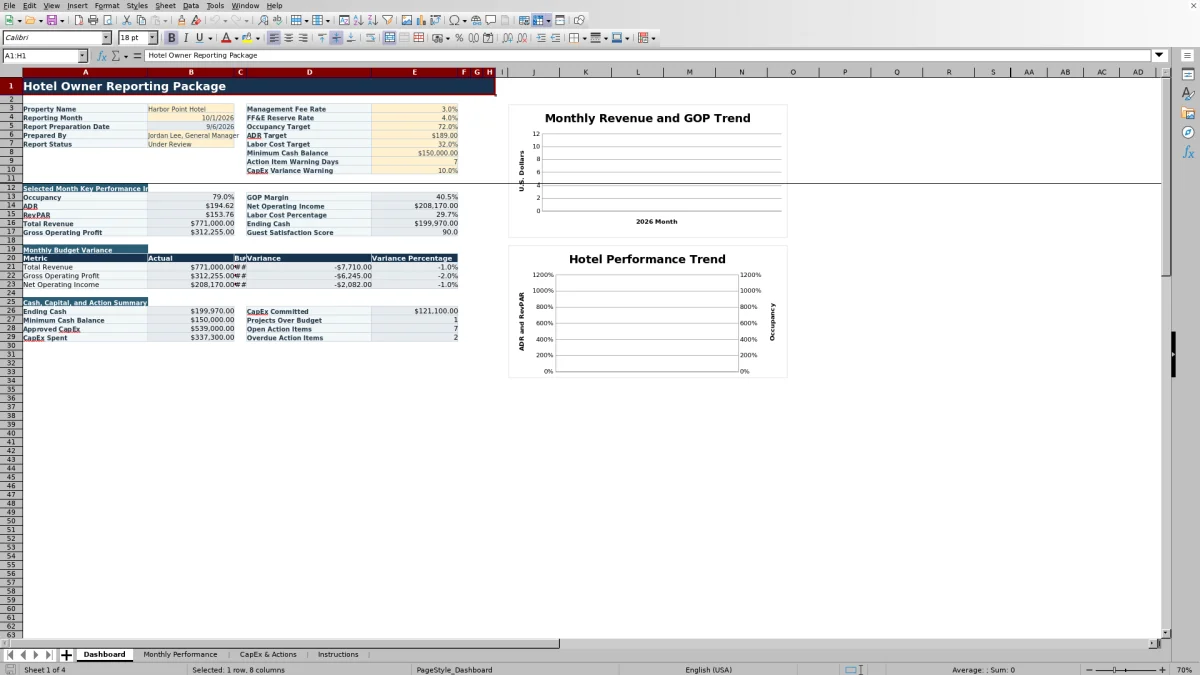
- Dashboard with selected-month KPIs, budget variance reporting, alerts, and two monthly trend charts.
- Monthly Performance table with formulas, input validation, report-status options, and actual-versus-budget calculations.
- Separate structured tables for capital expenditure projects and management action items.
How to use the template
1. Save a working copy and set the reporting controls
Follow the Instructions sheet guidance and copy the workbook before beginning a new reporting cycle. On the Dashboard, update the property name, reporting month, preparer, report status, and editable assumptions. These include the management fee rate, FF&E reserve rate, occupancy target, ADR target, labor cost target, minimum cash balance, action-item warning days, and CapEx variance warning.
2. Enter the monthly hotel results
In Monthly Performance, use the first day of the reporting month as the date. Enter rooms available, rooms sold, complimentary rooms, revenue by source, departmental and undistributed expenses, total labor cost, fixed charges, and cash activity. The workbook identifies yellow cells as inputs and gray cells as calculated fields.
Also enter budget revenue, budget gross operating profit, budget net operating income, prior-year results, guest satisfaction information, report status, and the available supporting information for the month. Confirm that rooms sold does not exceed rooms available.
3. Reconcile results and review calculated metrics
Compare the entered figures with the property’s internal financial reports. Formulas calculate days in month, occupancy, ADR, RevPAR, total revenue, expense totals, gross operating profit, GOP margin, management fee, FF&E reserve, net operating income, NOI margin, ending cash, and budget variances.
Review the Dashboard for selected-month KPIs, budget results, cash levels, alerts, and trends. The two charts use monthly data to show revenue with budget and GOP, plus ADR and RevPAR trends.
4. Update CapEx projects and management actions
For each capital project, maintain the project identification, category, business reason, dates, owner, vendor, approved budget, amount spent, amount committed, funding source, status, priority, approval reference, latest update, and source document reference. Forecast final cost, remaining budget, and variance are calculated.
Review management action due dates, reporting treatment, completion details, and priorities. Commentary should explain significant business drivers rather than simply repeat the reported numbers. Change the report status to Final only after internal review.
What is included in the hotel owner reporting package?
The Dashboard provides the report identity and key assumptions at the top of the package. It displays the selected month’s occupancy, ADR, RevPAR, total revenue, gross operating profit, GOP margin, net operating income, labor cost percentage, ending cash, and guest satisfaction score.
The Monthly Performance sheet is the workbook’s detailed operating record. It combines room statistics, rooms revenue, food and beverage revenue, other operating revenue, departmental expenses, undistributed expenses, labor, fixed charges, management fees, FF&E reserves, cash movement, budget figures, and prior-year figures.
CapEx & Actions contains one table for capital expenditure projects and another for management follow-up. The Instructions sheet provides a monthly workflow, input guidance, and a quality-control checklist covering actuals, budgets, prior-year information, cash activity, fee assumptions, and reserve assumptions.
Which hotel KPIs does the Excel template calculate?
The operating formulas calculate occupancy, ADR, and RevPAR from rooms available, rooms sold, and rooms revenue. Total revenue combines rooms, food and beverage, and other operating revenue.
Expense formulas total departmental and undistributed costs before calculating gross operating profit and GOP margin. The workbook also applies the Dashboard’s management fee and FF&E reserve rates, then calculates net operating income and NOI margin.
Cash reporting begins with beginning cash and incorporates cash receipts, cash disbursements, owner contributions, and owner distributions to calculate ending cash. These measures let an operator review operating performance and liquidity without separating the month into unrelated files.
How does the workbook compare actual results with budget?
Monthly Performance includes fields for budget total revenue, budget gross operating profit, and budget net operating income. Formulas calculate dollar and percentage variances for all three measures.
The Dashboard brings selected information forward for a more focused review. Its monthly chart compares total revenue, budget revenue, and GOP, while the selected-month area presents current KPIs and budget variance information.
For a reliable comparison, budget amounts should be entered for the same reporting month as the actual results. The Instructions sheet also calls for reconciling total revenue and major expense categories to the hotel’s internal financial reports before finalizing the package.
How are hotel capital projects and action items tracked?
The capital expenditure table records each project’s approved budget, spending to date, outstanding commitments, planned and actual dates, vendor, funding source, status, and priority. Formulas combine spent and committed amounts into forecast final cost, then calculate remaining budget, variance to budget, and variance percentage.
Project categories include guest rooms, food and beverage, building systems, life safety, technology, public areas, exterior, and other. Status choices range from proposed and awaiting approval through completed or canceled. Funding options include operating cash, owner contribution, reserve account, financing, and to be determined.
The management action table supports operational follow-up across areas such as rooms, finance, engineering, guest experience, and capital projects. Items can be identified for inclusion in the owner report or retained for internal follow-up. The monthly workflow directs users to review due dates and record completed dates.
Questions about this workbook
How many worksheets are in the hotel owner reporting template?
The workbook contains four worksheets: Dashboard, Monthly Performance, CapEx & Actions, and Instructions.
Does the Dashboard update from Monthly Performance?
Yes. Dashboard formulas reference monthly performance records for dates, total revenue, budget revenue, GOP, occupancy, ADR, and RevPAR. Other Dashboard formulas present selected-month metrics, variances, and review information based on workbook entries and assumptions.
Does the workbook include charts?
Yes. The Dashboard contains two charts. One uses monthly total revenue, budget revenue, and gross operating profit data. The other uses monthly ADR and RevPAR data.
What controls help reduce monthly data-entry errors?
Monthly Performance includes date, whole-number, decimal, and list validations. Rooms sold is checked against rooms available, and report status is limited to Draft, Under Review, or Final. The CapEx and action tables also provide list and numeric validation for specified fields.
Can the file import source documents or hotel system data?
No import function is identified in the workbook. The Instructions sheet states that source-reference fields are for file names or report references and do not import data. Monthly operating, financial, cash, project, and action information is entered into the applicable input cells.
Transparent credits
Editorial and workbook QA bylines
The named editorial signatures and their responsibilities stay consistent across the library.

Workbook guide and editorial context
Audrey Whitmore
Audrey Whitmore is the consistent editorial byline for practical setup guidance written from each workbook’s final manifest and published features.
Meet the editorial byline →
Workbook structure and formula QA byline
Ethan Cole
Ethan Cole is the consistent QA byline shown only when recorded checks pass for worksheet structure, formulas, validations, recalculation, and the published XLSX bytes.
See the QA byline and checks →