Revenue · XLSX
Free 2026 Hotel No-Show Cost Calculator Spreadsheet Excel Template
Hotel no-show cost calculator spreadsheet for tracking expected revenue, recoveries, avoided costs, handling costs, and follow-up by date.
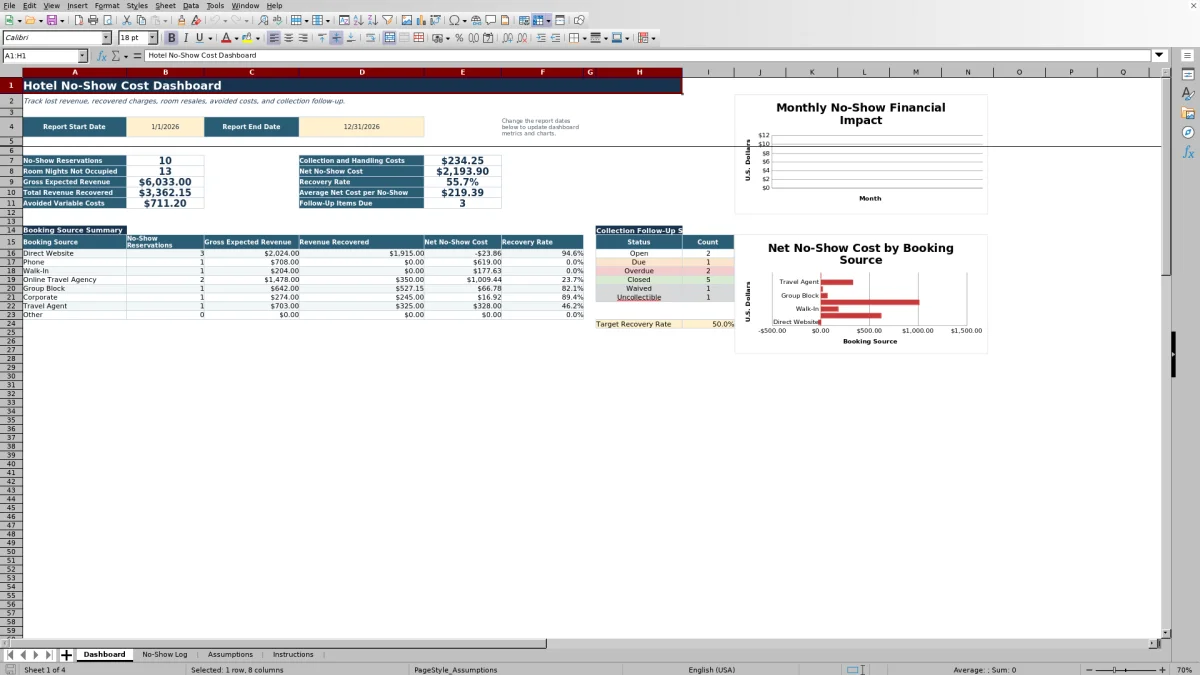
This hotel no-show cost calculator spreadsheet is a free Excel template for measuring the financial effect of reservations that fail to arrive. It separates expected room and ancillary revenue from actual collections, resale revenue, avoided variable costs, and collection expenses.
The four-sheet workbook includes a reservation-level No-Show Log, editable Assumptions, an Instructions sheet, and a date-controlled Dashboard. Operators can review net no-show cost, recovery rate, unoccupied room nights, average cost per no-show, and collection follow-up without combining unrelated figures manually.
At a glance
What this workbook helps you manage
- Measures no-show exposure after recoveries, avoided costs, and collection expenses.
- Separates amounts collected, tax collected, and room resale revenue for clearer review.
- Assigns collection follow-up to operating roles and identifies items that are due or overdue.
- Summarizes selected-period results by month and booking source on the Dashboard.
See the actual file
Inside the workbook
Included in the file
- Four worksheets: Dashboard, No-Show Log, Assumptions, and Instructions.
- Reservation-level formulas calculate expected collections, recoveries, avoided costs, handling costs, and net cost.
- Two Dashboard charts show monthly financial results and booking-source summary values.
- Validation lists, date and numeric checks, conditional formatting, filters, and review flags support data review.
How to use the template
1. Review the property assumptions
Begin on the Assumptions sheet and replace the sample values with property-approved amounts and rates. Editable items include the default policy charge rate, variable room cost per unoccupied night, avoided ancillary cost rate, payment processing rate, loaded hourly labor cost, and follow-up interval.
Also review the workbook’s service-charge, tax, and other operating assumptions before using the results. These values feed the reservation-level calculations when an applicable row input is blank.
2. Enter one no-show reservation per row
Use the No-Show Log for reservation inputs. Record the reservation ID, arrival and departure dates, booking source, room type, booked and resold room nights, booked room revenue, and estimated ancillary revenue. Enter expected revenue before tax.
The log provides prepared rows from 5 through 504. Drop-down lists are available for booking source, room type, follow-up owner, and collection status.
3. Record recoveries and operating effort
Enter the policy, service-charge, and tax rates when they differ from the assumptions. Keep the amount collected before tax, tax collected, and resale room revenue in their separate fields. Add direct collection cost and staff handling minutes so the workbook can calculate payment processing, labor, and total collection and handling costs.
4. Maintain collection follow-up
Choose a follow-up owner, update the collection status, and enter the last follow-up date after each action. The workbook calculates a follow-up due date and labels the item Closed, Overdue, Due, or Open based on its status and timing.
5. Set the reporting period
On the Dashboard, enter the report start and end dates. The summary formulas and charts update for the selected range. Review reservation counts, room nights not occupied, gross expected revenue, total revenue recovered, avoided variable costs, collection and handling costs, recovery rate, and average net cost per no-show.
How does the spreadsheet calculate hotel no-show cost?
The workbook uses the formula stated on its Instructions sheet: Net No-Show Cost equals gross expected revenue minus revenue recovered minus avoided variable costs plus collection and handling costs.
Gross expected revenue combines booked room revenue and estimated ancillary revenue. Revenue recovered combines the amount collected before tax with room resale revenue. Avoided costs estimate room and ancillary expenses that were not incurred, while collection and handling costs include direct collection expense, payment processing, and staff time. Tax collected is tracked separately and is not treated as property revenue. A negative result means recoveries and avoided costs exceeded the original expected revenue exposure.
What should hotel staff record for each no-show?
Each row is designed for one no-show reservation. Core operating fields cover stay dates, source, room type, booked nights, resold nights, expected room revenue, and estimated ancillary revenue. Collection fields capture the amount received before tax, tax collected, resale room revenue, direct costs, staff minutes, owner, status, last follow-up date, and notes.
Calculated columns then show nights not resold, gross expected revenue, expected base charge, expected service charge and tax, total expected collection, avoided costs, total recovered revenue, recovery rate, net cost, and follow-up status. Using a consistent reservation reference supports duplicate checks without requiring guest names.
How can the Dashboard support an operating review?
The Dashboard is controlled by a report start date and report end date, with accepted dates from January 1, 2020, through December 31, 2035. Its monthly calculations for 2026 summarize gross expected revenue, total revenue recovered, net no-show cost, and the number of no-show reservations within the selected period.
Additional summary areas show booking-source results and collection follow-up. This lets front office, reservations, revenue management, accounting, and general management review exposure and recovery activity using the same reservation-level records.
What data issues does the workbook identify?
The No-Show Log includes a Review Flag calculated for each prepared row. Its checks address duplicate reservation IDs, invalid stay-date order, resold nights exceeding booked nights, collections exceeding the expected amount, and a Collected status without a recorded amount.
Conditional formatting provides added visibility in the log. Operators should also review overdue follow-up, high-cost records, and low recovery rates as part of their regular process. The worksheet includes an Excel table and filter across columns A through AM for sorting and focused review.
Questions about this workbook
What worksheets are included in the hotel no-show calculator?
The workbook contains exactly four sheets: Dashboard, No-Show Log, Assumptions, and Instructions. The log holds reservation-level records, Assumptions stores editable operating values, the Dashboard summarizes the selected period, and Instructions explains the workflow and calculation.
How many no-show reservations can be entered?
The No-Show Log has 500 prepared data rows, running from row 5 through row 504. Each row contains input fields and calculated columns for one no-show reservation.
Does room resale reduce the calculated no-show cost?
Yes. Resale room revenue is included in Total Revenue Recovered. The log also compares booked room nights with resold room nights to calculate nights not resold and flags cases where resold nights exceed booked nights.
Can staff track partial or disputed collections?
Yes. Collection status choices include Not Started, Pending, Partially Collected, Collected, Waived, Disputed, Uncollectible, and No Charge Due. Staff can also assign an owner and record the last follow-up date.
What information should not be entered in the workbook?
The Instructions sheet advises using reservation references instead of guest names whenever possible. Do not enter payment card numbers, bank details, identification numbers, or other sensitive guest information.
Are the included rates ready for every property?
No. The Assumptions sheet states that its values are samples and should be replaced with property-approved amounts and rates. Charge, service-charge, refund, and tax treatment can vary by property policy, booking agreement, and other circumstances; the workbook is an operational calculator rather than legal, tax, or accounting advice.
Transparent credits
Editorial and workbook QA bylines
The named editorial signatures and their responsibilities stay consistent across the library.

Workbook guide and editorial context
Audrey Whitmore
Audrey Whitmore is the consistent editorial byline for practical setup guidance written from each workbook’s final manifest and published features.
Meet the editorial byline →