Revenue · XLSX
Free Hotel Group Displacement Analysis Excel Template for 2026
Hotel group displacement analysis workbook comparing group contribution with expected displaced transient contribution across 150 opportunity rows.
Formula and workbook structure checked before publication
This free Excel template helps hotel sales and revenue teams evaluate whether a group opportunity is expected to contribute more than the transient business it may displace. It calculates expected group pickup, direct group contribution, displaced transient contribution, and the resulting net contribution advantage.
The workbook includes Dashboard, Group Analysis, Assumptions, and Instructions sheets. Use it to organize up to 150 opportunity rows, monitor decision deadlines and data exceptions, and review recommendations with sales, revenue management, catering, and property leadership.
Results depend on the forecasts and assumptions entered. A positive result supports the group financially under those inputs, while a negative result may still require review of strategic and operational factors outside the workbook.
At a glance
What this workbook helps you manage
- Compares expected group contribution with the contribution from displaced transient room nights.
- Accounts for room revenue, ancillary revenue, variable costs, concessions, and incremental labor.
- Flags missing inputs, capacity exceptions, overdue decisions, high wash, and other review conditions.
- Summarizes open opportunities, recommendations, room nights, and contribution results on one dashboard.
See the actual file
Inside the workbook
Included in the file
- Four sheets: Dashboard, Group Analysis, Assumptions, and Instructions.
- A 150-row Group Analysis table with filters, frozen headers, validation rules, and calculated outputs.
- Dashboard selectors for sales manager and opportunity status, plus an event-date range and property display.
- Two dashboard charts covering monthly room nights and monthly contribution comparisons.
How to use the template
1. Review the operating assumptions
Start on the Assumptions sheet. Confirm the property name, room count, default group wash percentage, room variable costs, food-and-beverage cost percentage, service charge rate, and recommendation thresholds. The sheet also stores the lists used for sales managers, opportunity statuses, and event types.
These values are planning inputs. The lodging tax and sales tax assumptions are editable but are excluded from contribution calculations.
2. Enter one opportunity per row
Use the Group Analysis sheet for each proposed or existing group. Enter an Analysis ID, group details, sales manager, status, inquiry and decision dates, event dates, peak rooms, requested room nights, group ADR, and expected wash.
For a consistent comparison, use the same event period when entering available room nights and transient demand. Add the forecast transient ADR and applicable variable cost assumptions for that period.
3. Add revenue and direct-cost inputs
Complete the applicable food-and-beverage revenue, meeting room rental, other group revenue, service charge rate, food-and-beverage cost percentage, other direct group costs, concessions value, and incremental labor cost. The workbook calculates total group revenue, total direct costs, group contribution, and contribution margin.
4. Review calculations and exceptions
Check expected picked-up room nights, expected displaced room nights, displaced transient contribution, and group contribution. Then review the Recommendation, Decision Timing, and check fields. Recommendations can return Accept, Review, Decline, or Hold / Incomplete depending on the calculated result, thresholds, and completeness checks.
- Resolve missing dates, room-night inputs, ADR, or transient forecast data.
- Review duplicate IDs, end dates before start dates, capacity exceptions, peak-room issues, and wash alerts.
- Investigate negative or low-profit results before recording a decision.
5. Use the Dashboard for team review
Set the event start range and use the sales manager and opportunity status selectors as needed. Review the headline totals, operational alerts, recommendation summary, monthly room-night results, and monthly contribution figures. Document the commercial rationale in Decision Notes and record the final status and Last Reviewed Date on the analysis sheet.
How does the hotel group displacement calculation work?
The analysis begins with requested room nights and expected wash. Expected picked-up room nights equal requested room nights after the wash percentage is applied. Group room revenue is based on expected pickup and group ADR, while group room variable cost uses expected pickup and the entered cost per occupied room.
Expected displaced room nights are calculated from expected group pickup, available room nights before the group, and forecast transient demand for the same event period. The workbook then calculates displaced transient room revenue and subtracts the variable costs avoided when those rooms are not occupied by transient guests.
Total group revenue includes group room revenue, food and beverage, meeting room rental, other group revenue, and included service charge revenue. Direct costs include group room variable cost, food-and-beverage cost, other direct group costs, concessions, and incremental labor. The resulting net contribution advantage is group contribution minus displaced transient contribution.
What information should a hotel enter for each group?
Each row supports identification and sales details such as Analysis ID, external reference, group name, organization, event type, sales manager, and opportunity status. Date fields cover inquiry, decision due date, event start, and event end.
Core rooms inputs include peak rooms, requested room nights, group ADR, expected wash, available room nights before the group, forecast transient demand room nights, transient ADR, and room variable costs. Ancillary fields cover food-and-beverage revenue, meeting room rental, other group revenue, service charge, direct costs, concessions, and incremental labor.
The workbook also provides calculated measures including ADR premium or discount, ADR index, displacement ratio, contribution per picked-up room night, contribution margin, recommendation, and decision timing.
What does the Dashboard show hotel leaders?
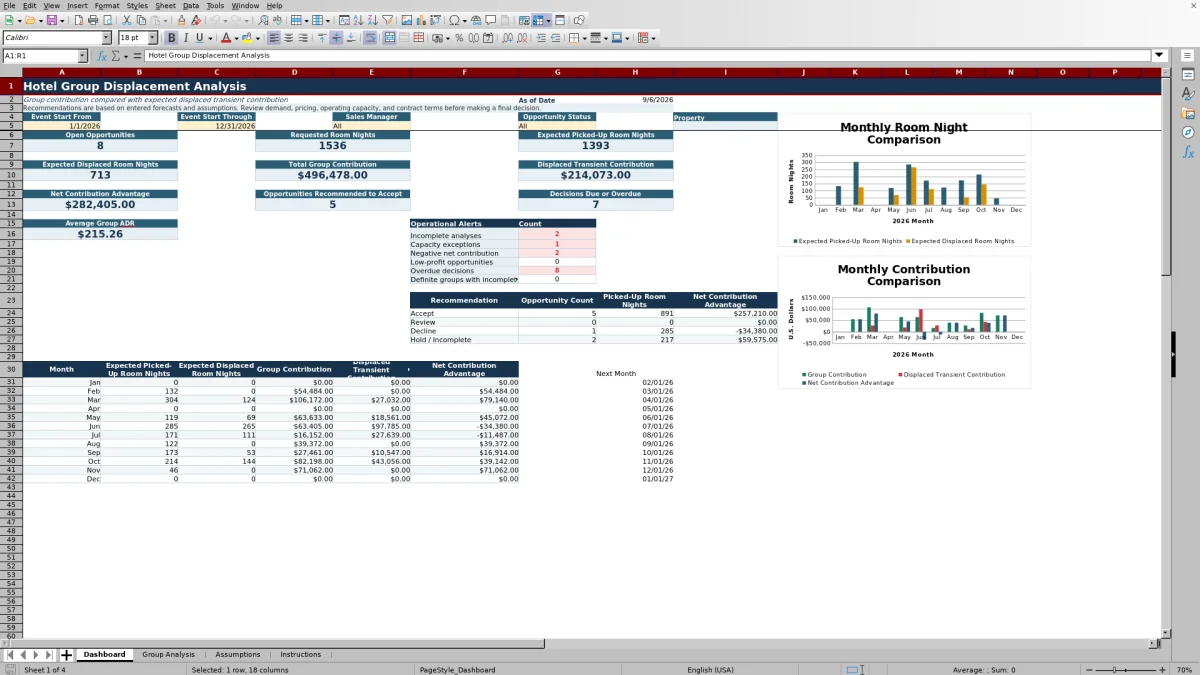
The Dashboard summarizes open Prospect and Tentative opportunities within the selected view. Headline figures include requested room nights, expected picked-up room nights, expected displaced room nights, total group contribution, displaced transient contribution, net contribution advantage, recommended acceptances, decisions due or overdue, and average group ADR.
An operational alert area counts incomplete analyses, capacity exceptions, negative net contribution, low-profit opportunities, overdue decisions, and Definite groups with incomplete data. A recommendation summary groups opportunities into Accept, Review, Decline, and Hold / Incomplete and reports opportunity count, picked-up room nights, and net contribution advantage.
Monthly rows and two charts compare expected pickup with displacement and group contribution with displaced transient contribution and net advantage.
How should a hotel interpret the recommendation?
An Accept result means the calculated net contribution advantage meets the applicable acceptance threshold in the Assumptions sheet. Review covers results between the review and acceptance thresholds, while Decline applies below the review threshold. An incomplete analysis is placed on Hold / Incomplete.
A recommendation is an internal planning output based on entered assumptions. Teams should also consider stay-pattern constraints, shoulder-night demand, minimum-stay patterns, suites, function-space conflicts, staffing limitations, contract risk, repeat business, and total account value where applicable.
The workbook uses event-period totals and does not replace a daily occupancy forecast when demand is uneven or particular nights are significantly more constrained than others.
Questions about this workbook
What sheets are included in the hotel group displacement analysis template?
The workbook contains four sheets: Dashboard, Group Analysis, Assumptions, and Instructions. The Group Analysis sheet holds opportunity-level inputs and calculations, while the Dashboard summarizes results and exceptions.
How many group opportunities can the workbook hold?
The Group Analysis table provides 150 opportunity rows, from row 2 through row 151. Each row is designed for one group opportunity.
Does the workbook account for food-and-beverage and meeting revenue?
Yes. It includes fields for food-and-beverage revenue, meeting room rental, other group revenue, and included service charge revenue. It also includes food-and-beverage cost, other direct group costs, concessions value, and incremental labor cost.
What opportunity statuses are available?
The supplied status list includes Prospect, Tentative, Definite, Lost, and Canceled. The Dashboard can be viewed for all statuses or a selected status from that list.
What data-quality issues does the workbook identify?
The analysis checks for missing IDs, duplicate IDs, missing or invalid event dates, missing room-night inputs, missing group ADR, missing transient forecasts, capacity issues, peak-room review conditions, and wash alerts. Decision timing can show missing due date, overdue, due today, due within seven days, future, or closed.
Transparent credits
Editorial and workbook QA bylines
The named editorial signatures and their responsibilities stay consistent across the library.

Workbook guide and editorial context
Audrey Whitmore
Audrey Whitmore is the consistent editorial byline for practical setup guidance written from each workbook’s final manifest and published features.
Meet the editorial byline →
Workbook structure and formula QA byline
Ethan Cole
Ethan Cole is the consistent QA byline shown only when recorded checks pass for worksheet structure, formulas, validations, recalculation, and the published XLSX bytes.
See the QA byline and checks →