Revenue · XLSX
Free Hotel Departmental Budget Excel Template for 2026
Hotel departmental budget Excel template for tracking monthly budget, actuals, profit, payroll, expenses, and variance by department.
Formula and workbook structure checked before publication
This free Excel template gives hotel operators a structured way to track monthly departmental budgets and actual results for 2026. It organizes revenue, payroll, and operating expenses by account, department, budget owner, and month.
The workbook contains four worksheets: Dashboard, Department Budget, Assumptions, and Instructions. Annual totals and variances calculate from monthly entries, while the department-level dashboard summarizes revenue, payroll, operating expenses, and departmental profit.
Use the editable planning assumptions for occupancy, average daily rate, labor cost, and variance thresholds. The file also provides 200 prepared budget rows for account-level records.
At a glance
What this workbook helps you manage
- Compare monthly budget and actual amounts for hotel revenue, payroll, and operating expenses.
- Review annual departmental profit, payroll percentage, and favorable or unfavorable variance.
- Assign each account record to a department, account type, account code, and budget owner.
- Adjust operating assumptions and management thresholds from one dedicated worksheet.
See the actual file
Inside the workbook
Included in the file
- Four worksheets: Dashboard, Department Budget, Assumptions, and Instructions.
- Monthly budget and actual columns for January through December, plus calculated annual results.
- Dashboard summaries for nine hotel department categories and a Total Hotel row.
- Two dashboard charts and variance-status conditional formatting for operational review.
How to use the template
1. Review the workbook instructions
Start with the Instructions worksheet. It explains the workbook purpose, recommended monthly workflow, sign convention, manual data-entry process, management assumptions, quality checks, and file-use guidance.
2. Set the property assumptions
Open the Assumptions worksheet and update the property name and budget year. Enter the property's available room nights, target occupancy, target average daily rate, labor cost target, variance warning threshold, variance action threshold, and stale-update days.
The worksheet also holds the reference lists used by the workbook: All Departments, Rooms, Food and Beverage, Sales and Marketing, Administrative and General, Property Operations and Maintenance, Housekeeping, Information Technology, Security, and Other Operated Departments.
3. Enter departmental account records
Use the Department Budget worksheet for detailed entries. Complete the input fields for each record:
- Record ID and Active status
- Department and account type
- Account code and account description
- Last updated date and budget owner
- Monthly budget and actual amounts from January through December
- Management comment when context is needed
Enter revenue, payroll, and operating expenses as positive dollar amounts. Revenue is favorable when actual revenue exceeds budget. Payroll and operating expenses are favorable when actual costs are below budget.
4. Preserve the calculated columns
The gray formula cells calculate Annual Budget, Annual Actual, Favorable/(Unfavorable) Variance, Variance Percentage, and Variance Status. Enter or paste monthly amounts into the designated input cells without replacing these formulas.
5. Review results on the Dashboard
Use the department selector to view All Departments or an individual department. Review the annual revenue, departmental profit, payroll percentage, net variance, departmental summary, and operational planning panel. After monthly close, reconcile the totals to the hotel's approved budget and internal financial reporting, then save a dated copy.
What does the hotel departmental budget template track?
The Department Budget worksheet records account-level activity across the full calendar year. Each row includes an Active status, department, account type, account code, account description, last-updated date, budget owner, and management comment.
Monthly budget and actual columns are provided for January through December. The workbook then calculates annual budget and actual totals, dollar variance, percentage variance, and a status for each populated record. Account types are limited to Revenue, Payroll, and Operating Expense.
The worksheet is formatted as an Excel table with filters, and the entry area remains visible by freezing panes at the first January input column. Data validation supports consistent department, status, account-type, date, and amount entries.
How are favorable and unfavorable variances calculated?
The variance direction depends on the account type. For Revenue, actual results above budget produce a favorable variance. For Payroll and Operating Expense, actual costs below budget produce a favorable variance.
Rows without an annual budget receive a No Budget status. Negative variances are compared with the editable warning threshold on the Assumptions worksheet. Depending on the result, the detailed row can show Favorable, Review, or Action Needed.
The Dashboard applies related logic to departmental profit and displays No Budget, On or Above Budget, Review, or Action Needed. These labels support management review based on the thresholds entered for the property.
What information appears on the hotel budget dashboard?
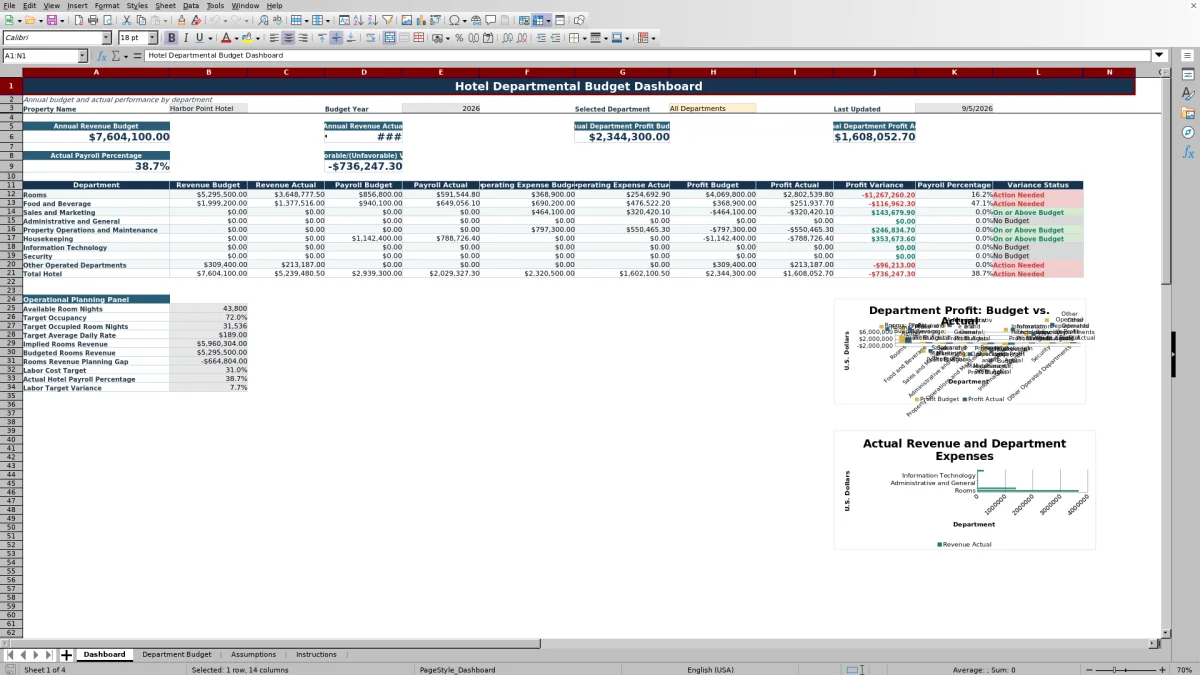
The Dashboard displays the property name, budget year, selected department, and most recent update date found in the detailed budget records. Annual summary figures cover revenue budget, revenue actual, departmental profit budget, departmental profit actual, actual payroll percentage, and net favorable or unfavorable variance.
A departmental summary lists Rooms, Food and Beverage, Sales and Marketing, Administrative and General, Property Operations and Maintenance, Housekeeping, Information Technology, Security, and Other Operated Departments. It reports revenue, payroll, operating expenses, profit, profit variance, payroll percentage, and variance status, followed by a Total Hotel row.
Two charts compare departmental results. One uses departmental profit budget and actual values; the other uses actual revenue and combined actual payroll plus operating expense values.
How does the operational planning panel support budgeting?
The Dashboard's planning panel turns selected assumptions into a concise operating view. It displays available room nights, target occupancy, target occupied room nights, target average daily rate, implied rooms revenue, budgeted rooms revenue, and the resulting rooms revenue planning gap.
It also compares the labor cost target with the hotel's actual payroll percentage and calculates a labor target variance. Occupancy, average daily rate, labor targets, and variance thresholds are editable management assumptions, not regulatory requirements.
How should hotel teams maintain the workbook each month?
Update each applicable account row with the latest monthly actuals and refresh its Last Updated date. Keep inactive records marked No so Dashboard summaries include only active rows. Management comments can document unusual revenue movement, payroll pressure, timing differences, or operating expense changes.
The Instructions worksheet recommends saving a dated copy after each monthly close, restricting formula editing to designated workbook owners, and reconciling annual totals to the hotel's approved budget and internal financial reporting. The file uses manual entry or pasted amounts and does not connect directly to hotel operating or accounting systems.
Questions about this workbook
How many account records can the hotel departmental budget workbook hold?
The Department Budget worksheet contains 200 prepared rows, running from row 6 through row 205. Each row includes monthly budget and actual fields, calculated annual results, variance fields, and space for a management comment.
Which hotel departments are included?
The supplied department list includes Rooms, Food and Beverage, Sales and Marketing, Administrative and General, Property Operations and Maintenance, Housekeeping, Information Technology, Security, and Other Operated Departments. The Dashboard selector also includes All Departments.
Can I enter negative revenue or expense amounts?
The workbook instructions specify positive amounts for revenue, payroll, and operating expenses. The monthly amount fields use decimal validation with a minimum of zero, and formulas determine favorable or unfavorable performance according to the account type.
Does the workbook calculate monthly variances?
The worksheet accepts monthly budget and actual amounts for all 12 months. Its calculated columns summarize annual budget, annual actual, favorable or unfavorable annual variance, variance percentage, and variance status. Separate monthly variance columns are not included.
Can the variance thresholds be changed?
Yes. The Assumptions worksheet includes editable variance warning and action thresholds. It also contains a threshold check that shows OK when the action threshold is at least as large as the warning threshold; otherwise, it shows Review thresholds.
Does the Excel file import data from hotel systems?
No. The Instructions worksheet states that the workbook does not connect directly to a property management system, point-of-sale system, payroll platform, or accounting system. Users can manually enter or paste amounts into the designated input cells.
Transparent credits
Editorial and workbook QA bylines
The named editorial signatures and their responsibilities stay consistent across the library.

Workbook guide and editorial context
Audrey Whitmore
Audrey Whitmore is the consistent editorial byline for practical setup guidance written from each workbook’s final manifest and published features.
Meet the editorial byline →
Workbook structure and formula QA byline
Ethan Cole
Ethan Cole is the consistent QA byline shown only when recorded checks pass for worksheet structure, formulas, validations, recalculation, and the published XLSX bytes.
See the QA byline and checks →