Revenue · XLSX
Free 2026 Hotel Channel Commission Calculator Spreadsheet Excel Template
Hotel channel commission calculator spreadsheet for tracking expected costs, actual charges, variances, settlements, and net revenue.
Formula and workbook structure checked before publication
This hotel channel commission calculator spreadsheet is a free Excel template for estimating channel costs by booking and comparing them with actual charges. It organizes room revenue, discounts, fees, taxes, booking status, commission terms, and settlement details in one workbook.
The four sheets are Dashboard, Booking Commissions, Channel Terms, and Instructions. Together, they calculate expected commission and processing charges, expected net revenue, settlement timing, variance, and effective channel cost rate for up to 150 prepared booking records.
Hotel operators can review all channels or filter the Dashboard by date range and channel. Operational alerts identify records that may need attention, including overdue commissions, unknown channels, missing confirmation numbers, negative revenue, and incomplete cost or settlement entries.
At a glance
What this workbook helps you manage
- Compares expected total channel cost with the actual cost recorded for each booking.
- Separates room revenue, discounts, property fees, taxes, and retained cancellation or no-show fees.
- Summarizes bookings, room nights, revenue, channel costs, variance, and net revenue by channel.
- Flags overdue, incomplete, unusual, or high-variance records for follow-up.
See the actual file
Inside the workbook
Included in the file
- Four worksheets: Dashboard, Booking Commissions, Channel Terms, and Instructions.
- Prepared Booking Commissions table with 150 booking-record rows and channel and status lists.
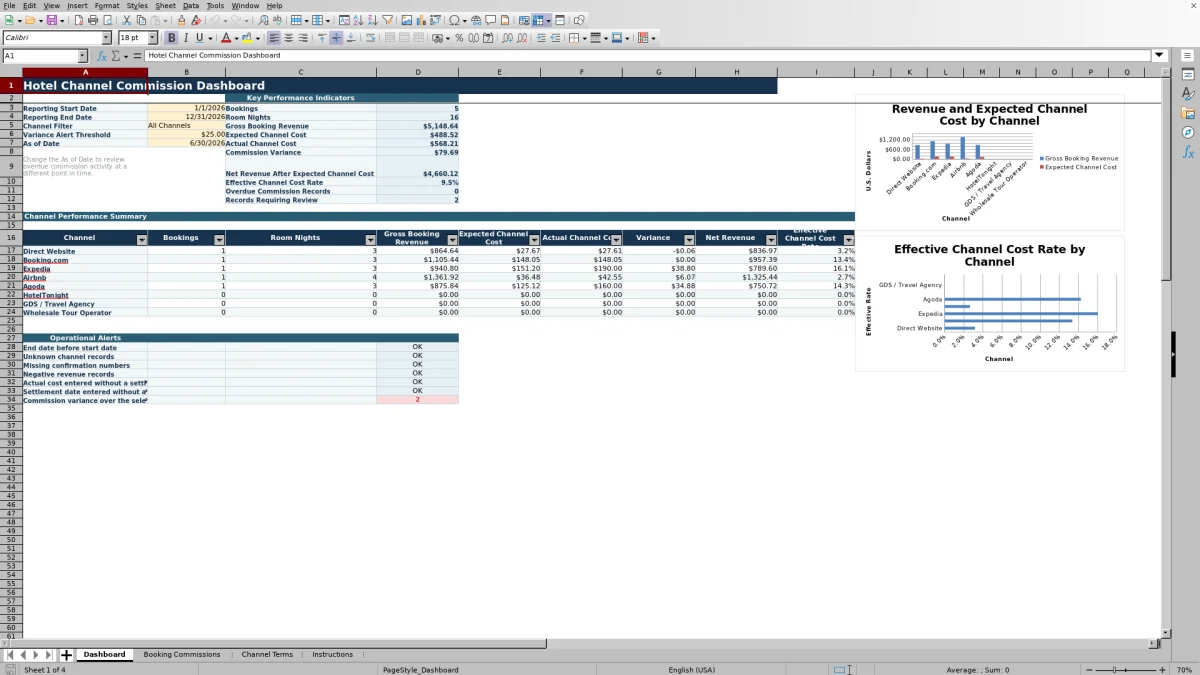
- Dashboard date and channel controls, KPI totals, channel summary, alerts, and two charts.
- Calculated expected commission, processing charge, total cost, net revenue, settlement date, variance, and status fields.
How to use the template
1. Review the Channel Terms sheet
Replace the illustrative assumptions with terms from the property’s current signed agreements. Each channel row includes room and cancellation commission rates, commissionable fee and tax settings, payment-processing rate, flat booking fee, expected remittance days, effective date, settlement method, contract reference, and notes.
Use one matching channel name for each set of terms. The sheet includes a duplicate-channel check, while booking calculations look up terms using the channel selected on each record.
2. Enter booking details
Use the pale gold input cells on Booking Commissions. Enter or paste the booking ID, guest name, channel, confirmation number, booking and stay dates, booking status, revenue components, and retained cancellation or no-show fee where applicable.
- Record room revenue before discounts separately from discounts.
- Enter property fees and taxes in their respective columns.
- Choose Upcoming, Stayed, Cancelled, or No-Show as the booking status.
- Avoid recording the same no-show amount as both room revenue and a retained fee.
The blue fields calculate room nights and gross booking revenue, retrieve channel terms, and determine expected commission, processing charge, total channel cost, net revenue, and expected settlement date.
3. Record actual costs and settlements
As statements or invoices are reviewed, enter the Actual Channel Cost and Actual Settlement Date. The spreadsheet calculates commission variance as actual channel cost minus expected total channel cost. A positive result means the actual charge is higher than expected.
4. Set the Dashboard controls
Choose the Reporting Start Date, Reporting End Date, Channel Filter, Variance Alert Threshold, and As of Date. The As of Date controls when unsettled activity is treated as overdue. The channel list includes All Channels, Direct Website, Booking.com, Expedia, Airbnb, Agoda, HotelTonight, GDS / Travel Agency, and Wholesale Tour Operator.
5. Work through exceptions
Review the Dashboard’s operational alerts, then filter Booking Commissions by Review Flag or Commission Payment Status. Compare expected amounts with the relevant statement or invoice, add notes for disputed or corrected entries, and update actual costs and settlement dates as needed.
How does the hotel channel commission calculation work?
The calculation begins with the revenue entered for each booking. Room revenue before discounts and discounts produce net room revenue. Gross booking revenue then reflects booking status and the applicable entries for net room revenue, property fees, taxes, and retained cancellation or no-show fees.
The matching Channel Terms row supplies the standard room commission rate, cancellation commission rate, commissionable treatment of property fees and taxes, payment-processing rate, flat booking fee, and expected remittance days. The workbook calculates a standard commission basis and applies the relevant rate. It calculates the expected processing charge separately and combines both amounts as expected total channel cost.
Expected net revenue equals gross booking revenue less expected total channel cost. The effective channel cost rate divides expected total channel cost by gross booking revenue.
What can hotel teams reconcile with the spreadsheet?
The Booking Commissions sheet places calculated expectations beside actual results. After an actual channel cost is entered, the Commission Variance field shows whether the charge is above or below the expected amount. The configurable variance threshold on the Dashboard helps place materially different records into Review status.
Settlement monitoring uses check-out date plus the channel’s expected remittance days to calculate an expected settlement date. Based on the Dashboard As of Date and the presence of an actual settlement date, each populated booking can show Settled, Overdue, Not Yet Due, or Missing Date.
This structure supports a recurring review of commission invoices and remittances without combining expected and actual figures in the same field.
Which hotel channel metrics appear on the Dashboard?
The Dashboard reports bookings, room nights, gross booking revenue, expected channel cost, actual channel cost, commission variance, net revenue after expected channel cost, effective channel cost rate, overdue commission records, and records requiring review.
A channel performance summary shows bookings, room nights, gross booking revenue, expected and actual channel costs, variance, net revenue, and effective channel cost rate for eight listed channel categories. One chart compares gross booking revenue with expected channel cost by channel, and another displays effective channel cost rate by channel.
The reporting start and end dates limit the summarized records by check-in date. The channel filter can show all listed channels together or isolate one listed channel.
What data-quality issues does the workbook flag?
The Dashboard reports counts for an end date before the start date, unknown channel records, missing confirmation numbers, negative revenue records, actual costs entered without settlement dates, and settlement dates entered without actual costs.
At booking level, the Review Flag also evaluates missing key booking information, invalid stay dates, actual-cost and settlement-date mismatches, and variances outside the Dashboard threshold. These checks help operators locate entries that could distort revenue or commission reporting.
Flags should be investigated against source records. The sample channel rates and policies are illustrative, and users must confirm current contract terms and tax treatment before relying on calculated expectations.
Questions about this workbook
How many booking records are prepared in this Excel template?
The Booking Commissions sheet is prepared for 150 booking records, covering rows 6 through 155. Formulas are already present in the calculated and channel-term lookup columns for those rows.
Can the calculator handle cancellations and no-shows?
Yes. Booking Status includes Cancelled and No-Show in addition to Upcoming and Stayed. The sheet provides a separate field for a cancellation or no-show fee retained, and the expected commission calculation applies the cancellation commission rate to cancelled bookings.
Are the included commission rates contractual rates?
No. The rates and policies on Channel Terms are sample assumptions. Replace them with the property’s current signed agreements, including commissionable fees, tax treatment, processing rates, flat fees, and remittance timing.
Does the workbook import reservations or accounting data automatically?
No. It does not connect automatically to property or accounting systems. Booking information may be entered manually or pasted into the prepared input columns.
How is an overdue commission record identified?
The expected settlement date is calculated from the check-out date plus the expected remittance days stored for the channel. If no actual settlement date is present and the expected date falls before the Dashboard As of Date, the record is marked Overdue.
Transparent credits
Editorial and workbook QA bylines
The named editorial signatures and their responsibilities stay consistent across the library.

Workbook guide and editorial context
Audrey Whitmore
Audrey Whitmore is the consistent editorial byline for practical setup guidance written from each workbook’s final manifest and published features.
Meet the editorial byline →
Workbook structure and formula QA byline
Ethan Cole
Ethan Cole is the consistent QA byline shown only when recorded checks pass for worksheet structure, formulas, validations, recalculation, and the published XLSX bytes.
See the QA byline and checks →