Revenue · XLSX
Free 2026 Hotel Capital Expenditure Budget Spreadsheet Excel Template
Hotel capital expenditure budget spreadsheet for tracking approved budgets, actual spend, commitments, forecasts, and project status.
Formula and workbook structure checked before publication
This hotel capital expenditure budget spreadsheet is a free Excel template for organizing 2026 capital projects, approvals, budgets, commitments, actual costs, forecasts, and completion dates. It gives hotel operators one structured workbook for project planning and ongoing financial review.
The file contains four worksheets: Dashboard, CapEx Plan, Spend Log, and Instructions. Project and transaction entries feed formula-driven calculations for actual spend, open commitments, forecast at completion, forecast variance, budget utilization, project status, capitalization review, and attention flags.
Use the workbook for projects across guestroom, building, food and beverage, mechanical, electrical, plumbing, technology, and other listed capital categories. Planning assumptions can be adjusted to reflect the property’s ownership, accounting, and approval policies.
At a glance
What this workbook helps you manage
- Keeps project scope, justification, ownership, funding, approval, schedule, and budget information together.
- Separates transaction-level actual costs and open commitments while connecting them to each project ID.
- Calculates forecast totals, remaining variance, budget utilization, project status, and review flags.
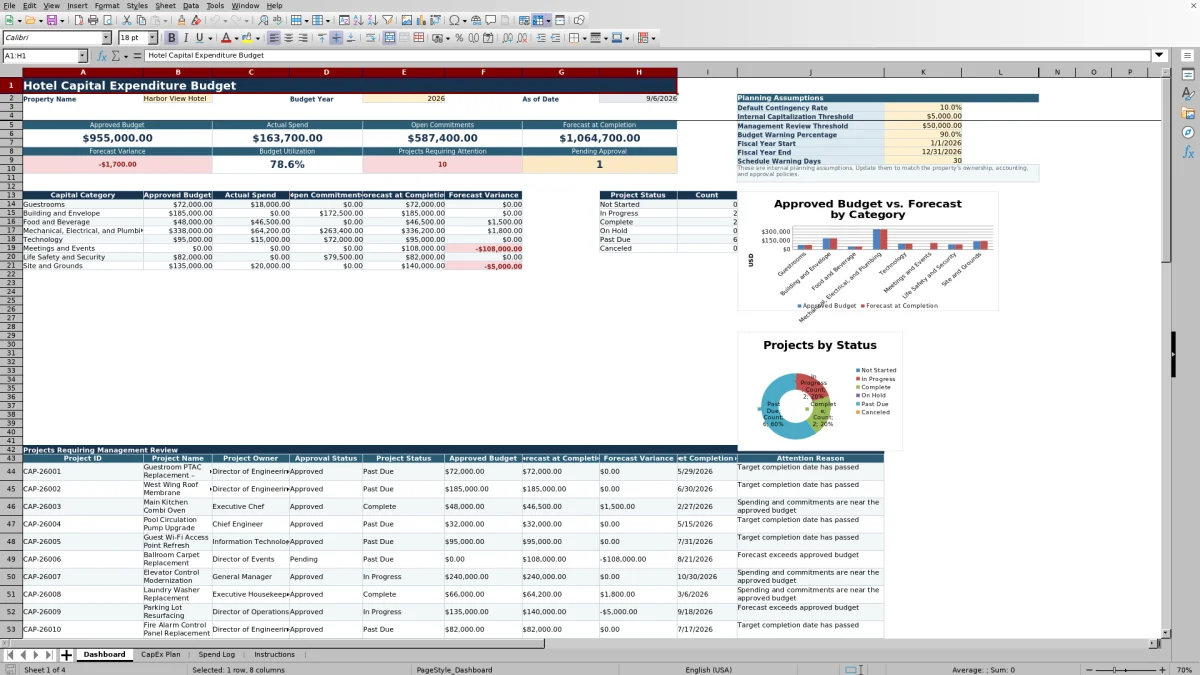
- Summarizes approved budget, actual spend, commitments, forecasts, categories, and statuses on one dashboard.
See the actual file
Inside the workbook
Included in the file
- Four worksheets: Dashboard, CapEx Plan, Spend Log, and Instructions.
- Structured CapEx Plan and Spend Log tables with dropdown lists and validated date, percentage, and amount entries.
- Formula-driven project forecasts, variances, utilization percentages, statuses, threshold reviews, and attention reasons.
- Dashboard summaries by capital category and project status, supported by two charts.
How to use the template
1. Set the property and planning assumptions
Begin on the Dashboard. Replace the sample property name, confirm the 2026 budget year, and enter the fiscal-year start and end dates. Review the default contingency rate, internal capitalization threshold, management review threshold, budget warning percentage, and schedule warning days. These are internal planning assumptions and should match the property’s established policies.
2. Build the capital project plan
Enter each project once on the CapEx Plan and assign a unique Project ID. Complete the operational details needed for review:
- Project name, capital category, property area, description, and business justification
- Priority, project owner, funding source, and approval status
- Approval, planned start, target completion, and actual completion dates
- Original estimate, contingency rate, approved budget, and estimate to complete
The workbook calculates the planning estimate from the original estimate and project contingency rate. It also calculates forecast at completion, forecast variance, and budget utilization.
3. Record commitments and actual costs
Use the Spend Log for purchase orders, signed contracts, invoices, and other project costs. Select the related Project ID and enter the transaction date, vendor, document number, transaction type, cost description, amount, commitment status, payment status, funding source, entered-by name, and review notes.
Project name and capital category are retrieved from the CapEx Plan. Entries marked Actual feed actual spend. Entries marked Commitment count as open commitments when their commitment status is Open. Consistent Project IDs are essential for accurate project rollups.
4. Review forecasts, schedules, and exceptions
Return to the CapEx Plan to review calculated project status and attention results. A project may be identified as Not Started, In Progress, Complete, On Hold, Past Due, or Canceled based on approval status and entered dates. The attention logic checks for conditions including a forecast above the approved budget, a past-due target date, high-value pending approval, spending near budget, or an approaching start condition.
5. Use the Dashboard for management review
The Dashboard summarizes approved budgets, actual spend, open commitments, forecast at completion, forecast variance, budget utilization, projects requiring attention, and pending approvals. Category totals and project-status counts support a concise capital review meeting. Two charts present category budget and forecast information and project-status counts.
What should a hotel capital expenditure budget spreadsheet track?
A working hotel CapEx plan needs more than a list of proposed purchases. This template tracks the project name, category, property area, description, business justification, priority, owner, funding source, approval status, schedule, original estimate, contingency rate, approved budget, and estimate to complete.
Those inputs support project-level calculations for planning estimate, actual spend, open commitments, forecast at completion, forecast variance, and budget utilization. Management notes provide room for context that may not be clear from financial figures alone, such as phasing decisions, operating constraints, or current review points.
How does the workbook connect project budgets to spending?
Every project on the CapEx Plan receives a unique Project ID. The same ID is selected for each related Spend Log entry. Based on that selection, formulas return the project name and capital category to the transaction row.
The CapEx Plan then uses the Spend Log to total Actual transactions and open Commitment transactions for each project. Forecast at completion combines actual spend, open commitments, and the entered estimate to complete. This creates a consistent project-to-transaction link without requiring project names to be retyped in every financial entry.
How can hotel teams identify projects that need attention?
The workbook assigns an Attention Flag of Review or OK and provides an Attention Reason. Review conditions include a negative forecast variance, budget utilization at or above the Dashboard warning percentage, a past-due project, a pending project at or above the management review threshold, or a not-started project approaching its target completion date within the schedule warning period.
The Dashboard counts projects requiring attention and pending approval. Operators can adjust the warning percentage, management review threshold, and schedule warning days to align the review process with property expectations.
Which hotel capital categories can be summarized?
The Dashboard includes category summaries for approved budget, actual spend, open commitments, forecast at completion, and forecast variance. Listed categories include Guestrooms, Building and Envelope, Food and Beverage, Mechanical, Electrical, and Plumbing, and Technology, along with additional categories available in the Instructions validation list.
This category view helps separate guest-facing renovations from building systems, equipment, and technology work. The related chart compares approved budget and forecast by category, while the status chart shows project counts by current status.
Questions about this workbook
What worksheets are included in the hotel CapEx template?
The workbook contains four worksheets: Dashboard, CapEx Plan, Spend Log, and Instructions. The Dashboard presents summaries and assumptions; the CapEx Plan stores project records; the Spend Log stores transaction records; and Instructions provides setup guidance and validation lists.
Does the spreadsheet calculate project forecasts automatically?
Yes. For each entered project, formulas calculate the planning estimate, actual spend, open commitments, forecast at completion, forecast variance, budget utilization, project status, capitalization review result, attention flag, and attention reason. The estimate to complete remains a project input.
How are actual spend and commitments treated differently?
Spend Log rows identified as Actual are included in actual spend. Rows identified as Commitment are included in open commitments only when the commitment status is Open. Commitment and payment statuses are entered separately.
Can the review thresholds be changed?
Yes. The Dashboard includes editable assumptions for the default contingency rate, internal capitalization threshold, management review threshold, budget warning percentage, fiscal-year dates, and schedule warning days. The workbook notes that these assumptions should be updated to match property policies.
What information can be recorded for each transaction?
The Spend Log includes transaction ID, project ID, project name, capital category, transaction date, vendor, document number, transaction type, cost description, amount, commitment status, payment status, funding source, entered by, and review notes.
Transparent credits
Editorial and workbook QA bylines
The named editorial signatures and their responsibilities stay consistent across the library.

Workbook guide and editorial context
Audrey Whitmore
Audrey Whitmore is the consistent editorial byline for practical setup guidance written from each workbook’s final manifest and published features.
Meet the editorial byline →
Workbook structure and formula QA byline
Ethan Cole
Ethan Cole is the consistent QA byline shown only when recorded checks pass for worksheet structure, formulas, validations, recalculation, and the published XLSX bytes.
See the QA byline and checks →