Revenue · XLSX
Free Hotel Accounts Receivable Aging Excel Template for 2026
Hotel accounts receivable aging Excel template tracking open balances, aging buckets, disputes, follow-ups, priorities, and dashboard totals.
Formula and workbook structure checked before publication
This hotel accounts receivable aging workbook is a free Excel template for tracking customer invoices, payments, credits, disputes, and collection activity. It gives hotel and venue finance teams an invoice-level AR record supported by customer account details and a reporting dashboard.
The workbook calculates open balances, days past due, aging buckets, invoice status, and collection priority. Dashboard summaries help operators review total open AR, past-due exposure, customer types, high-priority invoices, and collection work requiring attention.
At a glance
What this workbook helps you manage
- Organizes invoices, payments, credits, disputes, contacts, and follow-up dates in one ledger.
- Calculates open balances and assigns current, past-due, paid, or review classifications.
- Summarizes receivables by aging bucket and customer type on a formula-driven dashboard.
- Highlights collection priorities using editable aging, balance, and follow-up thresholds.
See the actual file
Inside the workbook
Included in the file
- Four worksheets: Dashboard, AR Ledger, Customer Accounts, and Instructions.
- Preformatted ledger for 150 invoice rows and customer register for 100 account rows.
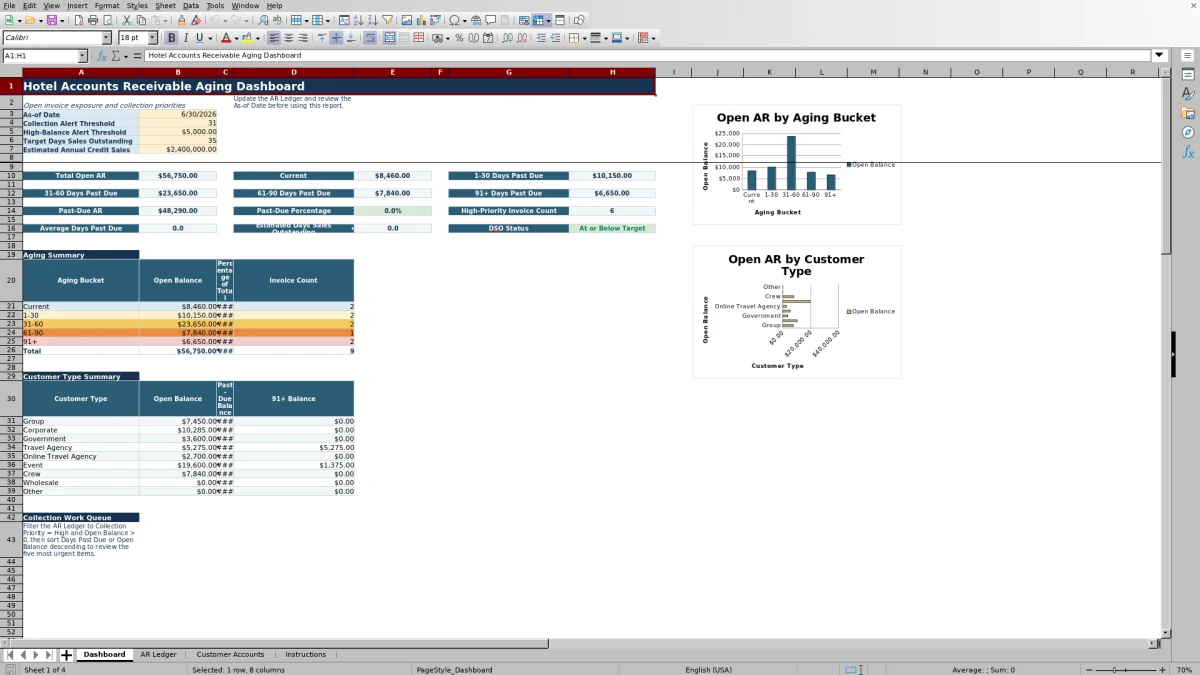
- Two dashboard charts showing aging balances and open balances by customer type.
- Dropdown lists, date and amount validation, filters, frozen headers, and conditional formatting.
How to use the template
1. Set the reporting assumptions
Open the Dashboard and confirm the As-of Date. The workbook uses this date to calculate days past due and assign aging buckets. Review the collection alert threshold, high-balance alert threshold, target days sales outstanding, and estimated annual credit sales before relying on the dashboard results.
2. Maintain customer records
Use Customer Accounts for one row per receivable customer. Complete the account name, type, billing contact, payment terms, credit limit, assigned collector, preferred billing method, account status, last credit review date, and notes. Keep customer account IDs consistent because the ledger uses them to retrieve the customer name, customer type, and collector.
3. Enter and update invoices
On the AR Ledger, use one row per invoice. Enter the property, customer account ID, invoice number, invoice and due dates, source type, available reference numbers, invoice amount, payments applied, and credits applied. The source fields can hold PMS folio, event contract, or external references, but they are manual tracking fields and do not create an integration.
4. Record collection activity
Update dispute status, last contact date, next follow-up date, contact method, promise-to-pay date, and collection notes as activity occurs. Avoid overwriting the formula columns for customer name, customer type, open balance, days past due, aging bucket, invoice status, collector, and collection priority.
5. Review exceptions and reconcile totals
Use the Dashboard and ledger filters to review high-priority invoices, overdue follow-ups, disputed balances, and items aged 91 or more days. Investigate missing due dates, duplicate invoice numbers, and overapplied payments or credits. Reconcile workbook balances to the property’s official accounting records.
How does the hotel AR aging calculation work?
The ledger calculates open balance as invoice amount minus payments applied and credits applied, with the result prevented from falling below zero. A fully paid invoice is classified as Paid and excluded from open AR totals.
For invoices with an open balance and a due date, the workbook compares the due date with the Dashboard’s as-of date. The resulting aging buckets are Current, 1–30, 31–60, 61–90, and 91+. Current means the due date is on or after the as-of date. An invoice without a due date is marked Missing Due Date in the aging field and Review in the invoice status field.
What does the hotel accounts receivable dashboard show?
The Dashboard reports total open AR, current balances, four past-due bands, total past-due AR, past-due percentage, high-priority invoice count, average days past due, estimated days sales outstanding, and DSO status. The aging summary includes open balance, percentage of total, and invoice count for each bucket.
A separate customer type summary reports open, past-due, and 91+ balances. Listed customer types include Group, Corporate, Government, Travel Agency, Online Travel Agency, Event, Crew, Wholesale, and Other. Two charts visualize aging balances and open balances by customer type.
How are collection priorities assigned?
Collection Priority is calculated for each entered invoice. An invoice with no remaining balance is Closed. An open invoice becomes High when its days past due meet the Dashboard collection alert threshold, its open balance meets the high-balance threshold, or its entered next follow-up date is earlier than the as-of date.
Other past-due invoices are classified as Medium, while open invoices that are not past due are Normal. Because the thresholds are editable, hotel finance teams should review them against current internal collection practices before using the priority field to plan outreach.
How can hotels track direct-bill and event receivables?
The AR Ledger includes source types for guest folios, group masters, event invoices, corporate direct bill, travel agencies, online travel agencies, crew billing, food and beverage, and other activity. Separate fields are provided for a PMS folio ID, event contract ID, and external reference.
The Customer Accounts sheet stores billing contacts, addresses, default payment terms, credit limits, account status, and assigned collectors. Together, these fields help staff connect an invoice to the responsible customer and supporting reference while documenting disputes, contact history, promise-to-pay dates, and next actions.
The Dashboard also calculates estimated DSO using total receivables and the entered estimated annual credit sales. Its status compares the result with the editable target DSO.
Questions about this workbook
Which worksheets are included in the template?
The workbook contains four worksheets: Dashboard, AR Ledger, Customer Accounts, and Instructions. The ledger holds invoice and collection details, Customer Accounts holds customer records, the Dashboard summarizes receivables, and Instructions provides operating guidance.
How many invoices and customer accounts can the workbook hold?
The formatted AR Ledger provides 150 invoice rows, running from rows 5 through 154. Customer Accounts provides 100 record rows, running from rows 5 through 104.
Does the workbook handle partial payments and credits?
Yes. Each invoice row has separate fields for Invoice Amount, Payments Applied, and Credits Applied. The Open Balance formula subtracts payments and credits from the original invoice amount and does not return a negative balance.
Can the template track disputes and collection follow-ups?
Yes. The ledger includes dispute status, last contact date, next follow-up date, contact method, promise-to-pay date, and collection notes. Dispute choices include documentation requested, rate dispute, tax question, service dispute, credit pending, under review, resolved, and none.
What should staff check before using the aging report?
Confirm the Dashboard as-of date and editable thresholds, then verify invoice due dates, payment and credit amounts, and customer account IDs. Staff should also investigate duplicate invoice numbers, missing due dates, overapplied amounts, overdue follow-up dates, disputed accounts, and balances aged more than 90 days.
Transparent credits
Editorial and workbook QA bylines
The named editorial signatures and their responsibilities stay consistent across the library.

Workbook guide and editorial context
Audrey Whitmore
Audrey Whitmore is the consistent editorial byline for practical setup guidance written from each workbook’s final manifest and published features.
Meet the editorial byline →
Workbook structure and formula QA byline
Ethan Cole
Ethan Cole is the consistent QA byline shown only when recorded checks pass for worksheet structure, formulas, validations, recalculation, and the published XLSX bytes.
See the QA byline and checks →