Revenue · XLSX
Free Hotel Market Segment Analysis Excel Template for 2026
Hotel market segment analysis spreadsheet for tracking room production, revenue, acquisition costs, budget variance, and segment mix in 2026.
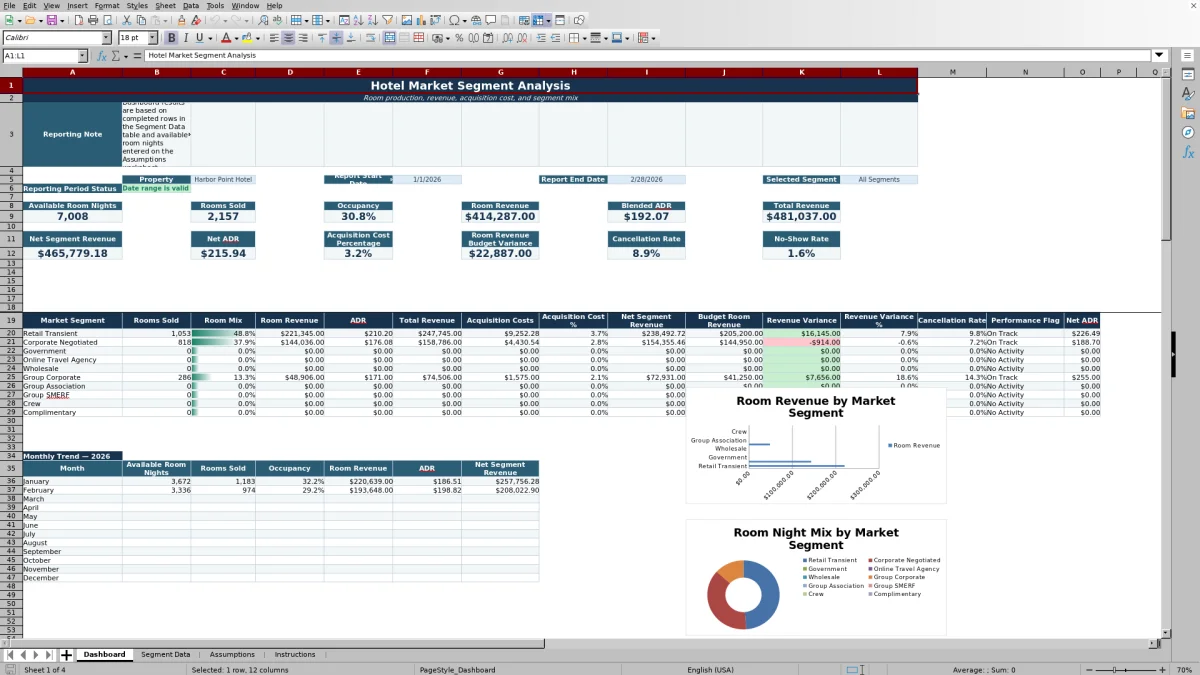
This hotel market segment analysis spreadsheet is a free Excel template for reviewing room production, revenue, acquisition costs, and segment mix in 2026. It organizes monthly results by property and market segment so hotel operators can compare contribution, cost, and budget performance in one workbook.
The file contains four worksheets: Dashboard, Segment Data, Assumptions, and Instructions. Enter monthly production and inventory information, review the built-in data checks, and use the Dashboard to examine a selected property, reporting period, and segment.
At a glance
What this workbook helps you manage
- Compare rooms sold, room revenue, ADR, and room mix across market segments.
- Measure acquisition costs and net segment revenue instead of reviewing gross revenue alone.
- Review room revenue against budget with dollar and percentage variances.
- Identify duplicate entries, missing fields, invalid dates, and inventory-related exceptions.
See the actual file
Inside the workbook
Included in the file
- Four worksheets: Dashboard, Segment Data, Assumptions, and Instructions.
- Monthly Segment Data table with input fields and calculated performance measures.
- Property and segment selection lists plus start-date and end-date controls on the Dashboard.
- Three Dashboard charts, conditional formatting, and validation checks for key inputs.
How to use the template
1. Review assumptions and property lists
Start on the Assumptions worksheet. Review the editable thresholds for high acquisition cost, negative budget variance, minimum segment mix, and the optional occupancy warning. Update the property list and standard market segment list as needed for your operation.
The workbook includes classifications such as Retail Transient, Corporate Negotiated, Government, Online Travel Agency, Wholesale, Group Corporate, Group Association, and Group SMERF. Keep segment names consistent because the workbook uses these lists to organize Dashboard results.
2. Enter monthly room inventory
In the inventory area of the Assumptions worksheet, enter one row for each property and month. Use the first day of the month as the date, then enter room count and out-of-order room nights. Available room nights are calculated from the room count, days in the month, and out-of-order rooms.
Review the inventory check result. It can identify an invalid room count, excessive out-of-order inventory, a duplicate property-month row, or a date that is not the first day of the month.
3. Complete the Segment Data worksheet
Enter one row per property, month, and market segment. The input fields cover:
- Bookings created, rooms sold, cancellations, and no-shows
- Room revenue, food and beverage revenue, and other revenue
- Channel commission, other acquisition cost, and segment marketing spend
- Budget rooms sold and budget room revenue
- Source reference and notes
Enter revenue before subtracting acquisition costs. The calculated columns produce total revenue, acquisition costs, net segment revenue, ADR, net ADR, average length of stay, acquisition cost percentage, room revenue variance, and segment occupancy contribution.
4. Check entries and review the Dashboard
Review the Duplicate Check and Row Check columns before relying on the summary. These checks can flag duplicate property-month-segment records, missing required fields, invalid monthly dates, exceptions that exceed bookings, rooms sold above available inventory, and other row issues.
On the Dashboard, select a property, start date, end date, and either All Segments or an individual segment. Confirm that the reporting period status says the date range is valid. The summary then presents available room nights, rooms sold, occupancy, room revenue, blended ADR, total revenue, net segment revenue, net ADR, acquisition cost percentage, budget variance, cancellation rate, and no-show rate.
What hotel market segment metrics does the spreadsheet calculate?
The workbook calculates operating and commercial measures from the monthly entries on the Segment Data worksheet. Total revenue combines room revenue, attributed food and beverage revenue, and other revenue. Acquisition costs combine channel commission, other acquisition cost, and segment marketing spend. Net segment revenue is total revenue after those acquisition costs.
ADR is calculated as room revenue divided by rooms sold, while net ADR uses net segment revenue divided by rooms sold. The workbook also calculates average length of stay, acquisition cost percentage, room revenue variance against budget, room revenue variance percentage, available room nights, and segment occupancy contribution.
How can a hotel compare market segment profitability?
Use the Dashboard segment table to compare rooms sold, room mix, room revenue, ADR, total revenue, acquisition costs, acquisition cost percentage, and net segment revenue. This separates production volume from the cost required to generate that business.
For example, a segment may produce substantial room revenue but also carry channel commissions or assigned marketing spend. Reviewing net ADR and acquisition cost percentage alongside gross ADR gives operators a clearer view of each segment's recorded contribution. Performance flags use the editable thresholds maintained on the Assumptions worksheet.
How does the workbook support hotel budget reviews?
Each Segment Data row includes fields for budget rooms sold and budget room revenue. The workbook calculates the difference between actual room revenue and budget room revenue, along with the related percentage variance.
The Dashboard summarizes room revenue budget variance for the selected property and period and includes segment-level variance columns. The negative budget variance threshold on the Assumptions worksheet can be adjusted for internal management use. The assumptions are explicitly identified in the workbook as internal values rather than legal requirements.
How should monthly segment data be prepared?
Prepare one summarized row for every property, month, and market segment. The Period Start Date must be the first day of the reporting month and must fall within 2026 under the supplied date validation. Rooms Sold represents occupied room nights attributed to the segment.
Before entering results, reconcile segment rooms sold and revenue to the approved monthly operating report. Confirm available room nights and out-of-order room nights, retain a source reference where useful, and add concise notes for material activity. The Instructions worksheet also recommends saving a dated copy according to the property's document-retention practice.
Questions about this workbook
What worksheets are included in the hotel market segment analysis spreadsheet?
The workbook has four worksheets: Dashboard, Segment Data, Assumptions, and Instructions. The Dashboard presents summaries and charts; Segment Data holds monthly production entries and calculations; Assumptions contains thresholds, validation lists, and room inventory; and Instructions provides definitions and a monthly workflow.
What market segments are represented in the workbook?
The supplied lists include Retail Transient, Corporate Negotiated, Government, Online Travel Agency, Wholesale, Group Corporate, Group Association, and Group SMERF. The Dashboard also includes an All Segments selection. Additional standard segment entries are present in the workbook's segment list beyond those visible in the Dashboard sample.
Can the spreadsheet analyze more than one hotel?
Yes. The property list contains three sample properties, and each Segment Data row includes a Property field. The Dashboard property selector uses that list, allowing results to be reviewed for the selected property.
What entry errors does the workbook check?
The workbook checks for duplicate segment rows, missing required fields, dates that are not the first day of a month, cancellations or no-shows that exceed bookings, combined exceptions above bookings, and rooms sold above available inventory. The inventory area separately checks room counts, out-of-order rooms, monthly dates, and duplicate inventory rows.
How are occupancy and available room nights calculated?
Available room nights are calculated by multiplying room count by the number of days in the month and subtracting out-of-order room nights, with a minimum result of zero. Dashboard occupancy uses rooms sold and the available room nights entered through the Assumptions worksheet for the selected property and period.
Transparent credits
Editorial and workbook QA bylines
The named editorial signatures and their responsibilities stay consistent across the library.

Workbook guide and editorial context
Audrey Whitmore
Audrey Whitmore is the consistent editorial byline for practical setup guidance written from each workbook’s final manifest and published features.
Meet the editorial byline →