Revenue · XLSX
Free Hotel Occupancy Forecast Excel Template for 2026
Hotel occupancy forecast Excel template for tracking rooms, pickup, ADR, revenue, operating alerts, and actual results by date.
Formula and workbook structure checked before publication
This free Excel template gives hotel operators a daily view of occupancy, room demand, ADR, and room revenue. It combines rooms on the books, expected pickup, event adjustments, inventory constraints, and day-of-week baselines to calculate a final forecast for each date.
The four-sheet workbook includes a date-based forecast table, editable assumptions, a summary Dashboard, and operating instructions. Teams can record transient and group rooms separately, document demand conditions, apply management overrides, and compare forecasts with actual results.
Use it for recurring revenue, front office, housekeeping, engineering, sales, and staffing discussions. The workbook supports dates from 2026 through 2030 and contains 370 daily forecast rows.
At a glance
What this workbook helps you manage
- Combines transient and group rooms on the books with expected pickup and demand adjustments.
- Calculates sellable rooms, forecast occupancy, ADR, RevPAR, and room revenue by date.
- Highlights high- and low-occupancy dates, inventory issues, and missing actual results.
- Compares forecast results with actual occupied rooms, occupancy, ADR, and revenue.
See the actual file
Inside the workbook
Included in the file
- Four worksheets: Dashboard, Daily Forecast, Assumptions, and Instructions.
- A 370-row ForecastTable with daily inputs, calculations, actuals, variances, and checks.
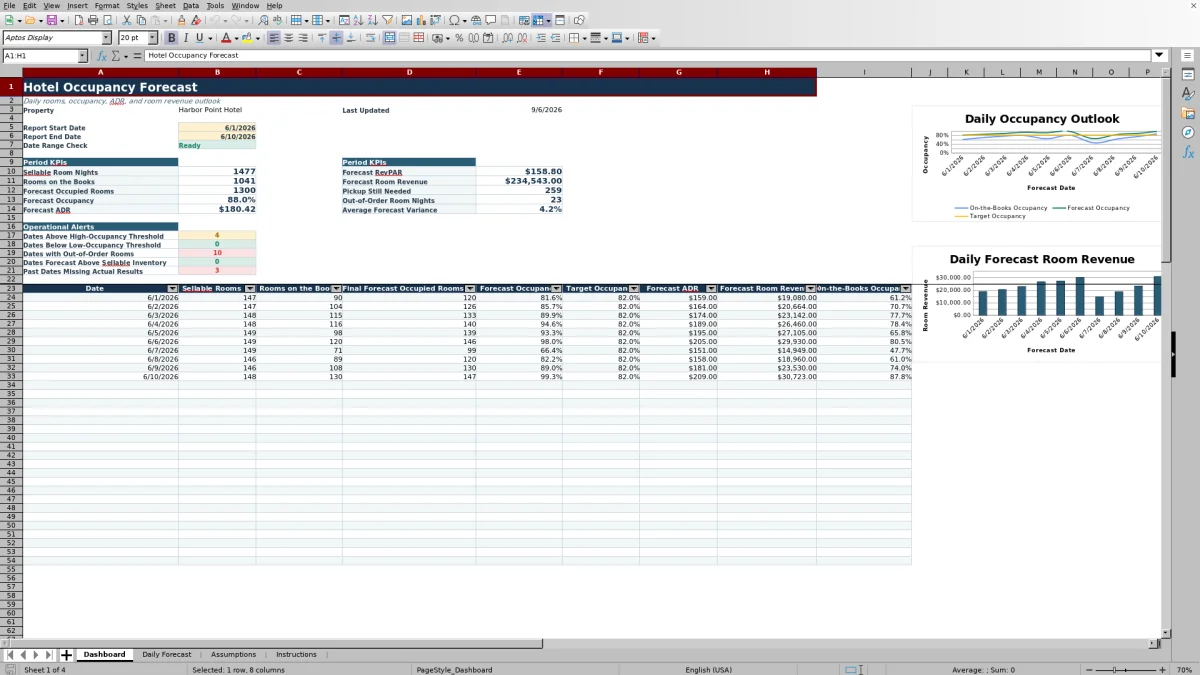
- Dashboard KPIs, five operational alert counts, a daily report grid, and two charts.
- Input validation, conditional formatting, frozen headers, filters, and U.S. dollar formats.
How to use the template
1. Review the property assumptions
Start on the Assumptions sheet. Enter the property name, default total rooms, target occupancy, high- and low-occupancy thresholds, default forecast ADR, and attention thresholds. Adjust the Monday-through-Sunday baseline occupancy percentages to reflect the property's normal demand pattern.
Check the four assumption review messages. They test whether the occupancy thresholds are in the correct order, percentage settings are within 0% to 100%, and default room inventory is greater than zero.
2. Enter one row for each forecast date
Use the Daily Forecast sheet for daily operating inputs. Each row can include:
- Forecast date, demand notes, and source reference
- Total rooms and out-of-order rooms
- Transient and group rooms on the books
- Expected pickup rooms and event demand adjustment
- On-the-books ADR or a forecast ADR override
Expected pickup may be positive or negative, allowing the team to reflect anticipated booking growth, wash, or cancellations. Out-of-order rooms reduce sellable inventory before occupancy is calculated.
3. Review the calculated forecast
The model combines rooms on the books with the day-of-week baseline, expected pickup, and event adjustment. The result is capped at sellable rooms. Review model forecast occupied rooms, final forecast occupied rooms, pickup still needed, forecast occupancy, occupancy to target, forecast ADR, room revenue, and RevPAR.
If management has a documented reason to replace the model result, enter a management occupied rooms override. That override becomes the final forecast while remaining capped at sellable inventory. A separate ADR override can replace the on-the-books or default ADR used in the revenue forecast.
4. Set the Dashboard reporting period
Enter a report start date and report end date on the Dashboard. A date-range check confirms whether the period is ready or whether the dates need correction. The sheet summarizes period KPIs and operational alerts, then lists daily sellable rooms, rooms on the books, final forecast, occupancy, target occupancy, ADR, room revenue, and on-the-books occupancy.
5. Add actual results after each business date
Enter actual occupied rooms and actual ADR on the Daily Forecast sheet. The workbook calculates actual occupancy, actual room revenue, occupied-room variance, occupancy forecast error, and revenue variance. This creates a consistent record for reviewing forecast performance over time.
What does the hotel occupancy forecast calculate?
The Daily Forecast sheet first subtracts out-of-order rooms from total rooms to determine sellable rooms. It adds transient and group reservations to calculate rooms on the books and on-the-books occupancy.
The model then considers the relevant day-of-week baseline, expected pickup, and event demand adjustment. It prevents the model result from falling below zero or exceeding sellable rooms. The final result supports calculations for forecast occupancy, ADR, RevPAR, and room revenue.
Pickup still needed shows the difference between final forecast occupied rooms and rooms already on the books. Occupancy to target compares forecast occupancy with the default target entered on the Assumptions sheet.
How can hotel departments use the daily outlook?
Revenue and sales teams can review transient and group pace, pickup expectations, event adjustments, and ADR. Front office and housekeeping can focus on dates approaching the high-occupancy threshold, while engineering can review days affected by out-of-order inventory.
The Dashboard counts dates above the high-occupancy threshold, below the low-occupancy threshold, and containing out-of-order rooms. It also identifies dates forecast above sellable inventory and past dates missing actual results. These exception-based checks help the team direct attention to dates that need discussion.
How should forecast assumptions be maintained?
Assumptions should reflect current property conditions rather than remaining static. Review the default room count whenever available inventory changes, and revise weekday baselines when booking patterns materially shift. Thresholds should represent the occupancy levels that prompt action at the property.
The default forecast ADR is used when neither a daily on-the-books ADR nor a forecast ADR override is entered. The high-occupancy threshold must be greater than the low-occupancy threshold, while occupancy and forecast-error settings must remain between 0% and 100%.
How does the workbook support forecast accuracy reviews?
After a business date, enter actual occupied rooms and actual ADR. The workbook derives actual occupancy and room revenue, then compares them with the final forecast. Available measures include occupied rooms variance, absolute occupancy forecast error, and revenue variance.
The Dashboard reports average forecast variance for dates with actual occupied-room entries. The Daily Forecast sheet also includes an operational check that identifies a missing actual result for a past date. Regular entry of actual operating results gives managers a clearer basis for reviewing assumptions and pickup estimates.
Questions about this workbook
What worksheets are included in the hotel occupancy forecast template?
The workbook contains four worksheets: Dashboard, Daily Forecast, Assumptions, and Instructions. The Dashboard summarizes a selected period, Daily Forecast holds the date-level forecast and actual results, Assumptions stores property settings and weekday baselines, and Instructions explains inputs and the recommended routine.
How many forecast dates can the workbook hold?
The Daily Forecast sheet contains 370 data rows, from row 2 through row 371. Date validation accepts dates from January 1, 2026, through December 31, 2030. Each row represents one forecast date.
Can the forecast account for group rooms and local events?
Yes. The sheet has separate fields for transient rooms on the books and group rooms on the books. It also includes an Event Demand Adjustment field for known events or unusual demand conditions, plus Demand Notes and Source Reference fields for context.
Can managers override the calculated occupancy or ADR forecast?
Yes. Management Occupied Rooms Override replaces the model forecast for that date but remains limited to sellable rooms. Forecast ADR Override replaces the on-the-books ADR or default forecast ADR used in the final ADR calculation.
Does the workbook connect to hotel operating systems?
No. It does not connect to a PMS, channel manager, payroll system, or accounting system. Source information may be entered manually or pasted from an existing operational report.
What operating routine is suggested in the workbook?
The Instructions sheet recommends updating the next 14 days daily and reviewing the next 30 to 90 days at least weekly. It also suggests confirming group counts with sales or events, reviewing out-of-order rooms with housekeeping and engineering, investigating low-occupancy dates, and entering actual results.
Transparent credits
Editorial and workbook QA bylines
The named editorial signatures and their responsibilities stay consistent across the library.

Workbook guide and editorial context
Audrey Whitmore
Audrey Whitmore is the consistent editorial byline for practical setup guidance written from each workbook’s final manifest and published features.
Meet the editorial byline →
Workbook structure and formula QA byline
Ethan Cole
Ethan Cole is the consistent QA byline shown only when recorded checks pass for worksheet structure, formulas, validations, recalculation, and the published XLSX bytes.
See the QA byline and checks →