Revenue · XLSX
Free Hotel Rate Plan Comparison Excel Template for 2026
Compare hotel rate plans, net room revenue, channel costs, discounts, and manually collected competitor rates in one Excel workbook.
Formula and workbook structure checked before publication
This free Excel template helps hotel operators compare rate plans, distribution costs, estimated guest totals, estimated net room revenue, and manually collected competitor rates. It organizes the review across four worksheets: Dashboard, Rate Plans, Market Shop, and Instructions.
Use the workbook to evaluate rate positioning and plan economics by room type, booking channel, stay date, discount structure, restrictions, and inclusions. Formulas calculate selling rates, estimated taxes and service charges, distribution costs, discount to BAR, and variance from a property-defined net revenue target.
The market shop provides a separate place to compare hotel and competitor pre-tax rates. It also identifies whether refundability and breakfast terms are comparable before assigning parity and market-position results.
At a glance
What this workbook helps you manage
- Compares public rates, discounts, channel costs, package costs, and estimated net room revenue.
- Separates hotel rate plan analysis from manually collected competitor rate observations.
- Flags records that may need review because of missing, expired, stale, or inconsistent information.
- Summarizes active plans, rate categories, booking channels, revenue targets, and market comparisons.
See the actual file
Inside the workbook
Included in the file
- Rate Plans table with fields for pricing, restrictions, inclusions, costs, status, notes, and operational checks.
- Market Shop table with rate differences, comparison quality, parity status, market position, and shop age.
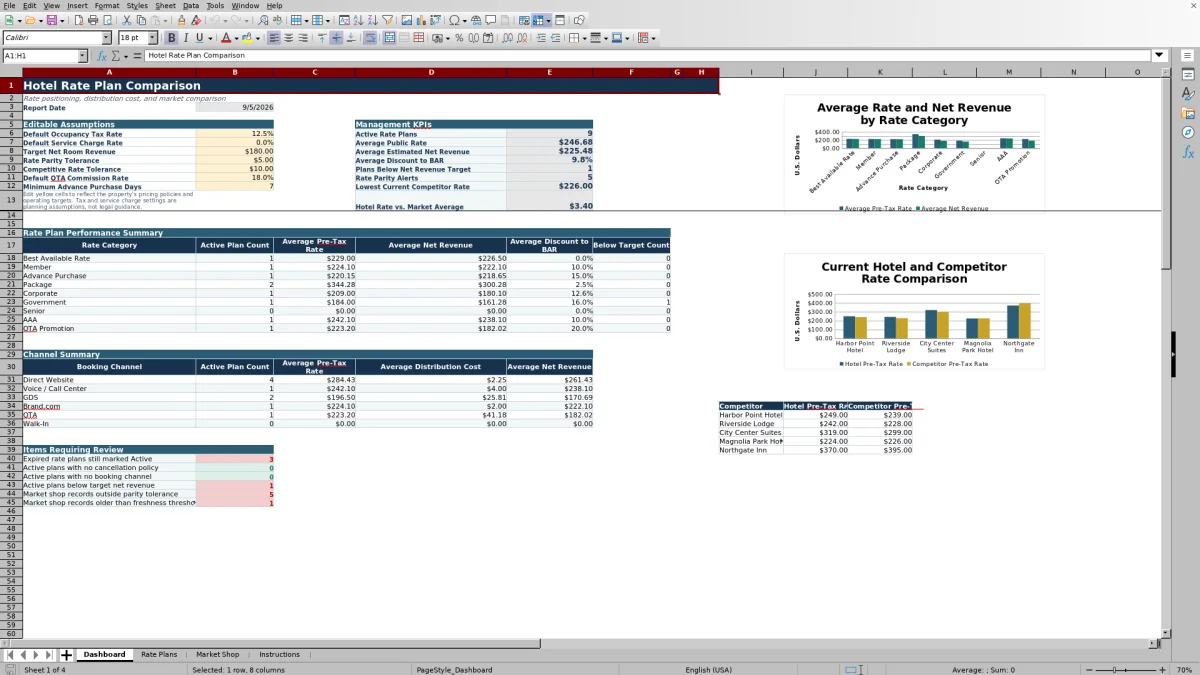
- Dashboard with editable assumptions, management KPIs, category and channel summaries, and two charts.
- Data validation lists, filters, frozen headers, conditional formatting, and color-coded input and formula cells.
How to use the template
1. Set the Dashboard assumptions
Begin with the yellow cells on the Dashboard. Enter the default occupancy tax rate, service charge rate, target net room revenue, rate parity tolerance, competitive rate tolerance, default OTA commission rate, and minimum advance purchase days.
These are editable planning assumptions. Confirm tax rates, service charges, commissions, and operating targets for the property before relying on the calculated results.
2. Enter each rate plan combination
On the Rate Plans worksheet, use one row for each rate plan, room type, booking channel, and stay date combination. Record the rate plan ID, source reference, plan name, category, room type, channel, stay date, booking window, and Base BAR.
Select a discount type of None, Percent, or Fixed Amount, then enter the applicable discount value. Add plan terms such as minimum and maximum stay, advance purchase days, refundability, cancellation policy, payment timing, breakfast, parking, other inclusions, and status.
3. Confirm costs and calculated amounts
Review occupancy tax, service charge, commission, fixed channel cost, and package inclusion cost for each row. The formulas calculate:
- Pre-tax selling rate after the entered discount
- Estimated tax and service charge
- Estimated guest total
- Estimated distribution cost
- Estimated net room revenue
- Discount to BAR and variance from the net revenue target
Estimated net room revenue deducts the entered commission, fixed channel cost, and package inclusion cost from the pre-tax selling rate. It is a planning calculation rather than an accounting result.
4. Record market shop observations
Enter manually collected observations on the Market Shop worksheet. Include the shop date, stay date, length of stay, guest count, hotel and competitor room types, booking channels, pre-tax rates, refundability, breakfast inclusion, and a source URL or reference.
For a useful comparison, match like-for-like terms wherever possible. The workbook marks records as Not Like-for-Like when refundability or breakfast inclusion differs.
5. Review the Dashboard and exceptions
Check active plan counts, average public rate, average estimated net revenue, average discount to BAR, plans below target, parity alerts, the lowest current competitor rate, and the hotel rate versus the market average. Investigate records marked Review, Aging, Stale, Terms Differ, or anything other than OK, then save a dated copy after a formal review.
What does the hotel rate plan comparison calculate?
The Rate Plans worksheet begins with Base BAR and applies either a percent discount, a fixed-amount discount, or no discount. This produces the pre-tax selling rate. Entered occupancy tax and service charge rates are then used to estimate tax, service charge, and the guest total.
Distribution cost combines commission on the pre-tax selling rate with the entered fixed channel cost. Package inclusion cost is deducted separately. The resulting net revenue estimate can be compared with the target entered on the Dashboard. The workbook also calculates the percentage discount to BAR.
This structure helps revenue teams distinguish the guest-facing price from the amount remaining after the specific distribution and package costs entered in the row.
How does the workbook compare hotel and competitor rates?
The Market Shop worksheet compares the hotel's pre-tax rate with a competitor's pre-tax rate for an observed stay date. It calculates the dollar difference and percentage difference, then checks whether refundability and breakfast inclusion match.
If those terms differ, the comparison is labeled Not Like-for-Like and the parity result becomes Terms Differ. Comparable observations are assessed against the Dashboard's rate parity tolerance. Their market position is labeled Below Market, Near Market, or Above Market using the competitive rate tolerance.
Shop age is also calculated from the observation date. A record is Current at seven days or less, Aging from eight through fourteen days, and Stale after fourteen days. This gives operators a practical way to separate current observations from older shops.
Which hotel rate plan details can be compared?
The workbook supports categories including Best Available Rate, Member, Advance Purchase, Package, Corporate, Government, Senior, AAA, OTA Promotion, Group, and Other. Booking channel choices include Direct Website, Voice / Call Center, Brand.com, GDS, OTA, Walk-In, Group Sales, and Other.
Operational terms can be recorded alongside price. These include booking dates, stay date, minimum and maximum stay, advance purchase days, refundability, cancellation policy, payment timing, breakfast, parking, other inclusions, and plan status. This makes it possible to review both price and booking conditions instead of comparing rates in isolation.
What should operators review on the Dashboard?
The Dashboard summarizes active rate plans and calculates average public rate, average estimated net revenue, average discount to BAR, plans below the revenue target, parity alerts, the lowest current competitor rate, and the difference between the hotel rate and market average.
Separate summaries group active plan results by rate category and booking channel. One chart references rate category information, while the competitor chart uses a fixed source area linked to the first five current sample records. Operators should confirm that the chart source reflects the comparison data they intend to present.
Use the displayed KPIs as a review queue. A below-target count may point to discounting, commission, fixed channel costs, or package costs that need closer examination.
Questions about this workbook
How many worksheets are included?
The workbook contains four worksheets: Dashboard, Rate Plans, Market Shop, and Instructions.
Does the template calculate the guest's estimated total?
Yes. The Rate Plans worksheet adds the entered occupancy tax and service charge rates to the pre-tax selling rate to calculate an estimated guest total. Taxes and service charges vary by jurisdiction and property policy, so the assumptions should be verified.
How is estimated net room revenue calculated?
The workbook starts with the pre-tax selling rate, subtracts estimated distribution cost, and then subtracts the entered package inclusion cost. Distribution cost consists of commission on the pre-tax rate plus the fixed channel cost.
Does the Market Shop collect competitor prices automatically?
No. Competitor rates, source URLs or references, and related observations are entered manually. The workbook does not claim direct PMS, CRS, channel-manager, accounting, or web integration.
What do the Operational Check fields identify?
The checks identify issues such as missing required information, invalid or reversed dates, rates that need review, active plans with expired dates, and stale market shops. Operators should investigate the underlying record rather than treating the message as an automatic pricing decision.
How are input and formula cells identified?
Light blue indicates user-entered operational data, light yellow indicates editable assumptions, and light gray identifies calculated formula cells. Green represents acceptable or within-target results, amber recommends review, and red indicates an issue or exception requiring attention.
Transparent credits
Editorial and workbook QA bylines
The named editorial signatures and their responsibilities stay consistent across the library.

Workbook guide and editorial context
Audrey Whitmore
Audrey Whitmore is the consistent editorial byline for practical setup guidance written from each workbook’s final manifest and published features.
Meet the editorial byline →
Workbook structure and formula QA byline
Ethan Cole
Ethan Cole is the consistent QA byline shown only when recorded checks pass for worksheet structure, formulas, validations, recalculation, and the published XLSX bytes.
See the QA byline and checks →